May 18, 2026
ReAct agent: a practical guide for production teams
A ReAct agent links reasoning, action, observation, and review so teams can build safer tool-using AI workflows. Use this guide to scope, test, and run one well.
Article focus
Internal Links: AI agent development Agentic BI and reporting Autonomous research agent case study AI agents with human review AI agent ops playbook External Links: Original ReAct paper Google Research ReAct overview OpenAI function calling documentation OpenTelemetry GenAI...
Section guide
Internal Links:
- AI agent development
- Agentic BI and reporting
- Autonomous research agent case study
- AI agents with human review
- AI agent ops playbook External Links:
- Original ReAct paper
- Google Research ReAct overview
- OpenAI function calling documentation
- OpenTelemetry GenAI semantic conventions
A ReAct agent is a workflow pattern that connects reasoning, action, observation, and review so an AI system can move from a user goal to controlled tool use. The production challenge is not the label; it is designing the data, guardrails, logs, and human checkpoints that make the workflow reliable.
Most teams do not need another agent demo that works once. They need a system that can inspect evidence, choose the next tool call, learn from the result, and stop when the evidence is weak.
Priya, a head of operations at a B2B SaaS company, had that problem. Her team wanted weekly competitor briefs, but every brief took six hours of manual source checks. A ReAct agent could help, but only if it gathered sources, flagged contradictions, and routed uncertain claims to a reviewer before the brief reached leadership.
This ReAct agent guide explains the workflow, examples, implementation steps, best practices, mistakes, and evaluation criteria that matter before production.
Key Takeaways
- A ReAct agent works best when the task needs reasoning, tool use, observations, and iteration
- Production design matters more than the prompt pattern: define tools, limits, stop conditions, logs, and escalation paths
- Strong ReAct agent examples include research briefs, reporting summaries, data checks, and operations workflows
- Human review should sit where business risk, data uncertainty, or irreversible action is high
- Evaluate the whole workflow, not only the final answer: tool accuracy, evidence quality, recovery, cost, and review effort all matter
Building this around a real workflow? Start with the AI agent development pattern: map the job, tools, approvals, and failure modes before choosing the stack.
What is a ReAct agent?
The basic ReAct loop is easiest to evaluate when each step is visible:
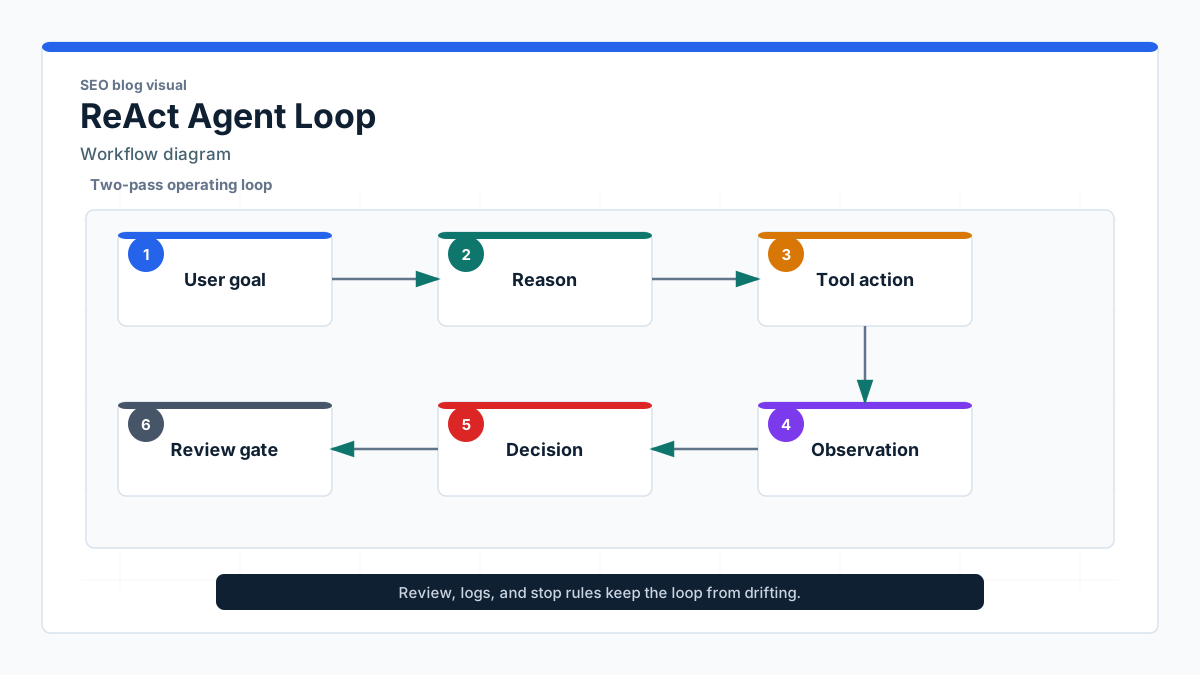
A ReAct agent is an AI agent that alternates between reasoning about a task, taking an action through a tool or environment, observing the result, and deciding what to do next. The term comes from "reasoning" plus "acting," described in the original ReAct paper and expanded in the Google Research ReAct overview.
This article is about ReAct as an AI agent workflow pattern. It is not about React, the front-end JavaScript library.
A simple ReAct agent workflow looks like this:
- A user gives a goal
- The agent identifies the next useful step
- The agent calls a tool, retrieves data, or queries an environment
- The agent observes the result
- The agent decides whether to continue, answer, ask for review, or stop
That loop is useful because many operational questions cannot be answered from one prompt. A reporting request may need warehouse metrics. A research task may need source checks. A support task may need ticket history and policy lookup.
In production, the ReAct agent framework needs more than the loop. It needs explicit tool permissions, structured observations, retry limits, stop conditions, logs, and review checkpoints. Without those controls, the same capability that makes the agent useful also makes it risky.
Why a ReAct agent matters in production
A ReAct agent matters when a static answer is not enough. The pattern is useful when the task depends on external information, multi-step decisions, or tool calls that change what the agent should do next.
Common use cases include:
- Research workflows that gather sources and flag unsupported claims
- Reporting workflows that inspect metrics and explain anomalies
- Data validation tasks that compare records against rules
- Internal operations workflows that follow checklists
- Decision-support tasks that need evidence before a recommendation
For example, an executive asks, "Why did pipeline conversion drop last week?" A normal chatbot may summarize general causes. A ReAct agent can inspect CRM metrics, compare segments, check deploy logs, observe that one integration failed, and draft a report with evidence.
That is also why the pattern needs discipline. A tool-using agent can act on live systems. It can query sensitive data, send messages, update records, or produce reports that people trust. The risk profile is different from content generation.
For teams building agentic BI and reporting, this distinction matters. The goal is not a dashboard that talks. The goal is a reporting workflow that checks numbers, explains movement, escalates anomalies, and leaves an audit trail.
How to use ReAct agent planning without overbuilding
A scoped control plane keeps the ReAct agent from becoming a broad assistant with unclear authority:
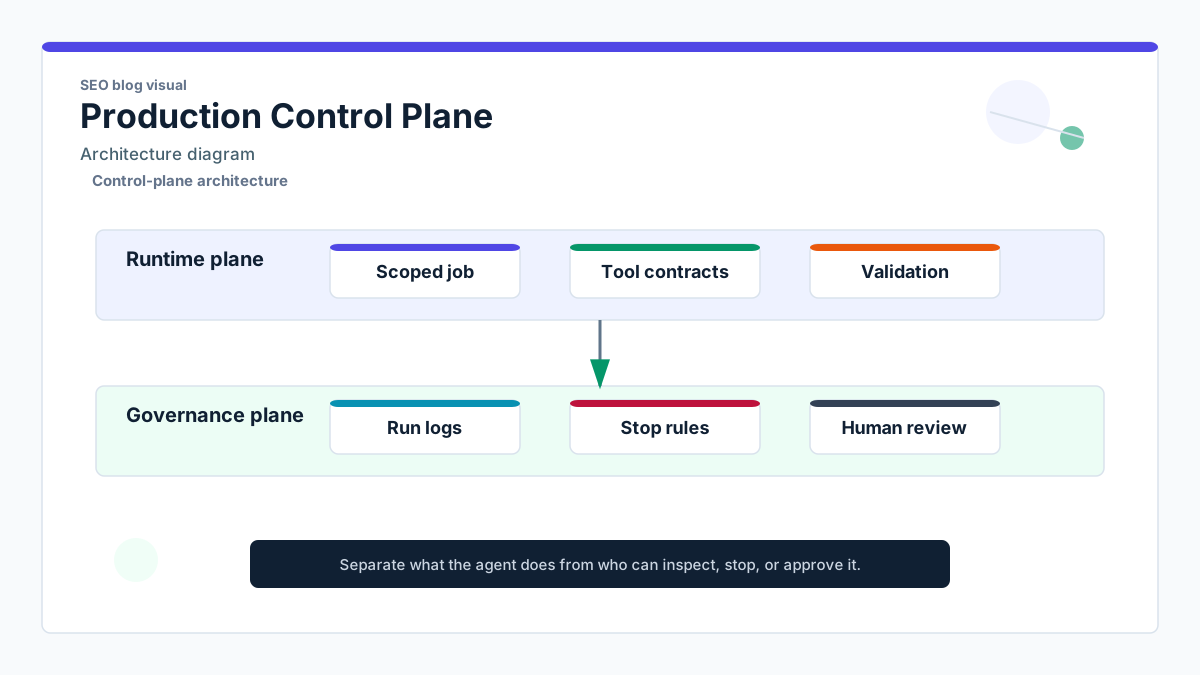
The safest way to approach ReAct agent implementation is to scope the workflow before choosing the framework. A narrow job with clear tools beats a broad assistant with vague access.
Use this planning sequence:
- Define the job the agent should perform
- Identify tools and data sources it can use
- Write action rules and stop conditions
- Add validation checks before final output
- Log tool calls, observations, errors, and decision labels
- Add human review for high-impact or uncertain cases
- Test expected, edge-case, and failure scenarios
A practical research workflow might start with a weekly competitor request. The agent gathers public sources, checks whether each claim has support, marks contradictions, and drafts a structured brief. If evidence is missing, it escalates the claim instead of hiding uncertainty.
That pattern is close to the workflow behind Van Data Team's autonomous research agent case study: the value comes from evidence handling, structure, and review, not from pretending the agent is fully autonomous.
Tool design is the next decision. A tool should have a narrow contract: input schema, allowed action, output schema, timeout, retry policy, and failure response. The OpenAI function calling documentation is a useful reference for thinking about tools as structured calls rather than loose text.
Do not use private reasoning text as the audit trail. Log what operators can verify: user goal, selected tool, tool input, tool output, observation summary, confidence label, validation result, and escalation status.
ReAct agent examples for real workflows
Good ReAct agent examples are grounded in repeatable work. The agent should have a job, a bounded action space, and a clear answer format.
Research agent
A research agent receives a request such as, "Prepare a weekly competitor brief for product leadership." It reasons that it needs source coverage, calls search or internal knowledge tools, observes which claims are supported, and flags gaps.
The review step matters. If a claim has one weak source or conflicting evidence, the agent should mark it for human review rather than polishing it into confident prose.
Reporting agent
A reporting agent reviews warehouse metrics, compares current values against prior periods, and drafts a narrative summary. If it sees an anomaly, it checks known events such as campaigns, deployments, or data freshness.
Marcus, a RevOps lead, tested this with a trial workflow. On Monday morning, the agent found a 17% drop in qualified leads. The first explanation was not "demand is down." The observation showed that one form source stopped syncing on Friday. The final report saved time because the workflow checked evidence before writing the narrative.
Operations assistant
An operations assistant follows a checklist across internal systems. It can draft a CRM update, prepare a Slack summary, or recommend a next action. For irreversible actions, it should ask for approval.
That makes the ReAct agent workflow useful without giving it unchecked authority. Draft actions and approved actions should be separate states.
ReAct agent best practices for production teams
The best ReAct agent best practices are operational. They make the workflow easier to debug, review, and improve.
| Practice | Why it matters | Production note | |---|---|---| | Narrow the job | Broad agents drift | Start with one workflow and one output | | Limit tools | Too much access increases risk | Grant only the tools needed for the task | | Structure observations | Free-text observations are hard to validate | Return JSON or typed records where possible | | Add review gates | High-impact decisions need oversight | Use confidence, data sensitivity, and action risk as triggers | | Log tool calls | Failures need a trail | Capture inputs, outputs, latency, and errors | | Define stop conditions | Loops can run too long | Set step limits, timeouts, and fallback responses | | Separate draft from execute | Suggestions are safer than actions | Require approval before writes, sends, or deletes | | Test failure paths | Happy-path demos miss real risk | Simulate missing data, bad tools, and conflicting evidence |
The review design should be proportional. Do not force a human to approve every harmless lookup. Do require review when the agent touches money, customer records, production systems, legal claims, or executive reporting.
For deeper review patterns, see this guide to AI agents with human review. It covers where to place checkpoints so review protects the workflow without slowing every step.
Observability is also part of the design. OpenTelemetry's GenAI semantic conventions show how the industry is moving toward clearer tracing for model calls, tool calls, and agent spans. Even if your stack is simpler, the principle holds: if you cannot inspect the run, you cannot operate the agent.
Ready to scope a production workflow? Use the AI agent ops playbook to define escalation triggers, monitoring, and ownership before rollout.
Common ReAct agent mistakes to avoid
A ReAct agent fails when teams treat it as a clever prompt instead of an operating model. The prompt matters, but production behavior depends on the surrounding contracts.
| Mistake | Why it matters | Better approach | |---|---|---| | Starting too broad | The agent cannot choose reliably | Scope one job and one output first | | Adding too many tools | Tool choice becomes noisy | Add tools only after a test case needs them | | Skipping review | Risky actions reach users too fast | Route uncertain or high-impact cases to humans | | No stop condition | The agent can loop or overspend | Set max steps, timeout, and fallback response | | Weak evidence rules | Unsupported claims look polished | Require source labels and contradiction checks | | Poor logging | Failures cannot be debugged | Log tool calls, observations, and validation results | | Measuring only final answers | Workflow reliability stays invisible | Evaluate tool use, escalation, recovery, and cost |
One common failure shows up in research workflows. The agent gathers five sources, but two contradict each other. If the prompt only says "write a report," the final answer may hide the conflict. A better ReAct agent implementation marks the contradiction, asks for review, or outputs a qualified recommendation.
Another failure is tool overreach. Teams connect email, CRM, warehouse, search, and project management tools at once. Then they cannot tell whether a bad output came from the model, the data, the tool contract, or the orchestration layer. Start smaller.
How to evaluate a ReAct agent before production
Before production, the ReAct agent should be reviewed across workflow-level criteria:
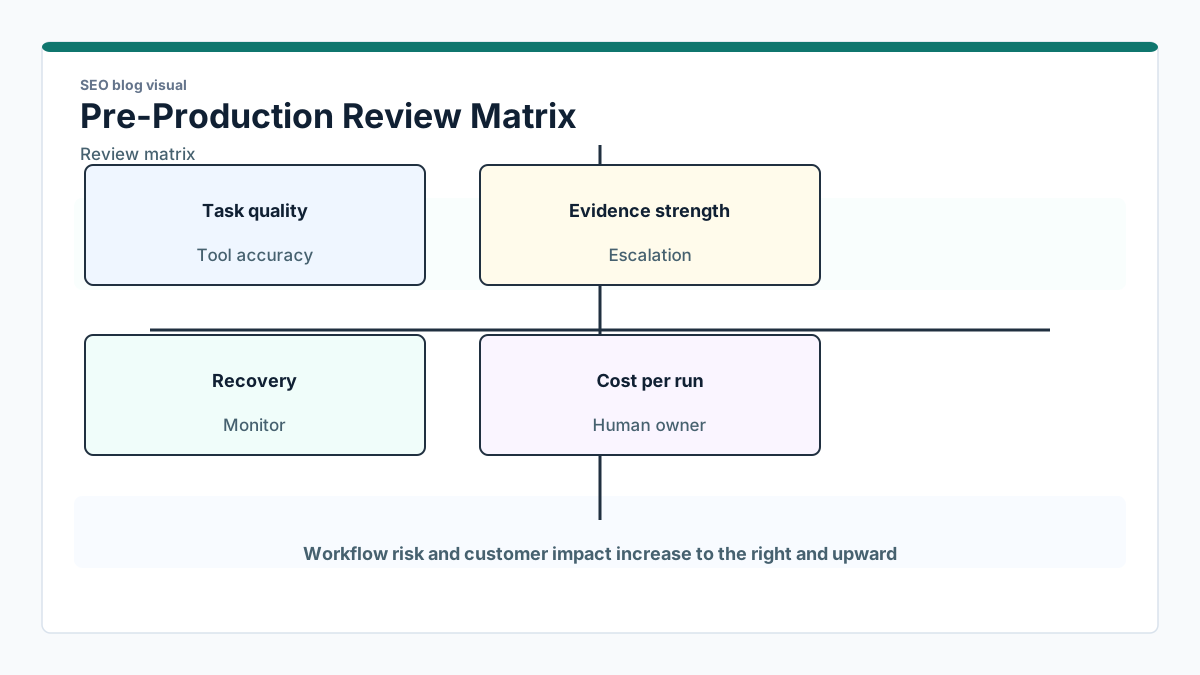
You should evaluate a ReAct agent as a workflow, not as a single answer. The final response is only one output of the system.
Track these criteria during testing:
- Task completion quality
- Tool-use accuracy
- Evidence quality
- Escalation behavior
- Error recovery
- Consistency across repeated runs
- Human review effort
- Cycle time
- Cost per run
- Failure rate by tool
Internal delivery metrics are optional at first, but they become important once the workflow runs repeatedly. Escalation rate tells you whether the agent is too cautious or too confident. Review effort shows whether humans are approving useful work or correcting preventable mistakes. Cost per run helps you decide where to cache, simplify, or move deterministic logic out of the model.
A good test set includes expected cases, edge cases, and failure cases. For a reporting agent, that means normal metric movement, missing warehouse data, duplicate records, delayed ingestion, and an anomaly with no clear cause.
The goal is not perfect autonomy. The goal is a workflow that behaves predictably, asks for help when it should, and gives operators enough evidence to trust or reject the output.
Conclusion: run the ReAct agent as an accountable workflow
A ReAct agent is useful because reasoning, tool use, observation, and review work together. The pattern helps teams build systems that inspect information before answering, adapt after tool calls, and stop when the evidence is not strong enough.
The production lesson is straightforward: the workflow is only trustworthy when it has boundaries. Define the job. Limit the tools. Structure observations. Add validation. Place human review where the cost of error is high. Log enough detail for operators to debug the run.
For a small team, the best next step is not a broad autonomous assistant. Pick one workflow with repeated demand and visible failure modes. Build a ReAct agent around that job, test it against failure cases, and expand only after the loop behaves reliably.
Van Data Team helps teams turn agent concepts into production AI and data workflows with guardrails, escalation, observability, and clear ownership. Start with production AI agent workflows when the goal is a system your team can run after launch.
Article FAQ
Questions readers usually ask next.
These short answers clarify the practical follow-up questions that often come after the main article.
Need a similar system?
If this article maps to a workflow your team already operates, the next step is usually a scoped review of the system, constraints, and rollout path.
Book your free workflow review here.
Related articles
View all
What AI Job Interviews Reveal About AI Evaluation
The OpenAI Safety Warning Every AI Builder Should Read
Zero Data Retention and OpenAI's Private Safety Processing