Database Query Plan Regression Review for Production Teams
How to tell a real query plan regression from a harmless plan change, then choose between plan forcing, hints and a durable fix without guesswork.
A database query plan regression review is the safest way to decide whether a changed execution plan is a harmless optimizer choice or a production risk. For database SREs, data engineers, platform leads, and analytics managers, the practical output is a repeatable decision record: detect the query, compare old and new plans, validate runtime impact, choose a reversible remediation, and add a prevention check.
The buyer problem is not that EXPLAIN is confusing. The real problem is that a slow query can hide inside a deployment, schema change, statistics update, index change, warehouse job, or growing dataset until users notice the impact. By then, the team may be debating symptoms instead of evidence.
At Van Data Team, we start by treating plan review as a production workflow, not a one-off tuning task. That means connecting plan evidence to data pipeline engineering, reporting dependencies, alerting, human review gates, and rollback paths. This guide gives you a practical framework for detection, comparison, remediation, automation, and governance.
If your team needs a scoped output, Van Data Team can map your critical queries, review gates, dashboard dependencies, and escalation paths into a concrete risk-review workflow with owners, artifacts, and implementation steps.
Key Takeaways
- A plan change is not automatically a regression; the review must prove runtime impact, workload risk, or business dependency.
- Strong reviews compare plan shape, runtime evidence, baseline behavior, query correctness, and affected workflows before choosing a fix.
- Manual review, Query Store-style tooling, CI/CD checks, and production monitoring solve different parts of the problem.
- Plan forcing and hints can be useful, but they need documentation, monitoring, and a decision on whether they are temporary or durable.
- The best process turns each incident into a prevention step: a baseline, alert, test, runbook update, or review gate.
What is database query plan regression review?
A database query plan regression review is a structured process for investigating when a database chooses a worse execution plan than a previous known-good plan. The review compares old and new plans, validates runtime evidence, estimates production impact, and selects a safe response such as monitoring, tuning, rollback, or guarded plan forcing.
The key word is review. This is not just opening a visual execution plan and guessing that a join looks expensive. It is a controlled workflow that asks, "Did the query get slower, riskier, more expensive, or less predictable compared with a baseline?"
A simple example: the same reporting query used to finish inside the expected batch window. After an index change, the optimizer chooses a different access path. The query still returns correct results, but the job now runs long enough to delay a finance dashboard. The review should collect the current plan, the previous plan, runtime statistics, the deployment window, and the downstream dependency before deciding what to do.
For general plan interpretation, broad guides such as SQLCheat's SQL query plan explanation are useful background. A regression review goes further because it focuses on change over time, not just whether one plan appears efficient in isolation.
The first decision rule is simple: do not remediate a plan change unless the evidence shows meaningful impact or credible risk. A different plan may be valid, especially after data distribution changes. The review exists to separate harmless differences from production reliability issues.
Why The Review Matters In Production
Query plan regressions show up as user-facing slowness, late reports, failed jobs, longer warehouse runs, higher database load, or unstable dashboards. Some are sudden. Others look like gradual degradation until a month-end report, customer dashboard, or scheduled pipeline misses its window.
That is why production teams need more than an emergency tuning habit. "Force the old plan" may work in a narrow SQL Server incident, but it may also hide a stale index strategy, changed data shape, or workload pattern that needs a durable fix. Tactical Query Store workflows, including regression analysis guidance from RelationalDBDesign, are useful when the database platform supports them. The broader operating question is how the team reviews risk across tools, environments, and business workflows.
For data teams, the stakes are often downstream. A query regression can delay a dbt model, refresh stale executive metrics, slow a customer-facing analytics feature, or force analysts into manual work. Van Data Team's electricity market pipeline case study is not a query-plan regression project, but it shows the same discipline: every five-minute report is archived in S3 and loaded into DynamoDB, and a re-run never processes the same report twice.
The review checkpoint is this: what business workflow does the query support? A regression on an ad hoc analyst query may deserve monitoring. A regression on a billing, finance, SLA, or customer dashboard query deserves faster escalation.
Causes, Signals, And First Triage
Most plan regressions begin with a change that affects optimizer choices or workload behavior. Common triggers include schema changes, index changes, statistics updates, data growth, data distribution shifts, deployment changes that alter SQL shape, and database version or configuration changes.
The mistake we see is teams jumping from "query is slow" to "the optimizer picked a bad plan" without proving the timeline. First triage should correlate the signal with change windows, workload shifts, and runtime data.
| Trigger | Common signal | Review action |
|---|---|---|
| Schema or index change | Query slows after release | Compare plans before and after the change window |
| Statistics or optimizer behavior change | Same SQL chooses a new plan | Check runtime evidence and available plan history |
| Data growth or distribution shift | Gradual latency increase | Validate whether the old plan is still appropriate |
| Deployment changes | SQL text or parameters change | Confirm whether the query shape actually changed |
| Warehouse pipeline change | Batch job misses expected window | Link query evidence to the affected model or report |
| CI/CD plan check | Plan baseline differs | Require human review before blocking or approving |
A role-based example: a platform team deploys a schema change on Thursday evening. On Friday morning, a dashboard refresh takes longer than expected. The review does not start by blaming the new index. It starts by collecting the affected query, execution plan, runtime statistics, release notes, and dependency graph. If the plan changed after the release and runtime degraded in the same window, the team has a credible regression path to investigate.
Schema-change-focused guides such as How2.sh's query plan regression article are useful because they frame plan review as part of release safety. The practical rule is to correlate first, assign cause second.
A Practical Review Workflow
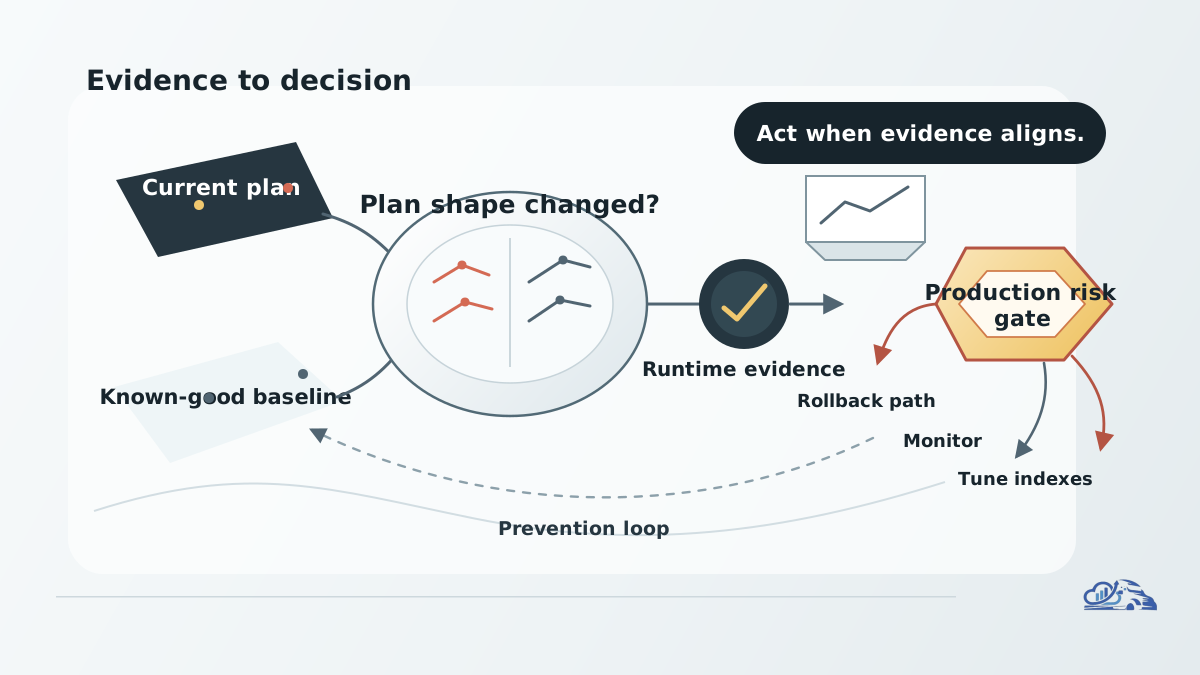
A good workflow is boring in the best way. Every engineer should be able to follow the same steps and reach a defensible decision.
- Identify the query and affected workload.
- Capture the current execution plan and runtime evidence.
- Find the previous known-good plan, baseline, or time window.
- Compare old and new plan shape.
- Compare runtime statistics side by side where available.
- Confirm whether output correctness is part of the risk.
- Classify severity based on business impact and recurrence risk.
- Choose remediation: monitor, tune, adjust indexes, apply hints, force a known-good plan, roll back a related change, or add automation.
- Document the decision, owner, rollback path, and prevention step.
The review should answer three questions before action: did the plan change, did runtime behavior get worse, and does the affected workflow matter enough to intervene? If one answer is missing, treat the issue as under investigation.
A practical review checklist looks like this:
- Query identifier, SQL hash, model name, job name, or dashboard dependency.
- Current plan, baseline plan, and capture timestamps.
- Runtime evidence such as duration, reads, rows, memory behavior, or job completion impact where available.
- Known change window, release, index update, statistics update, or data growth context.
- Severity classification and reviewer.
- Remediation choice and reason.
- Rollback or reversal path.
- Monitoring requirement after the fix.
- Prevention action for the next deployment.
For teams building maintainable warehouse systems, plan review should sit beside model structure, testing, and deployment discipline. The dbt + BigQuery playbook is a useful adjacent reference for thinking about warehouse delivery patterns, even when the database engine and plan tooling differ.
Treat production changes as reversible until the review confirms a durable fix. If the team cannot explain why the remediation works, it is not ready to be treated as complete.
Manual Review Versus Automated Checks
Manual and automated reviews are not competitors. They are layers.
Manual review is strongest during incidents, high-risk changes, and ambiguous production behavior. Automated checks are strongest for known critical queries, schema-change validation, CI/CD gates, and repeated baseline comparison. Monitoring catches symptoms that pre-deployment checks may miss.
| Approach | Best for | Strength | Limitation | Review owner |
|---|---|---|---|---|
| Manual execution plan comparison | Incidents and complex queries | Handles nuance and context | Slow if used for every query | Database SRE or senior data engineer |
| Query Store-style regression review | SQL Server environments with plan history | Compares plans and runtime windows | Platform-specific | DBA or database engineer |
| CI/CD query plan baseline checks | Critical SQL files and schema changes | Catches change before deploy | Can create noisy failures without policy | Platform or DevOps owner |
| Production monitoring and alerting | Real workload symptoms | Captures what tests miss | Needs thresholds and routing | SRE or data platform team |
| Human approval for high-risk remediation | Plan forcing, hints, rollback | Reduces unsafe fixes | Adds review burden | Engineering lead or service owner |
Automation resources such as QueryPlan.org focus on baseline tracking and regression gates, while tools like RegreSQL show how SQL output and plan changes can be checked in a PostgreSQL-oriented workflow. These patterns are valuable, but they still need policy. A pipeline that flags every plan difference without severity rules will train engineers to ignore it.
When AI assistance is added, keep the boundary clear. An agent can summarize plan differences, pull related deployment context, draft a review note, or route the issue. It should not silently force a production plan. For teams exploring that layer, Van Data Team's AI agent development work focuses on guarded workflows, review gates, and escalation rather than autonomous fixes.
Operationally, AI-assisted review needs constraints: token budget, redaction rules, prompt structure, evidence limits, evaluation criteria, and human approval. Long plans and logs should be summarized into reviewable signals instead of pasted into an unbounded model context.
Best Practices And A Lightweight Review Artifact
The best practices are less glamorous than the incident response. They are what make the next incident easier.
Keep known-good baselines for critical queries. A baseline can be a stored plan, a captured EXPLAIN, a Query Store time window, a CI artifact, or a documented runtime profile. The point is to know what "healthy" looked like before the change.
Review runtime evidence, not only plan shape. A plan that looks more complex may perform better on current data. A plan that looks familiar may be wrong after data distribution changes.
Separate detection from remediation. The alert can say, "this query changed and deserves review." The remediation decision should say, "we will monitor, tune, roll back, or force a known-good plan because the evidence supports it."
Define ownership before the incident. If a regression affects a finance model, an analytics engineer may own the model, a platform engineer may own the deployment gate, and a database engineer may own plan interpretation. The review should name those owners.
A lightweight review artifact can be stored as a runbook template, issue form, or CI review file:
1. Define the database query plan regression review decision.
2. List required inputs, owner, and stop conditions.
3. Run the smallest safe workflow.
4. Validate output quality before publishing or deployment.
5. Escalate unresolved risk to a human reviewer.
This artifact is intentionally short. It does not replace expert analysis; it forces the review to capture the minimum facts needed for a safe decision.
Van Data Team uses this same operating mindset in broader analytics platform delivery. The electricity market pipeline case study shows it in a pipeline that ingests a new market report every five minutes, which is relevant context for teams that need data systems to remain reliable as they scale.
Failure Modes And Decision Rules
A review process fails when it creates activity without better decisions. These are the common mistakes to avoid:
- Treating every plan change as a regression.
- Looking only at the visual plan and ignoring runtime evidence.
- Forcing a plan without documenting why.
- Skipping the business workflow dependency.
- Reviewing only after production incidents.
- Ignoring schema-change and deployment triggers.
- Automating noisy alerts without severity rules.
- Leaving ownership and escalation unclear.
- Treating one vendor's tooling as a universal process.
- Declaring success without post-fix monitoring.
The decision rules should be explicit.
Ignore or monitor when the plan changed but runtime behavior and workflow risk are acceptable. Investigate when runtime behavior changed but cause is unclear. Tune the query or indexes when evidence shows the plan is exposing a durable design problem. Roll back when the regression clearly follows a reversible change and production impact is high. Consider plan forcing or hints when the known-good plan is well understood, the risk is urgent, and monitoring is in place.
A composite example: an analytics team sees a warehouse job miss its expected completion window after a model change. A manual review finds that the SQL shape changed and the plan now scans more data than expected. The team rolls back the model change, adds a CI review for that SQL pattern, and documents the affected dashboard. The important outcome is not just the rollback; it is the prevention step.
Evaluation should include cost, latency, observability, review burden, and failure recovery. A fix that reduces latency but creates hidden maintenance cost may be wrong. An alert that improves observability but pages the wrong owner may still fail. A forced plan with no expiry review can become future technical debt.
How Van Data Team Supports The Workflow
For teams with critical reporting jobs, warehouse workloads, operational dashboards, or customer-facing data products, Van Data Team can turn query plan review from an informal expert habit into an operational workflow.
A practical engagement can produce:
- A critical-query and workflow dependency map.
- A review checklist for schema, index, model, and deployment changes.
- A dashboard gap review for latency, job completion, and regression signals.
- A CI/CD gate design for high-risk SQL or warehouse models.
- A human-in-the-loop escalation flow for remediation decisions.
- An implementation scope for automation, reporting, and ownership.
The goal is not to replace database expertise. It is to make that expertise repeatable, visible, and connected to production outcomes.
Where AI agents are useful, they should support review rather than bypass it. For example, an agent can gather plan artifacts, summarize differences, prepare a decision note, and route urgent cases to the right owner. Van Data Team builds agents on that principle: in the YouHeal platform, rule-based engines produce every result and the AI drafts reports for practitioner review, which is relevant to the pattern of guarded escalation, though not a claim of query-plan remediation outcomes.
Conclusion
A database query plan regression review is a production reliability workflow, not a database trivia exercise. The point is to detect the signal, compare the current plan against a baseline, validate runtime impact, choose a safe remediation, document the decision, and prevent the same class of issue from recurring.
The strongest teams do not wait for a slow dashboard or failed job to invent the process. They define critical queries, capture baselines, connect alerts to owners, and build review gates around schema, index, model, and deployment changes.
If your organization depends on reliable reporting, warehouse jobs, operational pipelines, or customer-facing analytics, the next step is a scoped workflow review. Van Data Team can help produce a signal map, review checklist, dashboard gap analysis, escalation model, and implementation plan so query-plan risk becomes visible before it becomes an incident.

Founder of Van Data Team. Builds Vanaxity, the AI agent system for SEO, GEO, and AEO, and leads data engineering delivery for B2B teams.
About the authorArticle FAQ
Questions readers usually ask next.
These short answers clarify the practical follow-up questions that often come after the main article.
Need a similar system?
If this article maps to a workflow your team already operates, the next step is usually a scoped review of the system, constraints, and rollout path.
Free plan review
Review Query Plan Regressions
Map your database query plan regression review into detection signals, comparison evidence, remediation options, owners, and prevention checks.
- Critical query and dashboard dependency shortlist
- Old-versus-new execution plan comparison checklist
- Runtime impact and baseline evidence requirements
- Reversible remediation options for risky regressions
- Monitoring, review gate, and escalation next steps
Consultation
Scope your next AI workflow.
Share the system and blockers. We will map fit, gaps, and the next step.