July 12, 2026
Microsoft Data Days 2026: A Practical Guide for Data Teams
Microsoft Data Days 2026 guide for production teams: compare workflow fit, risk, cost, review burden, and deployment guardrails before shipping safely.
Article focus
Microsoft Data Days 2026 breaks down when source systems are scattered, reviews stay manual, handoffs are unclear, and risk is hard to prove. This guide is for operators who need a practical map, workflow, dashboard signal, review gate, and implementation plan.
Section guide
Microsoft Data Days 2026 breaks down when source systems are scattered, reviews stay manual, handoffs are unclear, and risk is hard to prove. This guide is for operators who need a practical map, workflow, dashboard signal, review gate, and implementation plan. At Van Data Team, we start by tracing source systems, ownership, automation boundaries, and escalation paths before turning the review into production work.
Microsoft Data Days 2026 is a free Microsoft learning program for data teams that need practical training across Fabric, Power BI, SQL, AI, study groups, challenges, and certification preparation. The schedule includes sessions beginning June 14, 2026 and is framed as 60 Days of Data Days, which makes it useful only if your team turns the schedule into a focused operating plan.
The buyer problem is not access to training. The problem is priority. A data leader can send everyone to random webinars and still leave with no migration plan, no certification path, no implementation notes, and no production change. At Van Data Team, we would treat this event as a short training sprint tied to data platform modernization, pipeline reliability, analytics governance, and AI-ready workflow design.
This guide gives you the practical output: how to read the schedule, how to split analytics and engineering tracks, how to use certification prep without chasing badges blindly, and how to turn free sessions into backlog items your team can actually ship.
How Van Data Team Makes This Operational
At Van Data Team, we treat Microsoft Data Days 2026 as an operating workflow, not a theory section. We start by mapping the current handoff, source systems, decisions, review gates, dashboards, and recovery paths. The useful output is a scoped delivery plan: which signals to collect, which workflow gaps to close, which automation belongs behind a human review gate, and which dashboard or runbook lets the team act next.
Key Takeaways
- Microsoft's official schedule lists 127 sessions spanning June 14 through early August 2026, so data teams need a selection framework before the event window starts.
- The topic mix includes 51 Fabric sessions, 24 Power BI sessions, 21 SQL sessions, and 9 Get Certified sessions, which is broad enough to support role-based learning paths.
- The DP-600 certification fits analytics engineers, semantic model owners, and BI developers, while the DP-700 Fabric Data Engineer track fits pipeline, Spark, lakehouse, monitoring, and optimization work.
- A free Microsoft certification voucher should be treated as a deadline, not as the strategy. The real strategy is a study plan, lab practice, role alignment, and a production-relevant implementation exercise.
- The best teams will leave the event with artifacts: a training backlog, certification map, platform gap list, implementation experiment, and review workflow.
What Microsoft Data Days 2026 Includes
Microsoft Data Days 2026 includes free live and on-demand learning for Microsoft data professionals, with Fabric, Power BI, SQL, AI, certification, contests, challenges, and study groups organized into a time-boxed program. The Microsoft Fabric Community event-format post frames the program around live sessions, on-demand access, challenges, study groups, and free participation.
Microsoft's companion post uses the phrase:
That short phrase matters operationally. This is not a single conference day. It is a temporary training window where managers can assign tracks, protect study time, and turn session notes into delivery work.
Here is the compact view:
| Area | What Microsoft lists | How a data team should use it |
|---|---|---|
| Full schedule | 127 sessions | Build a role-based attendance plan instead of forwarding the whole agenda |
| Fabric | 51 sessions | Prioritize lakehouse, warehouse, governance, and platform adoption topics |
| Power BI | 24 sessions | Improve analytics delivery, semantic model practices, and reporting standards |
| SQL | 21 sessions | Connect modernization decisions to existing SQL estates and warehouse patterns |
| Certification | 9 Get Certified sessions | Split study groups by role and exam outcome |
The mistake we see is treating a broad event as a content library. A content library is passive. A training sprint has owners, deadlines, output templates, and review gates.
For example, a BI lead can assign semantic model owners to analytics engineering sessions, while a platform lead sends pipeline owners to Fabric engineering and SQL modernization sessions. Both groups should come back with different artifacts. One group may update model governance and dashboard release rules. The other may propose a lakehouse ingestion proof of concept.
Use the Schedule as a Decision Tool
The following illustration summarizes from event schedule to delivery plan:
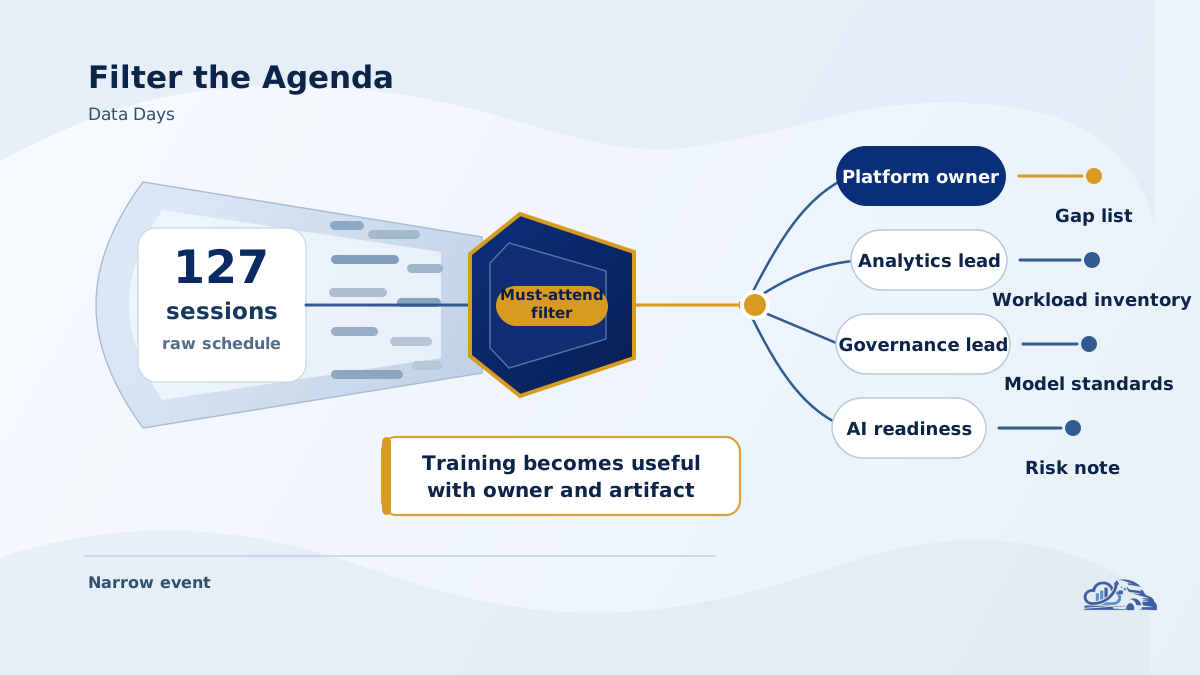
The Fabric Data Days schedule is best used as a prioritization map, not as a calendar to consume from top to bottom. The official schedule shows a broad mix across Fabric, Power BI, SQL, certification, and special events, which means the highest-value sessions depend on your team's production goals.
A practical triage model is simple:
| Priority | Session type | Who owns it | Required output |
|---|---|---|---|
| Must attend | Directly tied to a current platform decision | Domain owner | Implementation note and follow-up task |
| Should attend | Clarifies architecture, governance, or roadmap direction | Tech lead or manager | Risk note and decision impact |
| Watch later | Adjacent topic or exploratory area | Rotating learner | Summary only if relevant |
| Skip | Interesting but not tied to a team goal | No owner | No action |
Use business goals to narrow the schedule:
| Business goal | Best training track | Practical artifact |
|---|---|---|
| Fabric adoption | Fabric architecture and platform sessions | Migration gap list |
| SQL modernization | SQL and warehouse sessions | Workload inventory |
| Analytics governance | Power BI and analytics engineering sessions | Semantic model standards |
| Pipeline reliability | Fabric engineering and data engineering sessions | Failure-mode checklist |
| AI readiness | AI and data platform sessions | Data quality and retrieval-risk map |
| Certification readiness | Get Certified sessions | Study plan and lab schedule |
A platform lead might build this into a shared tracker before the event window opens. Each row gets an owner, target session, reason for attending, and post-session action. That is enough structure to stop random attendance.
This is also where Van Data Team would connect training to delivery. If a team is considering Fabric but still has brittle batch jobs, unmanaged report logic, and unclear ownership, the first move is not tool enthusiasm. The first move is to map current workflows, failure points, and handoffs, then use the event to answer specific platform questions.
Choose the Right Certification Path
The DP-600 and DP-700 tracks solve different team problems, so managers should not put every data professional into the same study group. According to Microsoft Learn, the DP-600 certification is aligned with implementing analytics solutions using Microsoft Fabric, including analytics assets, semantic models, warehouses, lakehouses, SQL, KQL, and DAX skills.
The DP-700 Fabric Data Engineer study guide points toward data engineering implementation: ingestion, transformation, pipelines, dataflows, Spark, lakehouse implementation, Real-Time Intelligence, monitoring, optimization, and secured assets.
That difference is not academic. It changes who should attend which sessions and what the team should expect afterward.
| Role | Better first track | Why |
|---|---|---|
| BI developer | DP-600 | The role depends on analytics models, serving data, and report-ready assets |
| Analytics engineer | DP-600 | The work sits between warehouse/lakehouse data and governed analytics |
| Semantic model owner | DP-600 | The exam scope maps to model design, security, and analytics delivery |
| Data engineer | DP-700 | The work depends on ingestion, transformation, pipelines, Spark, and monitoring |
| Platform engineer | DP-700 | The role needs operational controls, implementation patterns, and optimization |
| Data leader | Both, through delegates | Leadership needs coverage, not personal attendance at every technical session |
A concrete example: Priya, a data manager, has a BI team struggling with inconsistent metrics and a data engineering team struggling with late pipeline runs. Sending both teams to the same certification prep is inefficient. She assigns analytics engineers to DP-600 study sessions and pipeline owners to DP-700 sessions. After each session, every participant writes a short note: what workflow it affects, what risk it exposes, and what experiment should be tested.
That is how certification becomes operational. The certificate may matter for career development, partner programs, or team capability signaling. But the delivery value comes from the notes, labs, review habits, and changes made to production workflows.
Turn Free Training Into Production Work
Free data engineering training only creates value when it changes how the team builds, monitors, and reviews data systems. A good event plan should produce a delivery backlog, not just a list of watched sessions.
Use this runbook during the event window:
| Stage | Action | Output |
|---|---|---|
| Before sessions | Inventory current platform gaps | Gap list grouped by ingestion, storage, transformation, analytics, AI, and governance |
| During sessions | Capture implementation notes | Decision notes with source session, owner, and affected workflow |
| After sessions | Convert notes into backlog items | Experiments, design reviews, or migration tasks |
| Certification prep | Split by role | DP-600 and DP-700 study groups with lab owners |
| Production review | Test one workflow | Small proof of concept with monitoring and rollback notes |
| Leadership review | Decide what ships | Roadmap update with risk, cost, and effort assumptions |
The production dimensions matter. Before adopting a new pattern from a session, ask:
- What workflow does this improve?
- What breaks if it fails?
- How will the team monitor it?
- Who approves the change?
- What is the rollback path?
- Does it reduce manual reporting work or move it somewhere else?
- Does it improve cost visibility, or only platform novelty?
- Does it make future AI workflows safer by improving data quality, lineage, or access control?
This is where production data engineering becomes more important than event attendance. A session may introduce a useful Fabric pipeline pattern, but your environment still has its own source systems, permissions, service-level expectations, and reporting dependencies. Good teams translate training into local design decisions.
A late-stage example: a data engineering team watches sessions on Fabric engineering and SQL modernization. Instead of rewriting everything, they choose one workflow with painful operational symptoms: a daily revenue pipeline with manual checks and late dashboard refreshes. Their experiment is narrow. Rebuild the ingestion path, define quality checks, add a monitoring view, document failure recovery, and compare the new operating burden against the old one.
That is a better outcome than a broad platform memo nobody can implement.
Build an Operating Framework for the Event Window
A useful framework starts with the current workflow and ends with a decision, not with the agenda. The event is broad, so the internal plan should be narrower than Microsoft's schedule.
Use this operating sequence:
| Step | Question | Decision |
|---|---|---|
| Inventory | Where does the current data platform hurt? | Pick priority workflows |
| Map | Which schedule categories answer those issues? | Assign sessions by domain |
| Split roles | Who needs analytics engineering versus data engineering depth? | Create study groups |
| Capture | What did each session change about our assumptions? | Write implementation notes |
| Test | Which idea deserves a production-relevant experiment? | Define proof of concept |
| Review | Did the test improve reliability, cost, governance, or delivery speed? | Ship, defer, or reject |
For AI-related sessions, be especially disciplined. AI workflows depend on data access, retrieval quality, permissions, evaluation, review gates, and escalation. If the team leaves with excitement but no guardrails, the training has not been converted into an operating model.
Van Data Team's approach is to start by mapping the intake, tools, data sources, decisions, and handoffs that already shape the work. Then we decide where automation, dashboards, pipelines, or AI agent development should enter the workflow. The event can supply Microsoft-specific training, but production readiness still comes from your local architecture and review process.
A useful mid-event CTA is not "talk to sales." It is this: ask for a scoped workflow review. The deliverables should be concrete: a signal map, dashboard gap review, data pipeline risk list, certification-role map, and an implementation scope that separates quick wins from platform work. Van Data Team's Strategy Sprint pricing is built for teams that need that kind of bounded review before committing to a larger build.
Common Mistakes to Avoid
Data teams waste free training when they treat the event as passive learning instead of managed change. The most common failure modes are predictable.
First, do not send everyone to the same sessions. Analytics engineers, BI developers, data engineers, and platform leads need different tracks. A shared kickoff is fine, but the study plan should split quickly.
Second, do not chase a free Microsoft certification voucher without a study plan. A voucher can create urgency, but it does not create readiness. Readiness comes from role fit, lab practice, exam-scope review, and time protected for study.
Third, do not ignore SQL because the event has a Fabric center of gravity. Many teams still run production reporting, transformation, and warehouse workloads through SQL-heavy estates. The 21 SQL sessions in the official schedule are a signal that modernization is not only about adopting the newest surface.
Fourth, do not overstate themes that the schedule does not support. If your internal memo says the event is mainly about telemetry or real-time architecture, validate that claim against the official agenda first. The safer stance is to say the event covers Fabric, Power BI, SQL, AI, certification, and related community learning.
Finally, do not publish a roadmap based only on session enthusiasm. Every recommendation needs a local check: current architecture, data quality, security, ownership, cost model, deployment path, and fallback behavior. A training note is not a production design until it survives that review.
This is also where cost belongs in the conversation. Training often creates appetite for new services, new storage patterns, and new orchestration approaches. Treat cost as a workflow-level measurement, not just a cloud bill line. Van Data Team has written separately about data stack cost optimization, and the same principle applies here: teams make better platform decisions when cost is mapped to ingestion, storage, transformation, analytics delivery, and experimentation.
Conclusion
Microsoft Data Days 2026 is most valuable when a data team treats it as a temporary operating window for training, certification planning, platform review, and delivery decisions. The event gives teams access to Microsoft data learning across Fabric, Power BI, SQL, AI, and certification preparation, but the real value comes from what the team produces afterward.
The best output is not a folder of session recordings. It is a practical set of artifacts: a role-based learning backlog, DP-600 and DP-700 study map, platform gap list, pipeline or analytics experiment, and leadership-ready roadmap.
Van Data Team helps teams turn that kind of training into production work: resilient pipelines, governed analytics, AI-ready data platforms, workflow automation, dashboards, and review gates that survive real operating pressure. Use the free event window to learn. Then make the learning prove itself against the workflows your team actually runs.
Article FAQ
Questions readers usually ask next.
These short answers clarify the practical follow-up questions that often come after the main article.
Need a similar system?
If this article maps to a workflow your team already operates, the next step is usually a scoped review of the system, constraints, and rollout path.
Free scoping session
Turn Data Days Into Delivery
Map Microsoft Data Days 2026 training to Fabric, SQL, AI priorities and leave with a practical 60-day team execution plan.
- Role-based Fabric, SQL, Power BI, and AI training track
- 60-day study and implementation backlog
- Certification prep priorities tied to production needs
- Review checkpoints for dashboards, pipelines, and AI workflows
- Next-step delivery plan for your data platform work
Related articles
View all
GPT-5.6 In Microsoft 365 Copilot: What Production Teams Should Know
Database Query Plan Regression Review for Production Teams
Data Engineering Partner vs In-House Team: How Buyers Should Think About the Tradeoff