July 10, 2026
GPT-5.6 In Microsoft 365 Copilot: What Production Teams Should Know
Learn how to evaluate GPT-5.6 In Microsoft 365 Copilot with practical examples, evidence checks, cost controls, review gates, and rollout criteria safely.
Article focus
GPT-5.6 In Microsoft 365 Copilot breaks down when source systems are scattered, reviews stay manual, handoffs are unclear, and risk is hard to prove. This guide is for operators who need a practical map, workflow, dashboard signal, review gate, and implementation plan.
Section guide
GPT-5.6 In Microsoft 365 Copilot breaks down when source systems are scattered, reviews stay manual, handoffs are unclear, and risk is hard to prove. This guide is for operators who need a practical map, workflow, dashboard signal, review gate, and implementation plan. At Van Data Team, we start by tracing source systems, ownership, automation boundaries, and escalation paths before turning the review into production work.
GPT-5.6 in Microsoft 365 Copilot means OpenAI's GPT-5.6 is now the preferred model behind Microsoft 365 Copilot, with Microsoft saying GPT-5.6 is available across Word, Excel, PowerPoint, Chat, and Cowork. The buyer problem is not whether the announcement happened. It is how a product, operations, data, or IT team should evaluate the change before letting Copilot influence production documents, analysis, decisions, and multi-step work.
At Van Data Team, we treat this as a workflow question before a model question. A stronger model can improve drafting, synthesis, analysis, and agentic execution, but production value still depends on data access, permission boundaries, review gates, logs, dashboards, and recovery paths. That is where AI agent development, reporting workflows, and operational review design become more important than the headline model name.
This guide explains what changed, what "preferred model" should and should not be assumed to mean, how Copilot Cowork changes the review burden, and how to evaluate the system in your own tenant without inventing benchmark claims the official announcements do not provide.
How Van Data Team Makes This Operational
At Van Data Team, we treat GPT-5.6 in Microsoft 365 Copilot as an operating workflow, not a theory section. We start by mapping the current handoff, source systems, decisions, review gates, dashboards, and recovery paths. The useful output is a scoped delivery plan: which signals to collect, which workflow gaps to close, which automation belongs behind a human review gate, and which dashboard or runbook lets the team act next.
Key Takeaways
- OpenAI announced on July 9, 2026 that GPT-5.6 became the preferred model in Microsoft 365 Copilot.
- Microsoft says GPT-5.6 is available across Word, Excel, PowerPoint, Chat, and Cowork, so evaluation should cover multiple app surfaces, not only chat prompts.
- "Preferred model" does not prove every request is served by GPT-5.6; TechCrunch reported that the phrase is not defined contractually or practically in the announcements.
- The right evaluation unit is the workflow: prompt, app context, files, permissions, model behavior, tool execution, human review, and measurable business outcome.
- Copilot Cowork deserves stricter governance because agentic knowledge work can affect files, analysis, and deliverables, not just draft text.
What Changed With GPT-5.6 In Microsoft 365 Copilot?
GPT-5.6 became the preferred model for Microsoft 365 Copilot, which means teams using Copilot should expect GPT-5.6 to play a central role in how Copilot supports knowledge work across core Microsoft 365 surfaces.
OpenAI describes GPT-5.6 as the preferred model in Microsoft 365 Copilot and frames it around more useful work from each token, stronger performance per dollar, and on-demand capability for complex tasks. Microsoft separately says GPT-5.6 is available in Word, Excel, PowerPoint, Chat, and Cowork.
"GPT-5.6 is now the preferred model in Microsoft 365 Copilot."
For an operator, the practical change is not simply "the model got better." The change is that a named flagship model is now part of a system where users draft documents, analyze spreadsheets, build presentations, synthesize company context, and ask agentic surfaces to complete work.
| Official statement or surface | Practical implication | What to test before rollout |
|---|---|---|
| GPT-5.6 is the preferred model | Model quality may improve in common Copilot tasks | Whether output quality improves on your real workflows |
| Available in Word, Excel, PowerPoint, Chat, and Cowork | Evaluation needs to span document, analysis, presentation, chat, and agentic work | App-specific failure modes, review burden, and source traceability |
| Microsoft positions Copilot as a broader system | The model is only one layer in the product | How Work IQ, permissions, compliance, and app context affect outputs |
| Official sources do not publish benchmark numbers | Public claims are not enough for production approval | Tenant-level evaluation against human-reviewed baselines |
| Cowork supports agentic work | Review shifts from checking text to auditing work execution | Logs, assumptions, action boundaries, and escalation paths |
A simple example: a sales operations lead uses Copilot in Word to draft a partner briefing from approved notes. The first draft may now need fewer prompt rounds, but the production risk is still unsupported claims, stale numbers, tone mismatch, or accidental inclusion of internal-only context. The right control is not a generic warning banner. It is a review checklist tied to claims, source documents, audience, and approval owner.
What "Preferred Model" Means In Practice
"Preferred model" should be read as an important product signal, not as proof that every Copilot interaction is served by GPT-5.6 in the same way.
This distinction matters because Microsoft 365 Copilot is not a raw model API. It is a product system that includes Microsoft 365 apps, tenant data, Work IQ, security, compliance, privacy controls, orchestration, and model behavior. The named model matters, but the workflow still depends on routing, retrieval, context packaging, permissions, and application-specific behavior.
TechCrunch's report is useful here because it highlights the ambiguity around "preferred model" and places the announcement beside reporting about Microsoft MAI models. The practical takeaway is straightforward: a model can be preferred without being the only model involved in every request, every app, or every tenant condition.
That does not weaken the announcement. It clarifies the evaluation job.
The mistake we see is teams treating model branding as a substitute for workflow evidence. A single-model benchmark cannot approve a multi-system workflow. If a finance analyst asks Copilot to explain margin variance in Excel, the answer quality depends on source ranges, spreadsheet structure, formulas, hidden assumptions, prompt wording, model behavior, and the analyst's review. If a product manager asks Copilot to turn launch notes into a PowerPoint, the risk includes narrative distortion, missing caveats, unsupported claims, and wrong audience framing.
A better rule: evaluate observed Copilot behavior inside representative business workflows. Do not approve or reject Copilot from model language alone.
Why GPT-5.6 Matters For Agentic Knowledge Work
GPT-5.6 matters most where Copilot moves from assistant output toward agentic knowledge work: planning, reasoning across context, using files, and returning finished deliverables.
Copilot Cowork is the surface to watch. Microsoft describes Cowork as an agentic Copilot experience where the user describes an outcome and the system can help reason across tools and files to complete work. That moves the review problem from "is this paragraph accurate?" to "did the system perform the right work, using the right context, under the right constraints?"
That is a material governance shift.
For drafting, the main risks are tone, factual accuracy, omitted context, and unsupported claims. For analysis, the risks include wrong ranges, incorrect assumptions, misread formulas, and misleading recommendations. For agentic workflows, the risk can include a chain of small errors that produce a polished but wrong deliverable.
Consider a cross-functional planning example. An operations lead asks Cowork to prepare a weekly readiness brief from meeting notes, project files, and open risks. The output looks clean. But one dependency was described as "likely unblocked" in a chat thread, while the project tracker still marks it unresolved. A human reviewer needs to see the source trail, assumptions, conflict handling, and escalation points. Without that, the deliverable may be fluent but operationally unsafe.
This is why production AI agent workflows need more than prompt tips. They need boundaries, logs, approval paths, and fallback behavior. Van Data Team designs these controls as part of production AI agent workflows, especially when agents retrieve context, call tools, summarize business state, or prepare decision support materials.
How Teams Should Evaluate The Copilot Upgrade
Teams should evaluate the Copilot upgrade by testing real workflows against clear output standards, not by relying on public benchmark gaps or broad productivity language.
A practical evaluation starts with workflow inventory. Pick the work that actually consumes time, creates risk, or affects decisions. Then define what a good output looks like before testing Copilot. This avoids the common trap where a polished answer feels useful but fails the business standard.
Use a simple evaluation table like this:
| Workflow | Business goal | Required inputs | Output standard | Failure modes | Human review point | Measurement approach |
|---|---|---|---|---|---|---|
| Word briefing | Produce partner-ready draft | Approved notes, source claims, audience context | Accurate, concise, no unsupported claims | Invented claims, wrong tone, missing caveats | Before external sharing | Claim audit and reviewer rework notes |
| Excel variance analysis | Explain financial movement | Workbook, formulas, period definitions | Correct ranges, defensible interpretation | Wrong range, formula misunderstanding, false cause | Before leadership review | Analyst validation and error log |
| PowerPoint first draft | Package approved launch plan | Launch notes, positioning, roadmap status | Clear story, correct claims, audience fit | Overstatement, missing risks, weak structure | Before stakeholder review | Slide-level rubric |
| Chat synthesis | Summarize project history | Documents, messages, decision records | Source-linked synthesis with open questions | Missing context, citation gaps, stale decisions | Before action planning | Source traceability check |
| Cowork deliverable | Complete multi-step knowledge task | Files, goals, constraints, tool access | Correct plan, auditable actions, clear assumptions | Wrong action, hidden assumption, cross-file conflict | Before execution or publishing | Execution log and exception review |
This is also where agentic BI and reporting becomes relevant. If Copilot is being used for analysis or reporting, the output should connect to a governed reporting layer, not sit as a one-off answer in chat. Teams need dashboards, traceable metrics, source definitions, and a way to see where the system is improving or failing over time.
A useful evaluation flow looks like this in prose:
- Select representative workflows from Word, Excel, PowerPoint, Chat, and Cowork.
- Write the expected output standard before the test.
- Run the same task through Copilot with standardized inputs.
- Compare the result against a human-reviewed baseline.
- Log errors by type: missing context, unsupported claim, wrong calculation, policy issue, permission issue, or poor escalation.
- Decide whether the workflow is ready for direct use, review-required use, or blocked use.
- Repeat after prompt, data, permission, or workflow changes.
Notice what is missing from this list: generic satisfaction scoring. User sentiment matters, but production approval needs outcome quality. A user may love a fast draft that still contains claims legal should never approve.
Where The Model Can Help First
GPT-5.6-backed Copilot workflows should start in low-risk, high-review tasks where the output can be checked before it affects customers, financial decisions, or operational execution.
The best early candidates are drafting, restructuring, synthesis, and first-pass analysis. These are workflows where a stronger model can reduce blank-page work while keeping a human in control.
Word is best for drafting and refinement. A sales lead can produce a briefing, policy summary, or partner memo faster, then review claims against source material.
Excel is best for analytical exploration. A finance analyst can ask Copilot to identify variance patterns, but formula checks, source ranges, and final recommendations still need human validation.
PowerPoint is best for narrative packaging. A product manager can turn approved notes into a first draft, then refine flow, evidence, and audience fit.
Chat is best for synthesis. An operations team can ask for a summary of project history, but the useful output is one that shows source trails and unresolved questions.
Cowork is best for agentic execution, but it should be introduced later or under tighter review. Multi-step work requires clearer boundaries because the failure mode is no longer a single bad answer.
A practical rollout pattern is to begin with review-required workflows. For example, an analyst named Linh uses Copilot to draft commentary for a weekly revenue dashboard. The team does not publish the commentary directly. They compare it against metric definitions, flag unsupported causes, and keep an error log for recurring failure patterns. After several cycles, they know which prompts, data sources, and review gates are reliable enough to keep.
That is the operating posture we recommend: start narrow, measure rework, and expand only where the workflow proves itself.
Common Mistakes To Avoid
The biggest mistake is treating a preferred model announcement as production approval.
A model upgrade can improve output quality while leaving workflow risk unchanged. Data can still be messy. Permissions can still be too broad. Review ownership can still be unclear. A polished answer can still be wrong.
Avoid these mistakes:
- Treating "preferred model" as proof that every request uses GPT-5.6.
- Using single-model benchmarks to approve a Copilot workflow.
- Rolling out Cowork without action logs, review checkpoints, and escalation rules.
- Measuring only satisfaction instead of business outcome quality.
- Assuming better model output removes the need for data governance.
- Quoting pricing or benchmark numbers from unofficial sources as if they are product guarantees.
Cost deserves particular care. A third-party pricing page reports Copilot Pro at $20 per user per month, Microsoft 365 Copilot Business at $25.20 per user per month, annual Business billing at $21 per user per month, and Enterprise at roughly $30 per user per month. Those numbers can help frame budget discussion, but they should be verified against Microsoft before procurement or publication.
Cost evaluation should also include review burden. If Copilot saves drafting time but increases senior review time, the workflow may not be cheaper. If it reduces time-to-first-draft and improves consistency with a controlled review process, the business case is stronger.
A Production Evaluation Framework
The following illustration summarizes copilot workflow evaluation path:
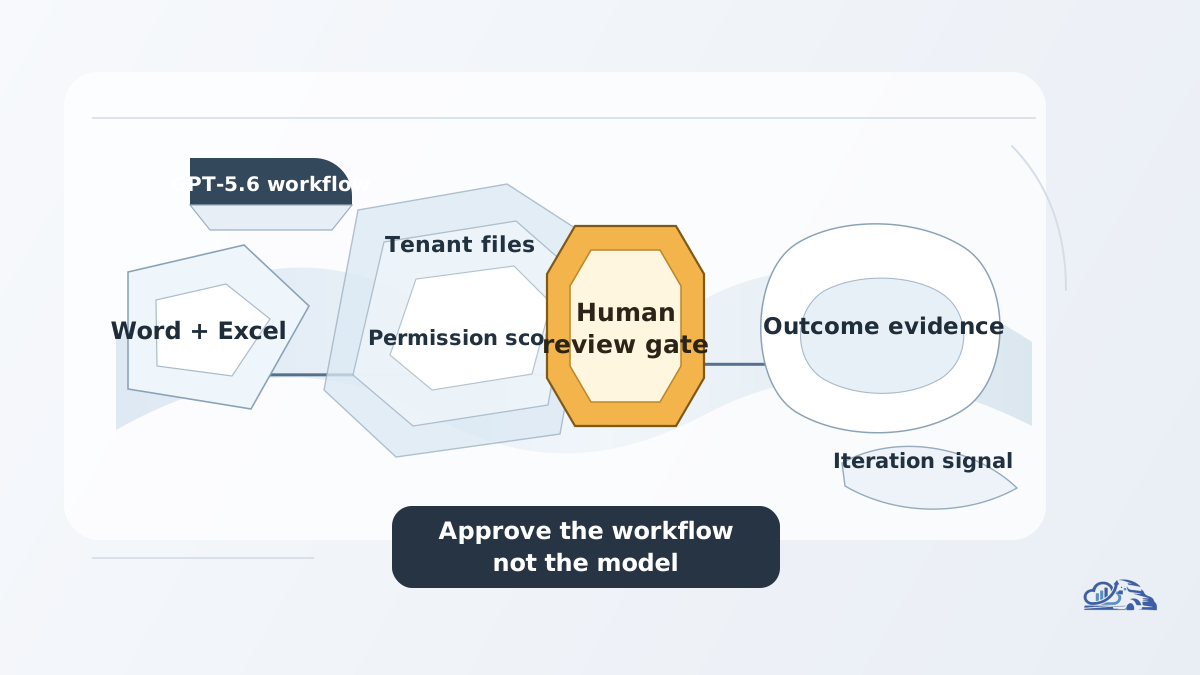
A production evaluation framework for Copilot should cover workflow selection, data access, prompt standards, output rubrics, review gates, exception handling, monitoring, and iteration.
At Van Data Team, we start by mapping the work before choosing the automation pattern. Who requests the output? Which files and systems matter? What can the AI see? What is it allowed to change? Who approves the result? What happens when the answer is incomplete, uncertain, or wrong?
Use this framework:
| Evaluation layer | Operator question | Production control |
|---|---|---|
| Workflow selection | Is this task frequent, costly, or risky enough to evaluate? | Workflow inventory and priority map |
| Data and permissions | What sources can Copilot access, and should it access them? | Permission review and source classification |
| Prompt standardization | Are users giving comparable instructions? | Prompt templates and input requirements |
| Output rubric | What makes the result acceptable? | Quality checklist by workflow type |
| Human review | Who approves, edits, or blocks the output? | Named review gate and escalation path |
| Exception handling | What happens when context conflicts or confidence is low? | Stop rules and fallback process |
| Monitoring | Are failures decreasing over time? | Error taxonomy and reporting dashboard |
| Iteration | What changes after review evidence accumulates? | Delivery backlog and improvement cycle |
This is the same discipline we use across AI and data engineering services: the stack matters, but the workflow decides the architecture. For Copilot, the architecture may include tenant policy, SharePoint and OneDrive governance, prompt libraries, Excel model validation, PowerPoint source controls, workflow dashboards, and manual review steps.
A concrete offer: if Copilot is entering your production workflows, Van Data Team can run a scoped workflow review that produces a signal map, risk register, review-gate design, dashboard gap review, and implementation scope. The output is not a generic strategy deck. It is a practical plan for which Copilot workflows to allow, which to review, which to block, and what telemetry to watch after rollout. You can review Van Data Team's founder-led delivery model and engagement options through the Strategy Sprint path.
Conclusion
GPT-5.6 in Microsoft 365 Copilot is an important product change because it places OpenAI's flagship model series inside the everyday tools where knowledge work already happens. But the production question is not just "is the model better?" The useful question is whether the Copilot workflow produces reliable business outcomes under your data, permissions, review process, and operating pressure.
Teams should start with representative workflows in Word, Excel, PowerPoint, Chat, and Cowork. Define output standards. Compare results against human-reviewed baselines. Track failure modes. Add review gates where the cost of error is meaningful. Treat Cowork as a higher-governance surface because agentic work changes what must be audited.
Van Data Team helps teams turn these model shifts into production systems: agent workflows, reporting layers, review processes, dashboards, and delivery plans that survive contact with real operations. The model announcement is the trigger. The operating system around it is where the value is won.
Article FAQ
Questions readers usually ask next.
These short answers clarify the practical follow-up questions that often come after the main article.
Need a similar system?
If this article maps to a workflow your team already operates, the next step is usually a scoped review of the system, constraints, and rollout path.
Free Copilot review
Evaluate GPT-5.6 Copilot Readiness
Review GPT-5.6 in Microsoft 365 Copilot against your source systems, review gates, and reporting workflow, then leave with concrete next steps.
- Copilot workflow map across Word, Excel, PowerPoint, Chat, and Cowork
- Source-system and permission boundary checklist for GPT-5.6 use
- Human review checkpoints for documents, analysis, and multi-step work
- Agent observability signals to track errors, escalations, and recovery
- Prioritized implementation plan for safe Microsoft 365 Copilot rollout
Related articles
View all
Claude Fable 5.1: Same Price, 75% Cheaper Cache
Claude Max Lawsuit: The 5x and 20x Usage Claims
Agentic AI security after Project Perception: governance before action