July 9, 2026
VS Code Multi-Agent Orchestration: What GitHub and VS Code Sources Describe
Learn how to evaluate VS Code Multi-agent Orchestration with practical examples, evidence checks, cost controls, review gates, and rollout criteria safely.
Article focus
VS Code multi-agent orchestration is a development workflow where a main AI agent can coordinate parallel agent sessions, subagents, and isolated workstreams inside VS Code and GitHub Copilot.
Section guide
VS Code multi-agent orchestration is a development workflow where a main AI agent can coordinate parallel agent sessions, subagents, and isolated workstreams inside VS Code and GitHub Copilot. GitHub's Copilot changelog and the VS Code team's multi-agent development post describe AI-assisted software engineering moving from a single chat interaction toward parallel implementation, testing, documentation, review, and cloud-assisted development.
The buyer problem is not "Can agents write code?" anymore. The operating problem is whether a product team can let multiple agents touch the same repository without losing review quality, merge discipline, cost visibility, or accountability. At Van Data Team, we treat this as a production workflow design problem: define the workstreams, isolate the risky ones, log the agent decisions, and keep human review gates where failure would matter. That is the same operating lens we use for production AI agent workflows, data automation, reporting, and agentic review systems.
Decision Matrix
A useful comparison should give a qualified operating verdict, not a universal winner. Treat each row as the first option to test, then validate it against your own workload and current source documentation.
| Reader need | Option A first test | Option B first test | Evidence to collect |
|---|---|---|---|
| Highest quality on a narrow task | Test when its sourced strengths match the task | Test when its sourced strengths match the task | Accepted-output rate, reviewer edits, blocking failures |
| Cost-sensitive batch work | Test when accepted-output cost is lower after retries | Test when accepted-output cost is lower after retries | Tokens, cache hit rate, retries, reviewer minutes |
| High-risk production action | Use only if evidence handling and escalation pass | Use only if evidence handling and escalation pass | Failure logs, escalation rate, audit completeness |
| Platform fit | Prefer when it fits the team's auth, data, and tooling constraints | Prefer when it fits the team's auth, data, and tooling constraints | Integration effort, governance, observability, support path |
Tooling And Landscape Fit
Do not evaluate the topic in isolation. Compare the main approach against adjacent frameworks, orchestration choices, and runtime controls so the reader can see when each option fits.
Review adjacent options such as LangGraph, LangChain, CrewAI, native function calling, MCP before choosing the implementation path.
Key Takeaways
- GitHub described parallel agent workflows in familiar developer surfaces: GitHub's Copilot changelog was published on July 8, 2026 and covers VS Code v1.123 through v1.127.
- The important shift is operational: parallel sessions let teams split implementation, tests, documentation, browser validation, and review, but they also increase coordination, permission, and merge risk.
- The official VS Code architecture distinguishes local, background, and cloud agents, with background agents using worktree isolation and cloud agents using remote isolation according to the VS Code multi-agent development post.
- GitHub reports larger-codebase support through 1M context windows, but a larger window does not replace scoped prompts, tests, or reviewer judgment.
- Teams should start with bounded workflows: an agent implements, another writes tests, another reviews risk, and a human owner decides what merges.
| Capability | What the sources describe | Production meaning |
|---|---|---|
| Parallel sessions | GitHub says developers can keep separate agent tasks visible and active at the same time in its July 8, 2026 changelog | Work can move in parallel, but someone still owns final integration |
| Multiple chats in one session | GitHub describes splitting implementation, review, testing, and docs across focused chats in VS Code v1.123 through v1.127 | Teams can separate context by workstream instead of stuffing every instruction into one chat |
| Subagent visibility | VS Code says multiple subagents can run in parallel and expose prompts and results in the official architecture post | Reviewers can inspect delegated work instead of accepting a single summarized answer |
| Cost visibility | GitHub added total session cost and delegated subagent usage visibility in the Copilot changelog | Credit spend becomes a workflow metric, not an afterthought |
| Background isolation | VS Code describes background agents as running on the developer machine through CLI worktrees in the multi-agent development post | Agents can explore changes without directly overwriting the active workspace |
What VS Code Multi-Agent Orchestration Changes
VS Code multi-agent orchestration changes AI coding from a single assistant conversation into a coordinated development runtime. In the cited VS Code and GitHub materials, the main agent can plan a task, delegate parts of it to specialized subagents, keep separate sessions visible, and bring results back for review.
That matters because software work is rarely one stream. A normal feature touches implementation, tests, docs, migration notes, release notes, browser validation, and sometimes security review. Before this shift, teams often tried to force all of that into one long prompt chain. The result was noisy context and weak traceability.
The new pattern looks more like a small engineering pod. An agent explores the codebase. Another drafts the implementation. Another writes tests. Another checks docs or UI behavior. The developer does not disappear from the workflow; the developer becomes the operator who scopes, inspects, rejects, and merges.
According to the official VS Code post, subagents are context-isolated workers where the main agent delegates work and only the final result flows back. That is the architectural point. The useful part is not just speed. It is context control.
"You can now run Claude and Codex agents directly alongside GitHub Copilot."
That line from the VS Code team is the clearest signal: the editor is becoming a control surface for multiple agent runtimes, not just a chat sidebar.
What GitHub and VS Code Sources Describe
GitHub and VS Code sources describe a practical multi-agent development surface across VS Code and GitHub Copilot, including parallel sessions, multiple chats in one session, subagent cost visibility, browser validation, model configuration, and larger-context workflows.
The GitHub Copilot in Visual Studio Code changelog says developers can run sessions side by side, use multiple chats in one session, group related sessions, and inspect subagent usage when delegated work consumes credits. It also describes generally available agentic browser tools, a Language Models editor, Autopilot improvements, session sync, chronicle, and 1M context windows for compatible models.
Independent coverage follows the same direction. InfoWorld described the VS Code feature as an orchestrator pattern where an objective is decomposed, assigned to specialist subagents, and surfaced in one interface. DevOps.com reported that the standalone Copilot desktop app was announced at Microsoft Build 2026 and framed around orchestrating multiple agents.
The mistake we see is treating these features as a productivity toggle. They are closer to a workflow runtime. Once multiple agents can work at the same time, teams need a policy for what agents may read, what they may edit, when they must stop, and how their output becomes a pull request.
For teams building their own agent systems, the same discipline applies outside code editors. A reporting agent, research agent, or ops automation agent needs permissions, trace logs, review thresholds, and escalation paths. That is why Van Data Team connects agent design to resilient automation pipelines, not just prompt writing.
The Runtime Models: Local, Background, and Cloud
The following illustration summarizes three runtime paths for parallel agent work:
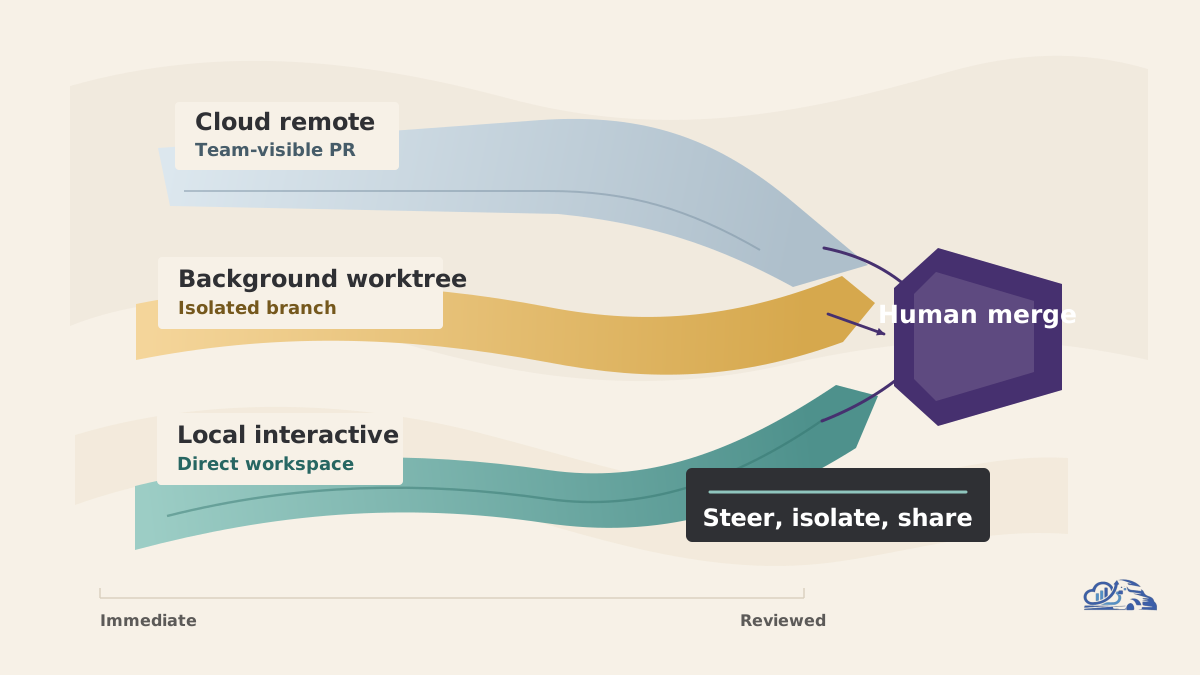
The runtime model determines how much control, isolation, and visibility a team gets from an agent session. Local agents are best for interactive work, background agents are useful for isolated asynchronous exploration, and cloud agents fit well-defined tasks that need remote execution and team visibility.
The official VS Code architecture separates agents into local, background, and cloud modes. Local agents run interactively with direct workspace access. Background agents run on the developer machine through the CLI and use worktree-based isolation. Cloud agents run on remote infrastructure and can expose work through pull requests and issues.
| Runtime | Best fit | Main strength | Main limitation |
|---|---|---|---|
| Local agent | Interactive debugging, code explanation, small edits | Fast steering by the developer | Direct workspace access means weaker isolation |
| Background agent | Refactor exploration, test generation, alternate implementation paths | Worktree isolation keeps the active workspace cleaner | Still needs local resource and merge discipline |
| Cloud agent | Issue-linked work, longer-running tasks, team-visible changes | Remote isolation and PR visibility | Requires clearer task specs and stronger permission rules |
A practical example: Priya is adding an authorization check to a billing workflow. She keeps a local agent open for interactive code navigation, starts a background agent to generate test coverage in an isolated worktree, and assigns a cloud agent to draft a PR description tied to the issue. The work happens in parallel, but Priya still reviews diffs, runs tests, checks security-sensitive files, and decides what merges.
That is the right mental model. Multi-agent development is not agent autonomy without ownership. It is controlled delegation.
Why Worktree Isolation Matters
Background agent worktree isolation matters because parallel agents can otherwise overwrite, pollute, or confuse the active development workspace. A separate worktree gives an agent a place to explore changes while the developer keeps their own branch and editor state stable.
Worktree isolation solves one narrow but important problem: file-level interference. If a background agent is trying a refactor while the developer is fixing a test locally, separate worktrees reduce the chance that one stream stomps on another.
It does not solve semantic conflicts. Two agents can still make incompatible design choices. One may update an API contract while another writes tests against the old shape. One may change copy in a UI while another changes the component state model. Isolation keeps the file trees apart; review discipline reconciles the product decision.
A production merge path should be explicit:
git status
git diff --stat main...agent-worktree-branch
git diff main...agent-worktree-branch -- src tests docs
npm test
npm run lint
npm run typecheck
The exact commands will vary by stack, but the principle does not. Inspect the diff, run the relevant checks, and force the agent output through the same quality gates as human work.
This is where teams should be careful with "background" as a word. Background does not mean unaccountable. It means asynchronous. The owner still has to check what changed, why it changed, and whether the change fits the release path.
Practical Multi-Agent Development Workflows
A useful multi-agent development workflow assigns each agent a narrow role and gives the human owner a clear consolidation step. The goal is not to make every task parallel; the goal is to parallelize work that can be separated without hiding risk.
One good starter workflow is implementation plus tests. The main agent receives the feature objective and identifies the touched files. A subagent writes or updates tests in a separate context. The developer reviews both diffs together, looking for a mismatch between intended behavior and asserted behavior.
A second workflow is documentation plus changelog drafting. The implementation agent updates code while a documentation agent inspects public interfaces, comments, README sections, or release notes. This works well because docs often lag behind code, and a focused documentation agent can find missing operational details.
A third workflow is security review plus linting. One agent checks changed files for permission, validation, dependency, and secret-handling risk. Another handles mechanical linting or formatting feedback. The security agent should usually have read-heavy permissions first. Editing security-sensitive code should require explicit human approval.
A fourth workflow is refactor exploration. The developer asks a background agent to try an alternate implementation in an isolated worktree. If the result is too invasive, the branch can be discarded. If it is useful, the developer cherry-picks or opens a focused PR.
These patterns also apply beyond software engineering. Van Data Team has built coordinated research and reporting systems where separate agents collect signals, normalize findings, and prepare reviewable outputs. The lesson from that multi-agent research workflow is the same: parallelism helps only when the handoff contract is visible.
Guardrails for Production Teams
Production teams need guardrails because parallel agents increase the surface area for context drift, conflicting changes, hidden cost, broad permissions, shallow review, and weak auditability. The more work agents do at once, the more explicit the control system must become.
Start with context boundaries. Each agent should receive a short role, a scoped file area, allowed tools, and a stop condition. Avoid asking every agent to understand the entire codebase unless the task genuinely requires it. Larger context windows help, but they do not remove the need for focus.
Then define permission levels. A read-only research agent should not have the same tool access as an implementation agent. A browser validation agent does not need to rewrite database migrations. A security review agent may need to inspect secrets handling but should not automatically change auth logic without review.
Cost visibility belongs in the adoption plan. GitHub added session and subagent usage visibility in the Copilot changelog, which is useful because delegated work can multiply quickly. Treat spend like any other operational signal: track which workflows consume credits and which produce mergeable output.
Review quality is the harder metric. A team should ask:
- Did the agent change files outside its scope?
- Did the tests assert the behavior the product owner actually wanted?
- Did the agent explain tradeoffs, or only report completion?
- Did reviewers find hidden regressions after merge?
- Did agent output create more review burden than it removed?
For a deeper operating model, review human escalation for agents before scaling this pattern across production repositories.
Adoption Checklist for Engineering Leaders
The safest way to adopt multi-agent development is to start with bounded, reviewable workstreams and expand only when the team can measure quality, cost, and recovery. Treat the first rollout as an engineering process change, not an editor preference.
Use this checklist before broad adoption:
| Decision area | What to define | Why it matters |
|---|---|---|
| Task scope | Which tasks agents may handle independently | Prevents broad, ambiguous agent changes |
| Runtime choice | Local, background, or cloud | Matches isolation and visibility to risk |
| Permissions | Read, edit, browser, terminal, PR creation | Limits blast radius |
| Review gates | Required tests, diff review, security review | Keeps accountability human-owned |
| Cost tracking | Session and subagent usage review | Avoids invisible spend growth |
| Recovery | Revert path, discarded worktrees, branch policy | Makes failure routine instead of disruptive |
A practical rollout could start with test generation, documentation updates, and refactor exploration. These tasks are useful but reviewable. After that, teams can test feature implementation on low-risk areas, then introduce cloud agents for issue-linked work when PR visibility and permissions are mature.
At Van Data Team, we start by mapping the intake, decisions, tools, logs, and handoffs that already shape the workflow. Then we decide where an agent should retrieve context, call tools, or stop for review. If your team is evaluating this pattern, a scoped workflow review should produce concrete outputs: an agent role map, permission matrix, review gate design, dashboard gap review, and an implementation sequence. That is more useful than a generic AI adoption workshop.
For teams that need dashboards and audit trails around agent output, the same structure can connect to agentic BI and reporting, especially when engineering leaders need to see throughput, review load, test failures, and defect signals in one place.
Evaluation Criteria Before Scaling
A team should scale multi-agent development only when it can prove that parallel work improves delivery without weakening quality control. The evaluation should include cost, latency, token budget, observability, review burden, and failure recovery.
Do not use productivity anecdotes as the only evidence. Track operating signals. How often did agent branches merge without major rewrite? How often did tests fail because the agent misunderstood the architecture? Did review time fall, or did reviewers spend longer untangling parallel changes? Did agent-generated docs match the shipped behavior?
Latency should be evaluated by workflow, not by a single model response. A background agent that takes longer can still be useful if it finishes while a developer works elsewhere. A local agent that answers quickly can still be harmful if it edits the wrong files.
Token budget and context size should be treated as design constraints. A broad codebase prompt may feel convenient, but focused subagents usually produce cleaner results. Give the implementation agent the relevant files, the test agent the behavior contract, and the review agent the diff plus risk checklist.
Observability matters because agent decisions are easy to lose. Teams should preserve prompts, outputs, changed files, test results, and reviewer decisions. Without that trail, it is hard to learn which workflows are safe and which create hidden debt.
Conclusion
VS Code multi-agent orchestration is a real shift in AI-assisted software engineering because it moves agent work from one chat thread into parallel, inspectable workstreams. The cited GitHub and VS Code sources put the runtime closer to where developers already work: VS Code, Copilot, worktrees, sessions, browser validation, and PR-linked collaboration.
The teams that benefit most will not be the teams that delegate everything fastest. They will be the teams that define roles, isolate risky work, track cost, preserve audit trails, and keep human review at the merge point. Worktree isolation reduces interference. Subagents reduce context noise. Parallel sessions reduce waiting. None of them remove engineering judgment.
If your team is planning production agent workflows, Van Data Team can help turn the idea into an operating model: workflow map, agent roles, permission boundaries, review gates, reporting signals, and a staged implementation scope. Start with AI agents with human review, then decide which parts of your development workflow are ready for controlled parallelism.
Article FAQ
Questions readers usually ask next.
These short answers clarify the practical follow-up questions that often come after the main article.
Need a similar system?
If this article maps to a workflow your team already operates, the next step is usually a scoped review of the system, constraints, and rollout path.
Free scoping session
Operationalize VS Code Agent Workflows
Map VS Code multi-agent orchestration to your repo, review gates, observability, and rollout path so parallel agents improve delivery without losing control.
- Workstream map for Copilot, VS Code subagents, tests, docs, and review
- Worktree and branch isolation plan for parallel agent sessions
- Human review checkpoints for risky code, data, and deployment actions
- Agent observability checklist covering logs, cost, retries, and accepted-output rate
- Pilot backlog with first tasks, success metrics, and owner decisions
Related articles
View all
Jev and System One Models: Fast Classifiers for AI Agents
Jev vs Fable 5.1 vs GPT-6 Astra: Which Model for Which Job
Model Portability: The Cursor-OpenAI Cutoff Lesson