Optimizing Docker Image Build Times: A Practical Guide for Production Teams
Faster Docker builds: measure local and CI builds first, order layers for cache hits, use multi-stage builds, and control build context and base images.

Optimizing Docker image build times means reducing how long it takes to produce a reliable container image without breaking runtime behavior, reproducibility, or deployment safety. For founders, platform leads, data engineers, and AI teams, the practical goal is not just a cleaner Dockerfile. It is faster feedback, lower CI/CD friction, and a deployment workflow your team can trust.
The buyer problem is simple: a small code change should not make the whole team wait on a slow rebuild before a data pipeline, API, or agent service can ship. The mistake we see is treating Docker optimization as a list of tricks instead of an operating workflow with measurement, review gates, and rollback safety.
At Van Data Team, we start by making the build path observable: which layer changed, which dependency step ran again, which CI runner lost cache, and which deployment was delayed. Then we connect the fix to the broader system, whether that is data pipeline engineering, AI service deployment, reporting automation, or a platform delivery process with human review.
This guide gives you a production-ready workflow: baseline the build, restructure Dockerfile layers, use cache deliberately, reduce unnecessary dependencies, validate in CI/CD, and document the result so the next edit does not undo the improvement.
Key Takeaways
- Faster Docker builds start with measurement, not guesswork: compare local and CI/CD builds under similar conditions before calling a change successful.
- Cache-friendly layer order often matters more than simply reducing the number of Dockerfile instructions.
- Smaller images and faster builds overlap, but they are not the same goal; optimize both separately.
- Multi-stage builds are useful when they separate build-time tooling from runtime artifacts without making the Dockerfile hard to maintain.
- Production teams need review gates for runtime behavior, security posture, observability, and CI/CD cache behavior.
What Docker build time optimization means
Docker build time optimization is the practice of reducing the time needed to create a container image while preserving runtime behavior, security, reproducibility, and deployment reliability. Build time is affected by base image choice, dependency installation, Dockerfile layer order, build context size, cache reuse, copied files, and CI/CD runner behavior.
The important part is "while preserving." A build that gets faster because you removed diagnostics, skipped security updates, or made dependency versions unpredictable is not a production improvement. It is technical debt with a shorter timer.
Docker's own documentation explains that build cache reuse depends on whether prior layers can be reused or must be invalidated by changed instructions, files, or build inputs. The Docker build cache documentation is the right starting point for understanding the mechanic.
A simple example: if your Dockerfile copies the entire application before installing dependencies, every source change may invalidate the dependency installation layer. If you copy package.json, package-lock.json, requirements.txt, or equivalent manifests first, install dependencies next, and copy source code later, code-only changes are less likely to force a full dependency reinstall.
That pattern is not magic. It is a way of aligning Dockerfile structure with the way your application actually changes.
Measure Before Editing the Dockerfile
Before changing the Dockerfile, create a baseline. Otherwise, you will not know whether the improvement worked, whether it only helped locally, or whether it made CI/CD worse.
Track these separately:
| Signal | Why it matters | How to review it |
|---|---|---|
| Total build duration | Shows developer and CI/CD wait time | Compare before and after under similar cache conditions |
| Slowest build steps | Shows where optimization has use | Use plain build output and CI logs |
| Final image size | Affects storage, transfer, and deployment behavior | Compare image metadata separately from build duration |
| Cache hit behavior | Shows whether layers are reusable | Review which steps rerun after source-only changes |
| Runtime test result | Confirms the image still works | Run unit, integration, or smoke tests after the build |
Use a repeatable command for local review:
time docker build --progress=plain -t app:baseline .
Then change one variable at a time. If you change the base image, dependency installation, .dockerignore, and CI cache all in one pass, you may get a faster build but learn nothing about the cause.
Local builds and CI/CD builds also differ. A developer machine may have warm cache and fast local storage. A hosted runner may start cold, pull base images every time, or discard cache between jobs unless configured. That is why the review should include both local and pipeline behavior.
For teams deploying event-driven architecture with message queues, this matters during incident response. If a streaming service needs a production fix, the build system should not become the slowest unknown in the recovery path.
Build Cache-Friendly Dockerfiles
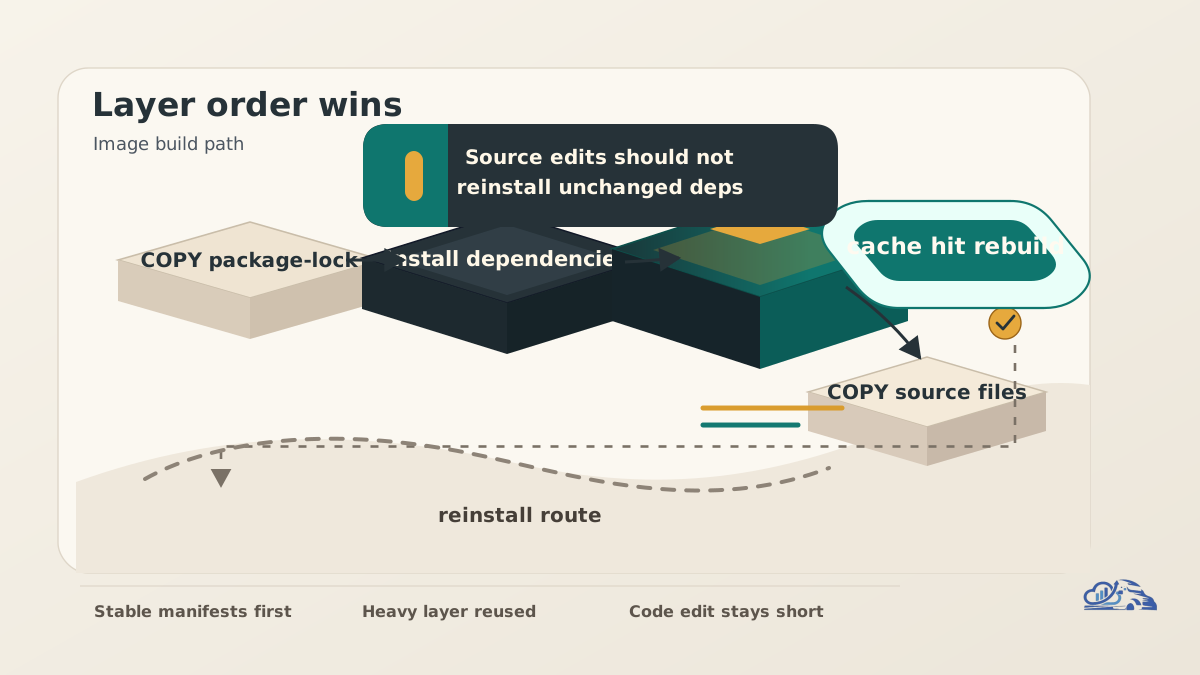
Docker builds work through layers. When an instruction and its relevant inputs match a previous build, Docker can reuse the cached result. When they do not match, that layer and later layers may need to run again. Docker's cache invalidation documentation covers the rules in more detail.
A cache-hostile Dockerfile often looks like this:
FROM node:22

WORKDIR /app

COPY . .

RUN npm ci

RUN npm run build

CMD ["npm", "start"]
The problem is the COPY . . line. Any application source change can invalidate the next step, including npm ci, even when dependencies did not change.
A cache-friendlier version separates dependency manifests from application source:
FROM node:22

WORKDIR /app

COPY package.json package-lock.json ./
RUN npm ci

COPY . .
RUN npm run build

CMD ["npm", "start"]
The same concept applies to Python, Java, Go, and many data platform images. Copy dependency files first. Install dependencies. Then copy the source files that change frequently.
For Python, a simplified pattern might look like this:
FROM python:3.12-slim

WORKDIR /app

COPY requirements.txt ./
RUN pip install --no-cache-dir -r requirements.txt

COPY src/ ./src/

CMD ["python", "-m", "src.main"]
This is not the final answer for every Python service. Some teams need compiled packages, private indexes, system libraries, or reproducible lockfiles. The point is the structure: stable inputs before volatile inputs.
Layer count still matters, but it is not the only goal. Combining every instruction into one long RUN statement can make the Dockerfile harder to review and may reduce useful cache boundaries. A readable Dockerfile with intentional layers is usually better than a compressed file nobody wants to maintain.
Use Multi-Stage Builds With Clear Runtime Boundaries
Multi-stage builds let you use one stage to compile, bundle, or prepare artifacts, then copy only the required output into the final runtime image. Docker documents this pattern in its multi-stage builds guide.
Use multi-stage builds when build-time dependencies are not needed at runtime. Examples include compilers, test tooling, development packages, front-end build tools, and temporary assets.
A simplified example:
FROM node:22 AS build

WORKDIR /app
COPY package.json package-lock.json ./
RUN npm ci

COPY . .
RUN npm run build

FROM node:22-slim AS runtime

WORKDIR /app
COPY package.json package-lock.json ./
RUN npm ci --omit=dev

COPY --from=build /app/dist ./dist

CMD ["node", "dist/server.js"]
This pattern can reduce final image size and keep runtime images cleaner. It can also make the build process easier to reason about because each stage has a job.
But multi-stage builds are not automatically better. If the Dockerfile becomes a maze of copied folders, hidden assumptions, and repeated dependency installs, the review burden increases. The team may save time in one build step and lose it every time someone has to debug the image.
A practical rule: use multi-stage builds when they remove build-only dependencies from the final image or make the build lifecycle clearer. Do not add them just because they look advanced.
Control Build Context, Base Images, and Dependencies
The build context is the set of files sent to the builder. If the context includes local caches, test artifacts, notebooks, data exports, screenshots, or large generated files, builds can slow down before Docker even reaches your dependency steps.
Use .dockerignore to exclude files that do not belong in the image. Docker's documentation on build context and .dockerignore explains how ignored files affect what is sent to the builder.
A practical .dockerignore might include:
node_modules
__pycache__.pytest_cache
.env
dist
build
coverage
*.log
data/raw
Review this carefully. Do not ignore files that the build actually needs. For data and AI teams, this is a common risk when local datasets, generated features, evaluation outputs, or model artifacts live near application code.
Base image choice also matters. Minimal images can reduce download size and final image footprint, but they can affect compatibility and debugging. A very small base image may be useful for a narrow runtime service. A standard base image may be better when your team needs familiar diagnostics, shell tooling, or package compatibility.
Dependencies need the same discipline. Install only what the runtime needs. Clean package manager caches when they are not required. Pin versions where reproducibility matters. Separate development dependencies from production dependencies where the ecosystem supports it.
This is where Docker optimization becomes a production engineering topic, not a Dockerfile-only task. The image should still support monitoring, emergency debugging, and rollback. A smaller image that leaves operators blind during an incident is not an improvement.
A CI/CD Workflow for Production Teams
CI/CD changes the optimization problem because cache availability is platform-specific. A local machine may reuse layers for weeks. A CI runner may start from an empty environment. A self-hosted runner may keep cache but introduce different security and maintenance responsibilities.
Use this workflow:
- Capture a baseline from CI logs and local builds.
- Identify the slowest Dockerfile steps.
- Review build context size and
.dockerignore. - Reorder layers around stable dependency inputs.
- Evaluate whether multi-stage builds clarify build and runtime separation.
- Configure CI cache according to your platform's supported approach.
- Run runtime tests from the built image.
- Compare local and CI/CD results.
- Document the change and the expected cache behavior.
For AI services, add one more review: confirm that image optimization does not hide changes to prompts, evaluation datasets, model routing configuration, or token-budget controls. The Docker image may build faster, but your release still needs evaluation and review gates if it changes agent behavior. Our AI agent development work treats deployable agents as production systems, not just code packages.
A CI pipeline should also make failures recoverable. If cache configuration breaks, the build should still complete from a cold state. If a dependency mirror fails, the logs should make the cause visible. If a runtime image is missing a required library, smoke tests should catch it before deploy.
When Van Data Team scopes this kind of workflow review, the deliverables are concrete: a build-step signal map, Dockerfile review notes, CI/CD cache gap review, deployment risk checklist, and an implementation scope tied to your service or data platform. Teams can review engagement options when they need a focused sprint instead of a broad platform rebuild.
Decision Table: Which Tactic to Use
| Tactic | Use when | Main risk | Validation checkpoint |
|---|---|---|---|
| Reorder Dockerfile layers | Dependency installs rerun after source-only changes | Reordering breaks expected files or build assumptions | Source-only change should not reinstall unchanged dependencies |
Add .dockerignore | Build context includes files not needed in the image | Required files are accidentally excluded | Build succeeds from a clean checkout |
| Use a smaller base image | Download size or final image size is a bottleneck | Missing runtime libraries or debugging tools | Smoke tests and operational checks pass |
| Use multi-stage builds | Build tools are not needed at runtime | Dockerfile becomes harder to understand | Runtime stage contains only required artifacts |
| Clean dependency caches | Package manager cache remains in image | Cleanup removes files needed later | Rebuild and runtime test both pass |
| Configure CI cache | CI builds are slow because cache is unavailable | Cache becomes stale or platform-specific | Cold and warm build paths are both understood |
This table is not a checklist of mandatory changes. It is a selection guide. The right optimization depends on which constraint is actually hurting the team: developer latency, CI cost, deployment delay, image transfer, runtime reliability, or review burden.
Failure Modes and Review Gates
The fastest Docker build is not always the best build. Production teams need guardrails.
Common mistakes include:
- Optimizing image size without measuring build duration.
- Reordering layers in a way that invalidates cache more often.
- Installing unnecessary packages because they were useful once during debugging.
- Removing operational tools that production support still needs.
- Treating one warm local build as proof that CI/CD improved.
- Adding multi-stage builds that only the original author understands.
- Repeating benchmark claims from other teams without matching their context.
- Ignoring runtime tests after a Dockerfile change.
A good review gate asks four questions:
- Did the build get faster under comparable conditions?
- Did the final image still run the same workload?
- Did the change preserve reproducibility and security posture?
- Did the team document what should remain cache-stable?
Here is a practical review checklist:
Docker build optimization review

[ ] Baseline local build captured
[ ] Baseline CI/CD build captured
[ ] Slowest build steps identified
[ ] Build context reviewed
[ ] .dockerignore checked from a clean checkout
[ ] Dependency layer order reviewed
[ ] Base image choice justified
[ ] Multi-stage build used only where helpful
[ ] Runtime smoke test passed
[ ] CI cache behavior verified
[ ] Image size tracked separately from build time
[ ] Rollback path remains clear
[ ] Notes added for future maintainers
For founders and operators, the bigger point is predictability. Slow builds are annoying. Unpredictable builds are operational risk.
A team deploying batch jobs may tolerate a slower build if it is rare and reliable. A team shipping frequent fixes to customer-facing APIs may need faster feedback. A team deploying agent workflows may need evaluation time budgeted into the release path, because build speed alone does not prove the agent is safe to release.
Practical Examples
Consider a data pipeline service that changes transformation code often but updates dependencies rarely. The first Dockerfile copies the whole repo, installs Python packages, and then runs tests. Every code edit triggers dependency installation. The fix is to copy the lockfile or requirements file first, install dependencies, then copy source code. The output is not a heroic rewrite. It is a Dockerfile that matches the team's real change pattern.
Now consider a front-end reporting service inside an internal analytics platform. The build stage needs Node tooling and bundlers. The runtime only needs compiled assets and a server. A multi-stage build can separate those concerns, reducing what ships into production and clarifying which dependencies belong in runtime.
A third example is a CI/CD runner that always starts cold. The Dockerfile may already be well structured, but the pipeline discards cache between jobs. In that case, the Dockerfile is not the only fix. The team needs to review CI cache configuration, runner behavior, base image pull behavior, and artifact storage policy.
These examples share the same pattern: measure the bottleneck, change the narrowest thing that addresses it, then validate in the environment where the delay actually hurts.
For teams building production platforms, Docker build time should be part of the same reliability conversation as observability, data quality, deployment rollback, and workflow automation. That is why our AI and data engineering services often include delivery workflow review alongside pipeline or application implementation.
Conclusion
Optimizing Docker image build times is a production workflow, not a one-line Dockerfile trick. The reliable path is to measure the current build, identify slow steps, structure layers around cache reuse, reduce unnecessary dependencies, use multi-stage builds where they clarify runtime boundaries, and validate the result in CI/CD.
The best teams optimize for speed and reliability together. They do not remove operational support just to make an image smaller. They do not trust a warm local build as proof that deployment improved. They document the intended cache behavior so future edits preserve the gain.
If Docker builds are slowing down data platform releases, AI service deployment, or production incident response, Van Data Team can turn the problem into an implementation plan: build-step signal map, CI/CD cache review, Dockerfile recommendations, runtime validation checklist, and a scoped delivery path through our founder-led engineering practice.

Founder of Van Data Team. Builds Vanaxity, the AI agent system for SEO, GEO, and AEO, and leads data engineering delivery for B2B teams.
About the authorArticle FAQ
Questions readers usually ask next.
These short answers clarify the practical follow-up questions that often come after the main article.
Need a similar system?
If this article maps to a workflow your team already operates, the next step is usually a scoped review of the system, constraints, and rollout path.
Free build-time scoping
Cut your Docker build times
Share your Dockerfile and CI setup. We map the slowest layers and cache misses, then hand you a concrete plan to ship faster without breaking runtime safety.
- Build-step signal map (which layer/step is slow)
- CI/CD cache review and fix list
- Dockerfile layer + multi-stage recommendations
- Runtime validation checklist before rollout
Consultation
Scope your next AI workflow.
Share the system and blockers. We will map fit, gaps, and the next step.