Event-driven Architecture With Message Queues: A Practical Guide
When to use message queues, how to choose between Kafka, RabbitMQ, Redis Streams and SQS, and how to build idempotent consumers with dead letter handling.
Event-driven architecture with message queues is a production pattern where services publish events or tasks to a broker, and independent consumers process them asynchronously. It helps teams decouple services, buffer workload spikes, isolate failures, and avoid making every workflow depend on a chain of synchronous API calls.
The buyer problem is practical: a checkout, onboarding flow, data sync, scraping job, or AI review workflow starts failing because one downstream dependency is slow, unavailable, or overloaded. The audience for this guide is technical founders, engineering leaders, and data teams deciding whether queues are the right foundation for more reliable automation.
At Van Data Team, we start by mapping the workflow signals, ownership boundaries, retry paths, dashboards, and review gates before selecting a broker. That same operating model applies to production AI agent workflows, real-time data pipelines, and platform automation: the queue is only useful when the surrounding system knows what to do with delays, duplicates, failures, and human escalations.
This guide gives you a production-ready framework for architecture, pattern selection, implementation, observability, failure recovery, and review checkpoints.
Key Takeaways
- Use message queues when work can happen asynchronously and needs buffering, retries, or consumer isolation.
- Do not choose Kafka, RabbitMQ, Redis Streams, or SQS only by popularity. Match the broker to ordering needs, replay needs, operations burden, and team skill.
- Reliable consumers must be idempotent, observable, and designed for duplicate delivery, poison messages, schema changes, and backlog growth.
- For AI and automation workflows, retries affect cost, token budget, latency, review burden, and escalation quality.
- A production-ready implementation needs event contracts, dead letter handling, owner assignments, dashboards, and rollback plans before launch.
What Event-driven Architecture With Message Queues Changes
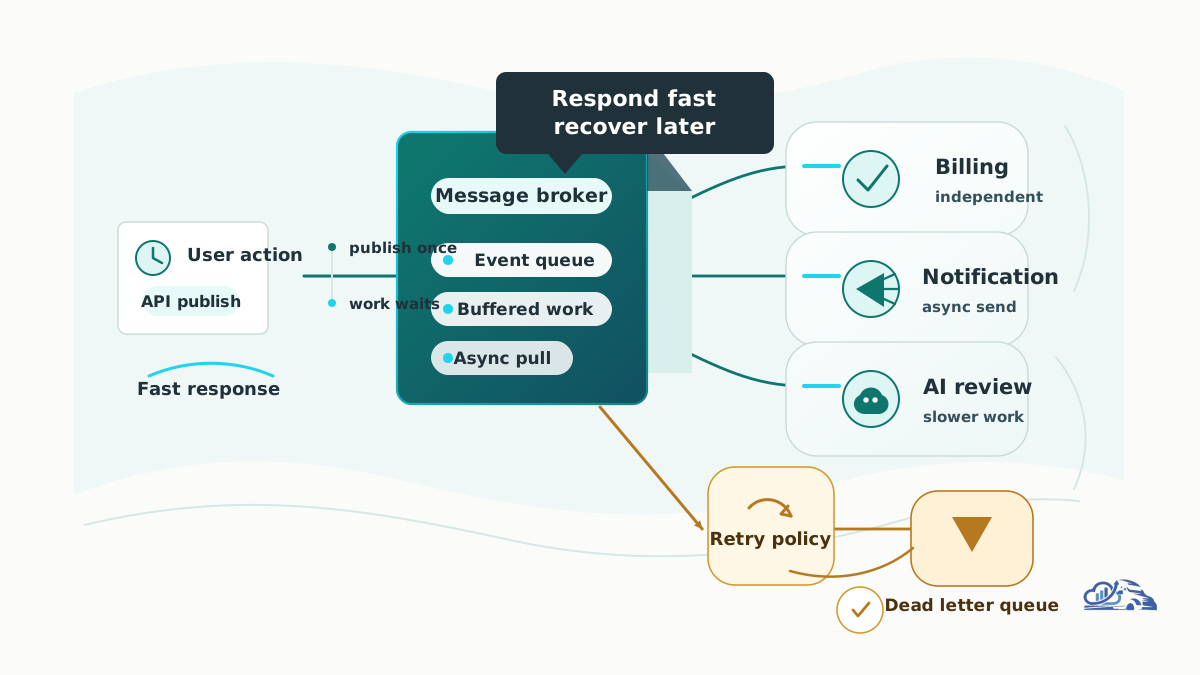
The core shift is from direct dependency to mediated work. A producer creates a message, the broker stores or routes it, and consumers process it when they are ready. That message might represent a business event, such as invoice.created, or a command, such as generate_monthly_report.
In a synchronous workflow, Service A calls Service B, waits, then calls Service C. If Service C fails, the user experience, the transaction, or the entire job can fail. In an event-driven workflow, Service A publishes a message and moves on. Consumers can retry, scale independently, or fail without breaking the original producer.
A basic production architecture has these parts:
- Producer: the service that emits the event or task.
- Broker: the queue, exchange, stream, or managed service that stores and routes messages.
- Consumer: the worker or service that processes messages.
- Acknowledgement: the signal that processing succeeded.
- Retry policy: the rule for temporary failures.
- Dead letter queue: the place for messages that cannot be processed safely.
- Monitoring layer: dashboards and alerts for backlog, failures, retries, and latency.
A useful workflow diagram would show a user action entering an API, the API publishing a message to a broker, separate consumers handling billing, notifications, analytics, and AI review, and failed messages moving to a dead letter queue with an operator review path.
The mistake we see is treating the queue as the architecture. It is not. The architecture is the full operating system around the queue: contracts, consumers, observability, cost controls, and recovery behavior.
Implementation Architecture
A good implementation starts with the business workflow, not the broker. For example, a customer signs up, uploads a file, or submits a request. That action creates a signal. The question is whether downstream work must finish before the user continues.
If the answer is no, the workflow is a candidate for a queue. Send a message, return a fast response, and let workers process the rest.
For a data pipeline, the producer might publish ingestion events as files arrive. Consumers validate records, enrich data, update warehouse tables, and trigger reporting jobs. For streaming-heavy systems, see Van Data Team's guide to data platform modernization for AI readiness, where replay, ordering, and continuous ingestion become central design concerns.
For an AI workflow, a message might trigger classification, summarization, extraction, or routing. That changes the evaluation model. You need to track not just success and failure, but also review rate, model cost, token budget, escalation quality, and whether the output passed human or automated checks.
A minimal message contract can stay short:
1. Define the Event-driven architecture with message queues decision.
2. List required inputs, owner, and stop conditions.
3. Run the smallest safe workflow.
4. Validate output quality before publishing or deployment.
5. Escalate unresolved risk to a human reviewer.
This is not meant to replace schema tooling. It is a review artifact. Before implementation, everyone should know who owns the event, which consumers depend on it, what failure means, and how operators will see problems.
Queues, Streams, Pub/Sub, and Synchronous APIs
Event-driven systems often combine several patterns. The right choice depends on whether you need work distribution, replay, broadcast, or immediate response.
| Pattern | Best For | Common Tools | Main Tradeoff |
|---|---|---|---|
| Message queue | Background jobs, task distribution, workload buffering | RabbitMQ, AWS SQS, Redis Streams | Great for async work, but ordering and replay depend on broker design |
| Event stream | Durable event history, replay, analytics pipelines | Kafka, Redis Streams | Powerful for data flows, but adds operational complexity |
| Pub/sub | Broadcasting the same event to multiple subscribers | SNS, Kafka topics, RabbitMQ exchanges | Flexible fanout, but consumers need clear ownership |
| Synchronous API | Immediate request-response workflows | REST, GraphQL, gRPC | Simple to reason about, but tightly couples availability and latency |
Official docs are the right place to validate broker behavior before production. Review Apache Kafka documentation for partitions, retention, and consumer groups; RabbitMQ documentation for exchanges, queues, routing, and acknowledgements; AWS SQS dead letter queue guidance for failure handling; and Redis Streams documentation if you are evaluating stream-like behavior inside Redis.
The practical rule: use a queue when you need durable async work distribution, a stream when you need ordered replayable history, pub/sub when multiple systems need the same signal, and synchronous APIs when the caller truly needs the answer now.
A Production Workflow for Getting Started
Start with the workflow map. List the action, producer, message, broker, consumer, database writes, external API calls, dashboards, and failure paths. Do this before writing code.
- Identify event boundaries. Name the business moments that matter: payment received, document uploaded, lead qualified, ticket escalated, report requested.
- Classify the message. Is it an event, command, or query? Events describe something that happened. Commands ask a worker to do something. Queries usually do not belong in queues unless you are building a specialized async request pattern.
- Choose the broker and delivery model. Match the tool to ordering, replay, throughput, team experience, managed-service preference, and operational tolerance.
- Define the schema. Include versioning, required fields, optional fields, ownership, and compatibility rules.
- Design retries and dead letter handling. Decide what gets retried, what gets delayed, and what requires human review.
- Add observability before launch. Track backlog, age of oldest message, processing latency, retry count, failure rate, consumer health, and dead letter volume.
- Review cost and capacity. Retries, duplicate work, and idle workers can create hidden infrastructure spend. This is where cloud cost optimization and architecture review should meet.
A useful mid-project checkpoint is a scoped workflow review. Van Data Team can deliver an event map, broker-fit recommendation, retry and dead letter plan, dashboard gap review, and implementation scope for teams modernizing data pipelines, automation systems, or AI agent workflows.
Best Practices for Reliable Queued Systems
Design consumers to be idempotent. A consumer should handle the same message more than once without corrupting state. Store processing markers, use unique operation IDs, or make writes naturally repeat-safe.
Separate business events from technical commands. customer.created is different from send_welcome_email. Blending them makes ownership confusing and schema changes risky.
Use dead letter queues intentionally. A poison message should not block the entire workflow forever. It should move to a review path where an operator can inspect the payload, error, consumer version, retry history, and business impact.
Version schemas. Consumers should not break because a producer added or changed a field without coordination. For critical workflows, schema compatibility checks should be part of deployment.
Choose choreography or orchestration on purpose. Choreography lets services react independently to events. Orchestration uses a central workflow controller. Choreography can be simpler at first but harder to trace. Orchestration can improve control but may become a central dependency.
Plan for observability. Queue depth alone is not enough. A small queue of old stuck messages can be worse than a large queue moving normally. Track age, retry loops, consumer lag, and dead letter reasons.
Keep payloads clear and stable. Include enough context for the consumer to work, but avoid stuffing every related record into the message. Large payloads increase storage, transfer, privacy, and compatibility risk.
For AI-driven workflows, evaluate outputs as part of the queue lifecycle. A message that produced an answer is not automatically successful. It may still need scoring, guardrails, human review, or escalation, especially in support, finance, compliance, and customer-facing operations.
Failure Modes and Readiness Checks
Queued systems fail differently than synchronous systems. The user may not see the failure immediately, which makes observability and review gates more important.
| Failure Mode | What It Looks Like | Readiness Check |
|---|---|---|
| Duplicate delivery | Same task runs twice | Consumer is idempotent and uses stable operation IDs |
| Poison message | One payload fails repeatedly | Dead letter queue captures payload, error, and owner |
| Schema drift | Consumer cannot parse new fields or formats | Schema versioning and compatibility checks exist |
| Retry storm | Temporary outage causes repeated work | Retry backoff and circuit breakers are defined |
| Backlog growth | Consumers cannot keep up | Dashboard tracks queue age, lag, and worker health |
| Hidden cost increase | Retries and workers consume more resources | Cost alerts connect queue behavior to infrastructure spend |
| Review overload | Humans receive too many escalations | Escalation rules are measured and tuned |
These checks matter for AWS and cloud-native stacks because architecture choices influence spend as much as reliability. Van Data Team's article on how data teams cloud cost optimization guardrails for data platforms shows the same operating principle: cost control works best when it is tied to workload behavior, not applied after the bill arrives.
Before production, hold one readiness review with engineering, data, operations, and the business owner. Confirm that each message has an owner, each failure has a path, and each dashboard answers a real operational question.
Practical Examples
A high-volume web automation system can use queues to distribute crawl or extraction jobs across workers. The producer creates job messages, workers process pages, failed jobs move through retry logic, and dashboards show success rate, backlog, and failure categories. For a production example of this operating shape, see Van Data Team's enterprise web automation and scraping platform.
A support triage workflow can use events to classify new tickets, route them to the right queue, escalate uncertain cases, and send human-reviewed outcomes back into reporting. This is the pattern behind AI-assisted operations: the queue moves work, but the review gate protects quality. Van Data Team's AI support triage and escalation system is a useful reference for that mix of automation, routing, and human review.
A reporting workflow can publish report.requested, let workers gather data, generate files, notify stakeholders, and record completion status. If the reporting provider fails, the original product experience does not have to fail. The job can retry, escalate, or land in a dead letter queue.
These examples all share the same principle: the queue is a buffer, but the production system is the workflow around it.
Conclusion
Event-driven systems work when they make production workflows calmer, not just more distributed. The practical decision is whether async processing, buffering, retries, and consumer isolation solve a real business or platform problem.
A strong Event-driven architecture with message queues implementation starts with event boundaries, then adds broker selection, schema ownership, idempotent consumers, dead letter handling, dashboards, cost review, and recovery plans. For AI and automation systems, add evaluation gates and human escalation before the workflow touches customers or critical operations.
If you are planning a queue-based workflow, Van Data Team can turn the idea into a scoped delivery plan: signal map, broker recommendation, retry and dead letter design, dashboard gap review, risk-review workflow, and implementation scope for your data pipeline, AI agent, or automation platform.

Founder of Van Data Team. Builds Vanaxity, the AI agent system for SEO, GEO, and AEO, and leads data engineering delivery for B2B teams.
About the authorArticle FAQ
Questions readers usually ask next.
These short answers clarify the practical follow-up questions that often come after the main article.
Need a similar system?
If this article maps to a workflow your team already operates, the next step is usually a scoped review of the system, constraints, and rollout path.
Free architecture review
Pressure-test your event-driven design
Share your queues, consumers, and failure cases. We map delivery guarantees, retry and dead-letter handling, and the riskiest path before it bites in production.
- Delivery-guarantee + ordering map
- Retry, idempotency, and dead-letter review
- Backpressure and failure-path gaps
- Prioritized hardening plan
Consultation
Scope your next AI workflow.
Share the system and blockers. We will map fit, gaps, and the next step.