July 15, 2026
Anthropic Claude in Microsoft 365 GCC: Governance Guide
Anthropic Claude in Microsoft 365 GCC is optional for non-federal GCC. Weigh the FedRAMP-boundary tradeoff and scope access before you enable it safely.
Article focus
For CISOs, compliance leads, and IT admins at non-federal GCC organizations, the real decision behind Microsoft’s July 15 rollout of Anthropic Claude in Microsoft 365 GCC is whether its frontier-model capabilities justify having Customer Data processed outside Microsoft’s.
Section guide
For CISOs, compliance leads, and IT admins at non-federal GCC organizations, the real decision behind Microsoft’s July 15 rollout of Anthropic Claude in Microsoft 365 GCC is whether its frontier-model capabilities justify having Customer Data processed outside Microsoft’s FedRAMP-authorized U.S. Government cloud—and, if so, who should receive access. This guide explains eligibility, exact admin controls, compliance questions, model-specific processor and retention terms, and a least-privilege rollout path, using Van Data Team’s workflow-first approach to data classes, identities, review gates, evidence, and rollback.
According to Microsoft's service guidance for Anthropic models, on July 15, 2026, Microsoft began rolling out an optional, disabled-by-default setting that lets non-federal GCC organizations enable Anthropic models in Microsoft 365 Copilot. Anthropic Claude in Microsoft 365 GCC is a governance choice, not a security upgrade: enabling it allows Customer Data to be processed outside Microsoft's FedRAMP-authorized U. S. Government cloud.
CISOs, compliance leads, records teams, and Microsoft 365 administrators therefore need a documented go or no-go decision before touching the toggle. At Van Data Team, we start by mapping the data classes, identities, tool calls, review gates, evidence, and rollback path around a workflow. That same production discipline shapes our production AI agent workflows and this guide: decide whether the boundary tradeoff is acceptable, separate the processor models, scope access narrowly, test the use case, and preserve a clean disable path.
Key Takeaways
The safe default is to keep Anthropic disabled until outside-boundary processing has been explicitly approved.
- The setting applies only to non-federal GCC customers. It is absent for federal GCC, GCC High, DoD, and other sovereign-cloud customers.
- The GCC control is optional and disabled by default.
- User and Entra group scoping limits who can use Anthropic, but it does not keep Customer Data inside the FedRAMP boundary.
- Standard Anthropic models and Preview models with Data Retention have different processor roles, contracts, retention behavior, and approval paths.
- An approved rollout should begin with a low-risk use case, a dedicated security group, measurable review criteria, and a provider-disable runbook.
What changed and who is eligible
The rollout adds an optional Anthropic provider control for non-federal GCC tenants; it does not extend Claude access to federal GCC, GCC High, DoD, or other sovereign clouds.
For standard models, Microsoft identifies Anthropic as its subprocessor. Once approved, eligible users can select Anthropic models across Microsoft 365 Copilot, Researcher, Copilot Studio, Power Platform, and Copilot in Microsoft 365 apps.
| Environment | Setting status | Required action |
|---|---|---|
| Non-federal GCC | Optional and disabled by default | Complete the governance review before assigning users or groups |
| Federal customer in GCC | Option does not appear | Do not attempt a workaround |
| GCC High | Option does not appear | Treat Anthropic as unavailable through this control |
| DoD | Option does not appear | Treat Anthropic as unavailable through this control |
| Other sovereign clouds | Not included | Do not generalize the GCC rollout to these environments |
This narrow scope matters. Directions on Microsoft's independent analysis frames Claude as additional model choice accompanied by regional, subprocessor, and governance risk. Meanwhile, NextGov's government-cloud reporting provides useful context on Microsoft's phased expansion of Copilot capabilities. Neither changes Microsoft's exact eligibility or boundary rules.
Commercial-cloud defaults are also irrelevant to this decision. Administrators must use the documented non-federal GCC behavior: Anthropic begins disabled and requires an affirmative action.
The FedRAMP boundary is the decision gate
The following illustration summarizes access scope does not preserve the boundary:
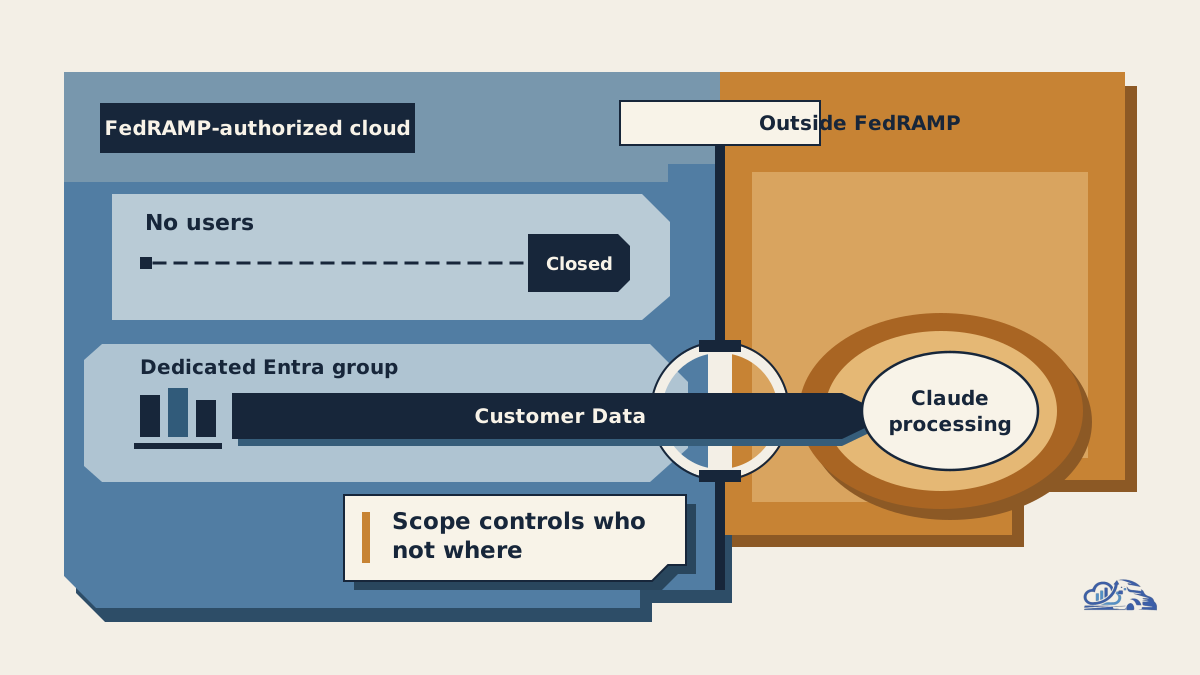
Enabling Anthropic means Customer Data can leave Microsoft's FedRAMP-authorized U. S. Government cloud, regardless of how narrowly administrators scope user access.
Microsoft's canonical service disclosure states the consequence plainly:
"When enabled, these Anthropic AI models process Customer Data outside Microsoft's FedRAMP-authorized U. S. Government cloud."
This is the central approval question. A dedicated Entra group reduces the number of authorized users. It does not alter where Anthropic processes their prompts, retrieved context, or other Customer Data.
Before approval, the organization should answer:
- Which data classifications may be processed outside the existing authorization boundary?
- Does the authorization package permit this data flow, or must the authorizing official approve a change?
- Which prompts, retrieved documents, outputs, and agent actions become records?
- How will eDiscovery, legal hold, retention, and audit requirements be verified?
- Which Microsoft Product Terms and Data Protection Addendum provisions cover the selected model class?
- Must privacy, legal, procurement, or records teams update the processor inventory and risk register?
- What incident-notification and escalation paths apply when Anthropic is operating as Microsoft's subprocessor?
- What evidence will show auditors that access remained limited to approved identities and use cases?
| Decision condition | Recommendation | Evidence required |
|---|---|---|
| Customer Data must remain inside the FedRAMP-authorized cloud | Keep Anthropic disabled | Data-handling policy and authorization-boundary requirement |
| Outside-boundary processing is approved for a low-risk workflow | Consider a limited pilot | Written approval, data classification, processor review, and use-case record |
| Records, eDiscovery, retention, or incident obligations remain unresolved | Keep Anthropic disabled | Tenant test evidence, authoritative vendor clarification, or formal approval |
| A retention preview is requested | Open a separate vendor-risk review | Anthropic terms, DPA review, retention acceptance, and explicit consent |
| The tenant belongs to an excluded environment | Do not enable | Microsoft scope documentation |
| The pilot breaches policy or fails its evaluation | Disable provider access | Named disable owner and evidence-preservation procedure |
Van Data Team can make this review operational by producing a data-flow map, approval matrix, permitted-use policy, evaluation plan, evidence checklist, and disable runbook. The output should be something an administrator can execute and an authorizing official can inspect, not a slide deck that leaves the hard decisions unresolved.
Standard models and retention previews need separate approvals
Standard Anthropic models use Microsoft's subprocessor relationship, while Preview models with Data Retention make Anthropic an independent data processor under separate terms.
That distinction changes contractual coverage, retention exposure, and decision ownership.
| Area | Standard Anthropic models | Preview models with Data Retention |
|---|---|---|
| Anthropic's role | Microsoft subprocessor | Independent data processor |
| Governing terms | Microsoft Product Terms and Microsoft DPA | Anthropic Commercial Terms and Anthropic DPA |
| Customer Copyright Commitment | Covered according to Microsoft documentation | Not covered |
| Consent path | Controlled through the Anthropic subprocessor setting | Default-off and requires a separate explicit opt-in |
| Retention information | Microsoft supplies no duration in this guidance; do not infer one | Most inputs and outputs may be stored for up to 30 days, flagged content for up to 2 years, and classification scores for up to 7 years |
| Training statement | Apply the Microsoft terms governing the standard path | Anthropic says it does not train on retained data without express permission |
Microsoft's examples include Claude Fable 5 and Claude Mythos 5. Treat these as current preview examples, not a permanent inventory.
Approval for standard models must never silently authorize retention previews. The mistake we see is treating model selection as a minor user preference after the provider has been approved. Here, selecting a different model class can change the processor, governing terms, retention behavior, and Microsoft commitments. Put that transition behind its own legal, privacy, security, and records gate.
Configure least-privilege access in the admin center
Eligible organizations should configure Anthropic through a dedicated Entra security group, with documented approval before the terms acknowledgment.
The documented path is:
Microsoft 365 admin center > Copilot > Settings > View all > AI providers operating as Microsoft subprocessors > Anthropic
The administrator should then:
- Review the Terms and conditions against the approved processor and model class.
- Record legal, compliance, privacy, and authorization approval before acknowledging the terms.
- Select the acknowledgment checkbox.
- Assign only the approved users or Microsoft Entra ID security groups.
- Reserve
All usersfor a separately approved broad deployment. - Select
No userswhenever access must be disabled.
The change requires an AI Administrator or Global Administrator role. When operating constraints allow it, the narrower AI Administrator role better supports least privilege.
Create a dedicated Entra security group for the pilot instead of reusing a broad department group. Name an owner, define membership criteria, set a review process, and remove access when a user's approved purpose ends. Microsoft's provider-level scope is enforced across Microsoft 365 Copilot and Copilot Studio.
Copilot Studio and Power Platform also have controls in the Power Platform admin center. Include that surface in the implementation review, but verify the available tenant settings rather than assuming that the Microsoft 365 control covers every agent, connector, environment, or data policy.
A minimum approval record should contain:
- Business purpose and accountable use-case owner
- Allowed and prohibited data classifications
- Selected model class and processor relationship
- Terms version and approval evidence
- Entra group and current membership
- Human-review requirements
- Evaluation criteria and test evidence
- Audit, records, and incident-response findings
- Stop conditions, disable owner, and restoration authority
- Reapproval triggers for model, term, processor, or boundary changes
Apply zero-trust principles as operating discipline
Zero-trust AI governance means verifying each use case, granting the smallest practical access scope, and planning for provider or workflow failure; it is not a Microsoft product bundled with this setting.
Verify explicitly
Confirm tenant eligibility, model class, processor role, approved terms, business purpose, data classification, and available evidence before production use. Test retrieved context as well as typed prompts because a user can expose restricted information through connected content without pasting it manually.
Build an evaluation set from representative, approved material. Test output accuracy, unsupported claims, citation behavior, sensitive-data handling, refusals, and recovery from incomplete context. Risky decisions or external actions should pass through documented human review loops.
Use least privilege
Start with a dedicated group, low-risk data, narrow use cases, and standard models only. Keep retention previews disabled unless their separate processor and retention terms have been accepted. Review group membership, connector permissions, use-case ownership, and agent actions as parts of the same access model.
Assume breach
Define who can switch the provider to No users, what evidence must be preserved, and which workflows must fall back to an approved model or manual process. Map the correct Microsoft and Anthropic escalation paths for the selected processor relationship.
Production evaluation should also cover operational pressure:
| Dimension | What to verify |
|---|---|
| Cost | Usage attribution by workflow, budget alerts, and an acceptable fallback |
| Latency | Response behavior under representative document and prompt loads |
| Token budget | Context limits, truncation behavior, and controls for oversized retrieval |
| Observability | Available administrative, audit, security, and workflow telemetry |
| Review burden | How often people must inspect outputs and whether that workload is sustainable |
| Failure recovery | Provider disablement, evidence preservation, fallback behavior, and restoration approval |
Do not treat a user-facing Claude indicator as proof of complete audit, eDiscovery, or security telemetry. Verify those capabilities in the eligible tenant.
Pilot, review, and disable
An acceptable pilot uses approved outside-boundary data, a dedicated cohort, standard models, explicit evaluation criteria, and a tested shutdown path.
Consider a hypothetical procurement team summarizing already-public policy and vendor materials. The organization has approved outside-boundary processing, assigns a dedicated Entra group, prohibits restricted inputs, and requires human review before a summary enters an official record. This is a plausible low-risk operating pattern, not evidence that every procurement workflow is suitable.
Now consider a casework team handling restricted personal records. Its authorization requires Customer Data to remain inside the FedRAMP-authorized cloud. Group scoping cannot repair that boundary conflict. The correct decision is to leave Anthropic disabled, even if the model appears useful.
Stop the pilot when prohibited data enters the workflow, group membership drifts, expected evidence is unavailable, output quality becomes unacceptable, terms change, or incident-response owners cannot reconstruct what occurred. The disable runbook should set the provider to No users, record the administrative change, preserve available evidence, suspend dependent automations, notify the required owners, and require reapproval before restoration.
Teams operationalizing these controls can use Van Data Team's production AI agent operations and escalation playbook to connect monitoring, human escalation, and recovery instead of treating launch as the end of governance.
What remains unavailable or unsettled
Several issues remain excluded, tenant-specific, or subject to change.
- Federal GCC, GCC High, DoD, and other sovereign clouds do not receive this option.
- Commercial-cloud regional defaults must not be applied to GCC.
- Preview names, availability, retention terms, and processor terms may evolve.
- The supplied Microsoft guidance does not establish tenant-specific eDiscovery, legal-hold, records-management, or audit-log behavior.
- It does not prove that an organization's authorization package permits outside-boundary processing.
- Administrators should verify that the rollout has reached their eligible tenant before capturing approval evidence or interface instructions.
Any change to the model class, terms, processor role, data flow, or authorization boundary should trigger reapproval.
How Van Data Team Makes This Operational
At Van Data Team, Anthropic Claude in Microsoft 365 GCC becomes an operating workflow before it becomes an admin setting. For an eligible non-federal GCC tenant, we map the handoff from the use-case owner through security, privacy, records, legal, the authorizing official, and the AI or Global Administrator. We trace source systems and data classes, each decision and review gate, the evidence dashboard, and the recovery path back to No users.
The resulting delivery plan defines:
- which signals can be lawfully collected, including authorized identity, security-group membership, model category, source data class, review outcome, exception, and incident;
- which gaps must close, such as missing approval for processing outside the FedRAMP boundary, unclear records or eDiscovery handling, and unowned escalation;
- which tool actions or sensitive-data workflows require a human checkpoint; and
- which dashboard and disable runbook let the team detect drift and act.
Standard models remain a Microsoft-subprocessor decision under Microsoft’s terms. Preview models with Data Retention stay separate: they require another default-off opt-in under Anthropic’s terms, with Anthropic acting as an independent processor. If approval survives both reviews, we start with a dedicated Entra security group and low-risk use cases—not All users. If the team cannot evidence boundary acceptance, monitor access, or execute rollback, Anthropic stays disabled.
Tooling And Landscape Fit
Anthropic Claude in Microsoft 365 GCC is a model-provider choice inside Microsoft’s stack, not a new orchestration framework. It fits low-risk Microsoft 365 work where a non-federal GCC organization accepts processing outside Microsoft’s FedRAMP-authorized U.S. Government cloud and wants centralized Entra-based eligibility. The provider toggle and user/group assignments determine who may invoke Claude; they do not govern individual tool calls, data classes, or approval steps.
Choose the adjacent pattern by the control you need:
- Keep Anthropic disabled when the authorization boundary cannot change, and use only models and services covered by the existing authorization package.
- Use Copilot Studio or Power Platform for low-code, reasoning-and-acting agents. Add environment-level external-model controls, connector restrictions, tool allowlists, agent observability, and human review checkpoints; selecting Claude still carries the same outside-boundary tradeoff.
- Use a LangGraph agent workflow when a pro-code team needs explicit state, durable checkpoints, custom routing, and granular tool-use policies. That flexibility also moves responsibility for hosting, identity, logs, retention, records discovery, and model-endpoint authorization to the organization.
Standard Anthropic models remain within Microsoft’s subprocessor, Product Terms, and DPA framework. Preview models with Data Retention are not merely another runtime option: Anthropic becomes an independent processor under separate terms and retention rules. Treat their separate opt-in as a new governance decision, not an extension of the standard-model approval.
Conclusion: Make the boundary decision first
Anthropic Claude in Microsoft 365 GCC should remain disabled unless an eligible non-federal organization can explicitly approve Customer Data processing outside Microsoft's FedRAMP-authorized U. S. Government cloud.
If the tradeoff is acceptable, begin with standard models, a dedicated Entra group, low-risk data, documented human review, measurable evaluation criteria, and a tested switch back to No users. Keep Preview models with Data Retention behind a separate processor, terms, retention, and authorization review.
Van Data Team can turn that decision into an implementation package: a data-flow map, permission design, approval record, evaluation plan, evidence checklist, monitoring requirements, and disable runbook. The admin toggle is simple. The accountable work is proving that the surrounding workflow remains authorized, observable, reviewable, and recoverable.
Article FAQ
Questions readers usually ask next.
These short answers clarify the practical follow-up questions that often come after the main article.
Need a similar system?
If this article maps to a workflow your team already operates, the next step is usually a scoped review of the system, constraints, and rollout path.
Book your free workflow review here.
Related articles
View all
Draft-Then-Upscale: A Generative AI Cost Pattern
Computer-Use Agents: An Engineer's Production Guide
GPT-5.6 on Azure Databricks: Production Guide for AI Teams