August 10, 2026
Computer-Use Agents: An Engineer's Production Guide
Learn when computer-use agents beat APIs, how desktop control matured, and which safety, evaluation, and observability controls production teams need.
Article focus
Computer-use agents can now observe real screens and act across desktop software, but production value depends on controls, not a convincing demo.
Section guide
Computer-use agents can now observe real screens and act across desktop software, but production value depends on controls, not a convincing demo. Software engineers, QA teams, and platform teams face direct risks: an agent can break workflows, expose data, or act without oversight. Teams ready to move beyond a demo can use Van Data Team's AI agent development with production guardrails to scope the workflow, controls, and evaluation plan. This guide provides an adoption framework and decision checklist built around sandboxing, least privilege, human approval, and task-level evaluation.
Key Takeaways
The safe default is to prefer structured integrations, then add visual control only where the interface is the only practical path.
- The historical starting point was a public beta; current desktop agents can execute multi-step work across real applications and local files.
- APIs usually offer better reliability, speed, testability, and cost control.
- Visual control fits GUI-only, legacy, incomplete, and cross-application workflows.
- Production rollout requires isolation, least privilege, approval gates, stop conditions, and complete action records.
- Evaluation must cover final-state correctness, retries, latency, token budget, unsafe attempts, and recovery.
From Public Beta to General Availability
The product line moved from a screen-control beta to generally available desktop products, while direct computer use in Cowork and Claude Code remained a research preview.
Anthropic's release notes document Cowork's general availability on April 9, 2026 and computer use in Cowork and Claude Code as a research preview on March 23, 2026.
Reported product state
Anthropic first introduced computer use with an upgraded Claude 3.5 Sonnet in October 2024. The public beta let the model inspect screenshots, move a cursor, click, and type. Anthropic described the goal directly:
"Developers can direct Claude to use computers the way people do."
That release also opened computer use through the Anthropic API. It established the interaction method, not a blanket claim of production readiness.
CNBC reported expanded desktop operation on March 24, 2026. Its coverage described Claude navigating applications, working with spreadsheets, and completing multi-step desktop tasks.
By Cowork's general availability milestone, Cowork was available on macOS and Windows with enterprise administration, while direct computer use in Cowork and Claude Code remained a research preview for Pro and Max plans. Anthropic's official documentation describes screen control in both products, and its architecture guide documents Cowork's cloud and local execution modes. For Team and Enterprise accounts, that guide says conversation data isn't used to train Claude.
For developers, Cloudvyn's implementation guide describes Computer Use access through the Anthropic API and a Docker-based local demo.
Anthropic later announced self-hosted sandboxes for Claude Managed Agents in public beta on May 26, 2026, moving tool execution to customer-controlled infrastructure while the agent loop remains on Anthropic's infrastructure. That supports internal network policies and tighter compliance controls. Announcement, preview, rollout, and plan-availability dates can differ, so verify current access and controls in Anthropic's official documentation.
Van Data Team analysis
General availability answers a distribution question. It doesn't prove that every desktop workflow is ready for autonomy. The production question is now: can the workflow be isolated, measured, reviewed, and audited when the interface changes or the model is uncertain?
That distinction matters. Claude Cowork and Claude Code show that visual control has moved into desktop products, but the engineering discipline must remain vendor-neutral.
What Computer-Use Agents Can Do Now
A visual desktop agent turns screenshots into mouse and keyboard actions, then checks whether the screen changed as expected.
The operating loop is simple. The agent observes a screenshot, interprets visible state, chooses an action, receives another screenshot, and validates progress. It can navigate menus, fill fields, move between applications, and work with files when its permissions allow.
This is more flexible than a fixed-coordinate macro. It can respond to visible state and plan across steps. It is also less deterministic than a structured integration. A pop-up, layout shift, slow render, hidden validation message, or unexpected login screen can change the path.
For engineering teams, the useful capability isn't clicking by itself. It is closing workflow gaps that structured tools can't reach. For QA, that can mean exercising a desktop product as a user would. For platform teams, it can mean operating a legacy console with no suitable API. For operations, it can mean carrying a task across incompatible applications.
The same reach creates the risk. An agent that can click anything can also delete, send, spend, expose, or misconfigure. Authority, containment, and evidence matter as much as model quality.
When Visual Control Beats an API
An API or native integration should remain the default whenever it reliably covers the required workflow.
The comparison below is Van Data Team analysis, not a vendor benchmark.
| Decision dimension | API or native integration | Visual computer-use automation |
|---|---|---|
| Best fit | Supported, stable, machine-readable operations | GUI-only, legacy, incomplete, or cross-application workflows |
| Reliability | Usually more deterministic | Sensitive to layout, rendering, timing, and visual state |
| Speed and latency | Usually the preferred path | Adds screenshot, reasoning, and interaction cycles |
| Cost and token budget | Easier to predict | Must be measured per completed task and retry |
| Failure detection | Structured status and error responses | Requires state validation, screenshots, and action logs |
| Permissions | Narrow service scopes are often possible | Requires strict desktop, file, identity, and network controls |
| Observability | Request, response, and service logs | Screenshot history, actions, approvals, retries, and outcomes |
| Default recommendation | Use when it sufficiently covers the task | Use as a governed fallback when structured access is insufficient |
APIs expose contracts, typed inputs, status codes, and testable error paths. They usually reduce latency because the system doesn't need repeated screenshot and reasoning cycles. Their permissions can also be narrower.
Visual UI automation earns its place when integration coverage is absent or materially incomplete. A legacy finance console may expose reports but not data entry. A desktop-only testing tool may require visible interaction. A cross-application workflow may include a critical GUI step that no connector reaches.
Use the narrowest capable mechanism for each step. Keep structured retrieval, calculation, and writes in APIs or tools. Give the desktop agent only the GUI-only remainder. The missing step must create enough value to justify higher cost, latency, review burden, and failure risk.
Where Desktop Automation Earns Its Keep
Visual automation is strongest when the visible interface is part of the task rather than an avoidable implementation detail.
End-to-end web and desktop testing
In a hypothetical QA flow, an agent starts a disposable virtual machine, signs in with a test identity, and runs a release candidate as a user would. It handles menus, dialogs, and visual state while recording screenshots. Deterministic assertions still verify the final data state. If the layout changes, the run stops for review instead of approving the release.
Legacy software without a sufficient API
In a hypothetical platform workflow, clean records arrive through a data pipeline, but the target application accepts input only through its desktop interface. The agent receives an allowlisted folder, enters the prepared records, and validates the visible confirmation. A separate check compares the resulting state with the source. This pattern keeps visual work narrow and auditable.
Teams facing adjacent browser-heavy problems can also study the operating boundaries behind a production web automation platform.
Cross-application operational work
In a hypothetical operations flow, an agent reads an approved file, updates a legacy tool, and prepares a message in another application. It may cross interfaces, but it pauses before sending or deleting anything. A human reviews the destination, attachment, and final content before the consequential action.
These patterns share a rule: use visual control for the missing interface step, not as a replacement for every structured tool around it.
Safety Controls Before an Agent Can Click
A production desktop agent needs a contained environment, narrow authority, explicit approval gates, and a complete record of its actions.
Start with isolation. Run the agent in a sandbox, disposable virtual machine, containerized desktop, or equivalent environment. Reset it to a known state between runs. Don't place the first deployment on an employee's daily workstation.
Give the agent a dedicated least-privilege identity. Deny production systems, secret stores, personal accounts, and unrelated folders by default. Allowlist required network destinations and writable paths. Short-lived credentials reduce exposure when a session or log is compromised.
Put human approval in front of consequential actions. Deletes, external sends, purchases, financial changes, permission edits, and irreversible submissions should pause before execution. The review screen must show the intended action, target, relevant context, and expected effect. Our guide to designing agents with human review explains how to place that gate inside the workflow.
Bound every run. Set maximum steps, retries, elapsed time, token use, and spend. Stop when the agent sees a new authentication request, changed permissions, an unapproved domain, a missing control, or uncertain state. A safe stop is a valid outcome.
Preserve screenshots, actions, approvals, errors, and final state. The audit trail should identify who started the run, which identity acted, what changed, and who approved it. Redact sensitive fields without destroying the evidence needed for incident review.
Local execution and self-hosting improve data control, but neither removes governance. A self-hosted agent can still overreach inside an internal network. Isolation, permissions, review, and recovery remain mandatory.
Evaluate the Workflow, Not the Demo
A trustworthy evaluation measures the final application state, failure recovery, operational cost, and attempted unsafe behavior on representative tasks.
Build an evaluation set from real workflow variants. Include slow pages, pop-ups, changed layouts, validation errors, partial completion, expired sessions, and unavailable dependencies. Mark a run complete only when the target application's final state is correct. A confident message from the model isn't proof.
Track first-attempt success, retry success, flakiness, abandoned runs, human interventions, and unsafe attempted actions. Record latency, token use, model cost, and infrastructure cost per completed task. Cost per model call hides retries and incomplete work.
Test recovery as deliberately as the happy path. Can the agent detect that a click didn't register? Can it avoid submitting the same form again? Does it stop when the screen no longer matches the expected state? Failure behavior often determines whether the workflow is supportable.
Observability must operate at action level. Store screenshots, chosen actions, tool calls, policy decisions, approvals, and state checks on a shared timeline. Preserve provenance from initiator to final change. This makes debugging, audit, and rollback possible.
Re-run the evaluation after changes to the model, prompt, application, operating system, policy, or environment. There is no universal pass threshold. The acceptable result depends on consequence, reversibility, and recovery cost.
Where Agent Frameworks Fit
Visual computer control is an actuator, not a complete agent architecture.
LangGraph and LangChain can coordinate state, tools, and transitions. CrewAI can organize role-based agent work. Native function calling and MCP provide structured access to services and data. A Plan-and-Execute pattern separates planning from action, which can make review points clearer.
A sound system often combines them. The planner selects a structured tool for retrieval and writes, then invokes visual control only for an unsupported interface step. A policy layer can require approval before the desktop actuator proceeds. A validator checks the final state through an API or database when possible.
Compare architectures across cost, latency, token budget, observability, evaluation effort, and recovery. Framework choice doesn't grant desktop safety. The controls must surround every actuator and identity that can change state.
Adoption Decision Checklist
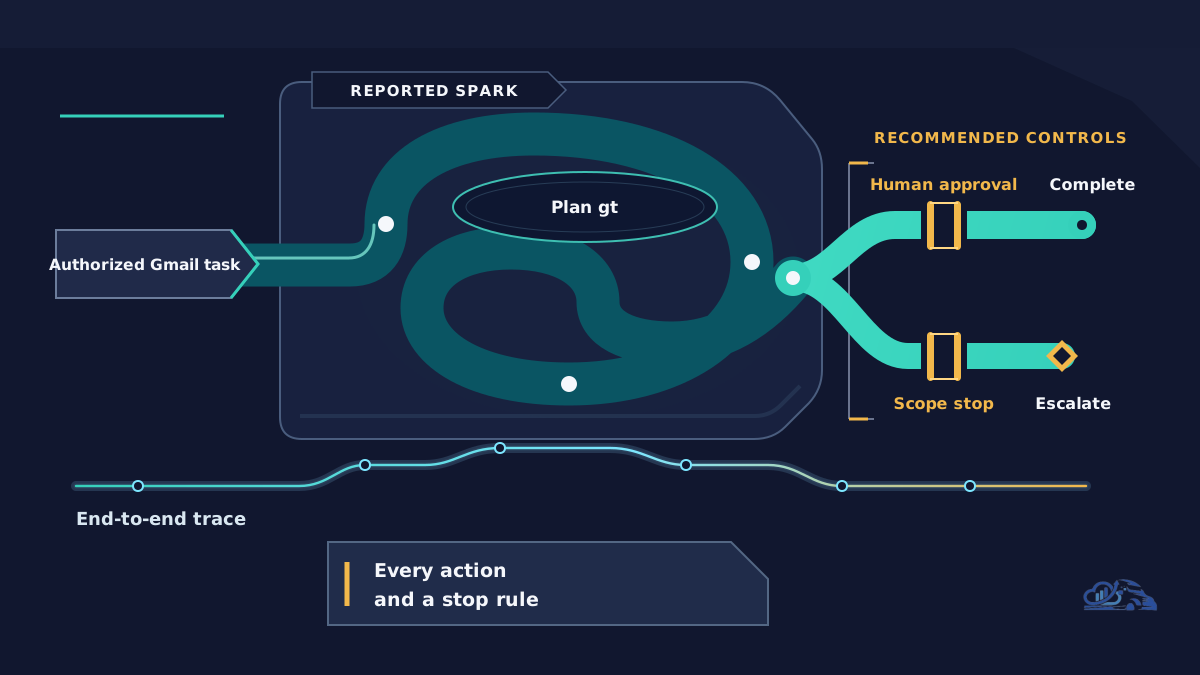
The following illustration summarizes the governed gui fallback:
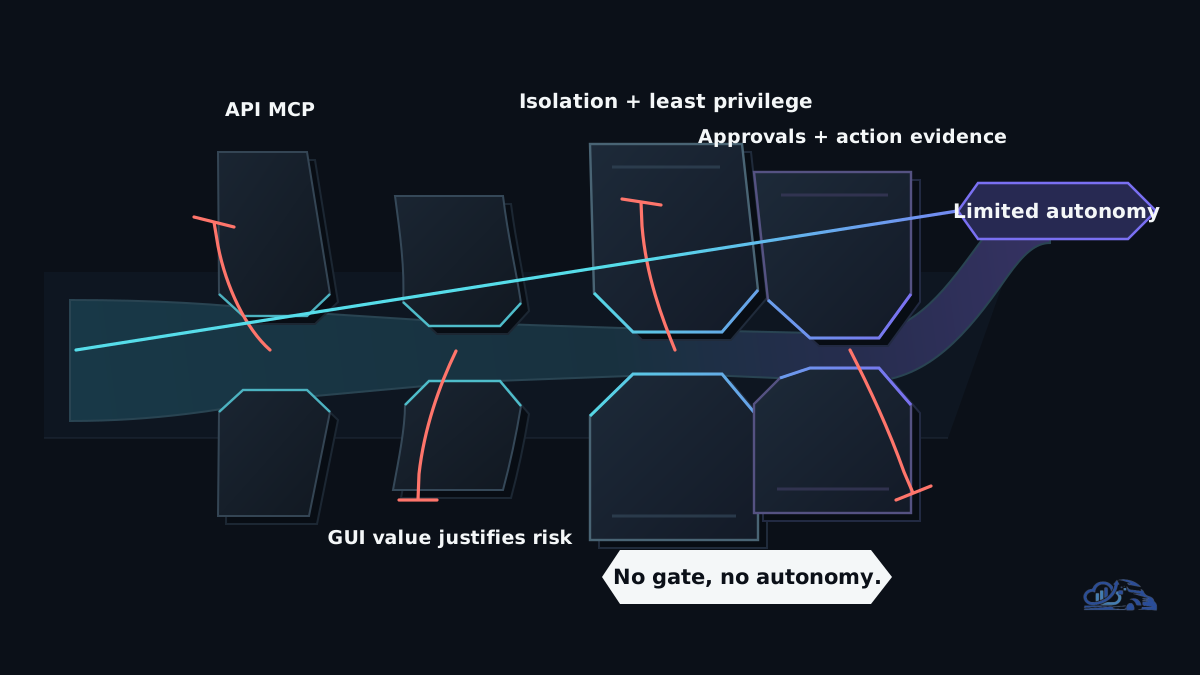
A team should approve visual autonomy only when the workflow needs it and every required control has an owner.
At Van Data Team, we start by mapping the intake, decisions, tools, GUI-only gaps, and handoffs already shaping the work. Our method for turning an operations brief into an executable scope helps produce an API coverage map, risk register, evaluation plan, approval matrix, and delivery scope.
Use this checklist at architecture review:
- [ ] A supported API, function call, MCP tool, or native integration can't fully complete the task.
- [ ] The GUI-only gap creates enough value to justify added latency and operational risk.
- [ ] The agent runs in an isolated, disposable environment.
- [ ] It uses a dedicated least-privilege identity.
- [ ] Production systems, secrets, personal accounts, and unrelated files are inaccessible by default.
- [ ] Network destinations and writable folders are allowlisted.
- [ ] Deletes, sends, spend, submissions, and permission changes require approval.
- [ ] Steps, retries, elapsed time, token use, and cost have hard bounds.
- [ ] Unexpected screens, authentication requests, permission changes, and uncertainty trigger a stop.
- [ ] Representative tasks test completion, retries, flakiness, latency, and recovery.
- [ ] Every run records screenshots, actions, approvals, errors, and final state.
- [ ] Rollout moves from observation to supervised execution before limited autonomy.
- [ ] Self-hosting and retention choices meet audit, network, and compliance requirements.
- [ ] Current vendor availability, plan access, and administrative controls have been verified.
A failed checkbox is a design task, not paperwork to waive. Resolve it or keep the workflow manual.
Conclusion
Computer-use agents are now a practical option for the long tail of GUI-only work, but APIs remain the preferred default.
Start with a bounded, reversible workflow outside production. Keep structured steps in APIs, isolate the desktop runtime, narrow its identity, and require approval for consequential actions. Measure final-state correctness, retries, latency, token cost, human burden, and recovery before expanding autonomy.
The durable capability isn't an agent that can click. It is a governed workflow that knows when to act, when to stop, and how to prove what happened. Van Data Team applies that discipline through explicit boundaries, evaluation suites, review gates, and audit-ready delivery. Use our production AI agent operations and escalation playbook to turn a promising visual workflow into an implementation and risk-review plan.
Article FAQ
Questions readers usually ask next.
These short answers clarify the practical follow-up questions that often come after the main article.
Need a similar system?
If this article maps to a workflow your team already operates, the next step is usually a scoped review of the system, constraints, and rollout path.
Free scoping session
De-risk Your Desktop Agent Rollout
Review your computer-use agent plan and leave with a safe adoption path, API-versus-visual decision, and concrete engineering next steps.
- An API-versus-visual decision for your target workflows
- A sandboxing and least-privilege control map
- Human approval gates for deletes, sends, spending, and production access
- An evaluation plan covering success, retries, latency, token cost, and action logs
- Prioritized next steps for a safe pilot
Related articles
View all
The NASA-IBM Lunar Foundation Model: What It Teaches

Kimi K3 vs Opus 5 vs GPT-5.6 Sol: which model should you use?
Google Gemini Spark: The always-on agent runtime