AWS Emulator: What AI Agents Built and How Data Teams Use It
AWS Emulator runs 200+ AWS services offline, and AI agents wrote all its code. What it is, what it can't test and how data teams can use it safely in CI.
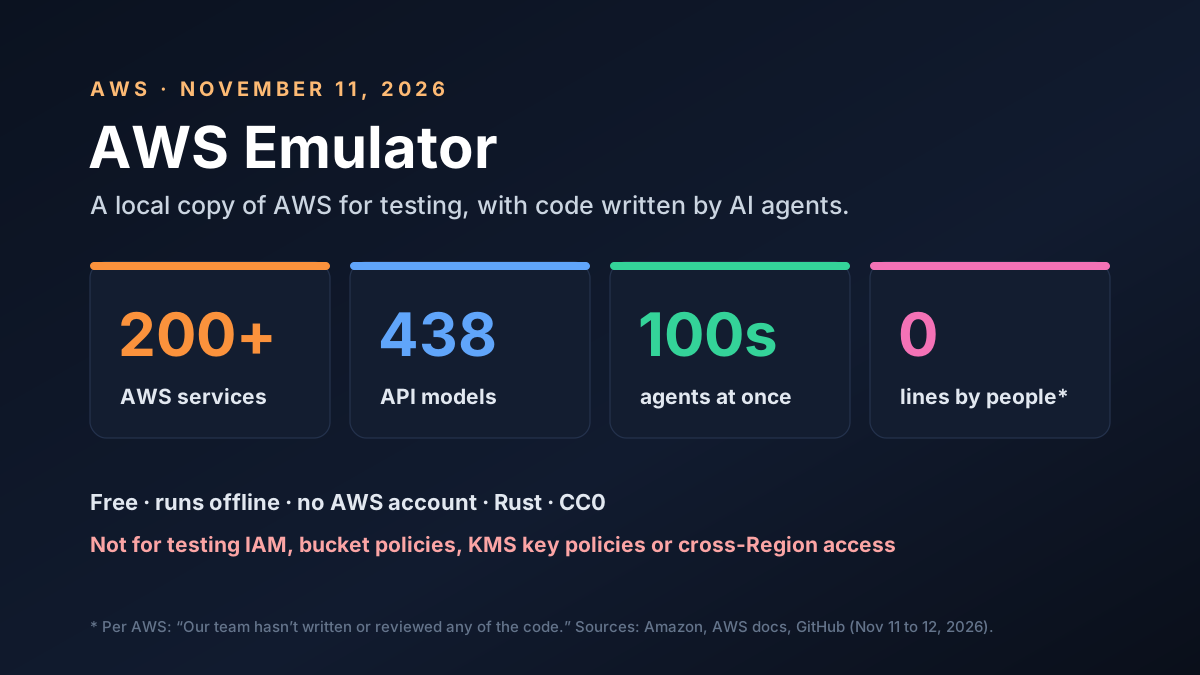
AWS just shipped a big piece of software that no human wrote. On November 11, 2026, it released AWS Emulator, a free local copy of more than 200 AWS services that runs on your own machine with no account. AWS says autonomous AI agents wrote every line.
That's two stories at once. For developers and data teams, it's a new way to test AWS code without a cloud bill. For anyone using coding agents, it's a rare public look at how AWS lets hundreds of them work on one codebase. Here's what AWS Emulator is, what it can't do and how to try it safely.
Key Takeaways
- It's free and local. AWS Emulator serves AWS APIs on your machine, a dev server or in CI, with no AWS account.
- It's big. It's built from 438 API models covering more than 200 services, which is far wider than most free local AWS testing tools have managed.
- Agents wrote it. AWS says its team hasn't written or reviewed any of the code. Hundreds of agents work on it at once.
- It isn't for security tests. AWS says it never denies a request signed with its own key and doesn't check bucket or key policies.
- Data teams gain the most in CI. Pipeline logic around S3, SQS, Lambda and DynamoDB can be tested in seconds, then confirmed on real AWS.
AWS Emulator at a Glance
The core facts, as of November 12, 2026:
| Item | What's public |
|---|---|
| Released | November 11, 2026 |
| What it is | A local emulator of the AWS APIs, with no graphical interface |
| Coverage | 438 API models, more than 200 AWS services |
| Cost | No service fee |
| Account needed | No |
| Language and license | Rust, CC0 public domain dedication |
| Runs on | Linux packages, or Docker on Windows and macOS |
| Who wrote the code | Autonomous AI agents, per AWS |
You start it, set an environment variable so the AWS CLI or SDK points at it, and run your code as usual. By default it serves HTTPS on port 9297 of your own machine, per the README on GitHub.
What AWS Released on November 11
AWS calls it a local emulator of the AWS APIs. It has no web console. Your requests go to the emulator, not to AWS, and you work with emulated resources that live in memory.
There are three ways to run it:
- Server mode: a Linux package, or a Docker container on Windows and macOS
- Embedded mode: inside Rust tests, one isolated copy per test
- Agent mode: an
aws-emulatorskill that coding agents can install with the AWS CLI
The third option tells you who AWS has in mind. Coding agents write AWS code fast, and they need somewhere safe to run it. Constellation Research analyst Holger Mueller called it a "digital twin of its public cloud" for testing agents, SiliconANGLE reported.
How AI Agents Built AWS Emulator
The build story is the part that drew the crowd. Senior Principal Engineer Matthew Goldberg described it in a post on the same day.
It started small. Goldberg asked Kiro, AWS's coding agent, for an emulator of Amazon SQS, and a passable first version came back in about 15 minutes. He then had Kiro work through the rest of AWS over a weekend.
That version had gaps. So the team built a system to close them.
The system uses public AWS API models as the spec and real AWS as the referee. Three teams of agents split the work:
- Test writers build fidelity tests from the API models and fix each test until it passes on real AWS
- Issue finders replay those tests against the emulator and file every failure
- Fixers take one issue per agent, fix it and submit the change
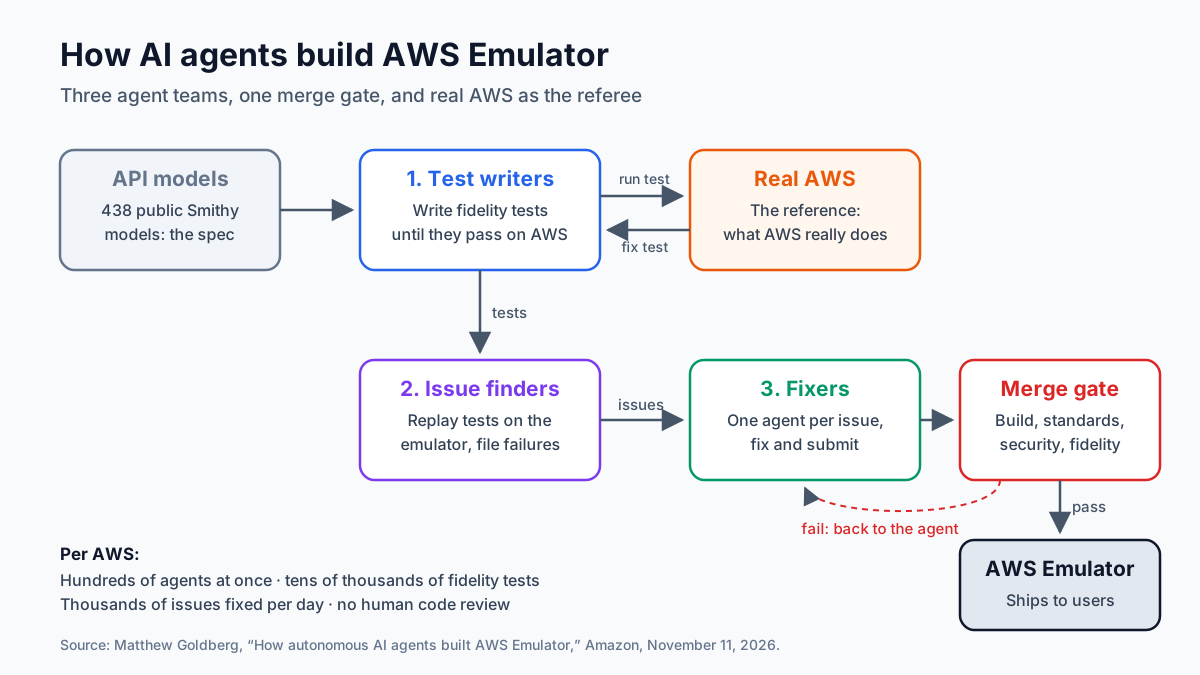
Every change must pass a merge gate before it lands. The gate covers the build, a coding standards review, a security check and a fidelity regression check. A change that fails goes back to the agent.
The scale is large, per Goldberg. Hundreds of agents work on the code at once, against tens of thousands of fidelity tests, and they fix thousands of issues every day. SiliconANGLE adds that the agents run on Amazon Bedrock AgentCore.
AWS Emulator by the Numbers
Here's what's public, with our own count from GitHub marked:
| Measure | Figure | Source |
|---|---|---|
| AWS API models | 438 | Amazon |
| Agents working at once | Hundreds | Amazon |
| Fidelity tests | Tens of thousands | Amazon |
| Issues fixed per day | Thousands | Amazon |
| First SQS prototype | About 15 minutes | Amazon |
| Commits, October 21 to November 10 | About 29,700 | Our count on GitHub |
| Hacker News points | 745, with 227 comments | Hacker News, November 12 |
The commit count is our math. We counted about 29,700 commits on GitHub between the first scaffold on October 21 and November 10. That's well over 1,000 a day, far beyond what a human team could review.
That's the point Goldberg makes himself. "Our team hasn't written or reviewed any of the code," he wrote. He trusts the guardrails. Not the diffs.
What "No Human Reviewed the Code" Really Means
It sounds alarming, so it's worth being precise. No human review doesn't mean no review. It means the review moved from people reading code to machines checking behavior.
Each change faces four checks before it merges. And each fidelity test is anchored to real AWS, so the emulator is graded on what AWS actually does, not on what an agent thinks it does.
AWS's Swami Sivasubramanian frames this as the new job for engineers, in a post on All Things Distributed. Engineers build the specs, tests and merge gates that decide when agent work is correct. He gives one example: a rebuild that took about four months by hand took about two hours with a clear spec and a test setup.
There are limits to that model. Tests only catch what they test. A behavior nobody wrote a test for can still be wrong, and the emulator would pass anyway. That's why the gap list matters, and why AWS still tells you to test on real AWS before production.
What AWS Emulator Can't Test
AWS is blunt about this in its security guide. Passing tests in the emulator don't show that your permissions are correct or safe.
| Don't test this | Why, per AWS |
|---|---|
| IAM policies and boundaries | It never denies a request signed with its own key |
| S3 bucket policies | Not checked |
| KMS key policies | Not checked |
| Cross-account or cross-Region access | Not supported |
| Untrusted function code | Code runs with your user's permissions, not isolated |
Some services do evaluate IAM policies for users and roles you create in the emulator, but not the same way AWS does. So a request that AWS would deny can succeed locally. A request AWS would allow can fail.
Fidelity also varies by service. AWS publishes fidelity scores with each release, and known gaps live in a public folder named things-that-do-not-work. As of November 12, it held more than 1,000 entries, and fixed ones move to a separate folder.
That's not a reason to skip it. It's a reason to check your own services against the list before you trust a green test.
AWS Emulator for Data Teams
Most coverage frames this as a developer tool. For data teams, the payoff is in testing data pipelines that touch many AWS services at once.
Think of a typical ingest flow. A file lands in S3, a message goes to SQS, a Lambda parses it and writes to DynamoDB, and a Glue job or Athena query runs later. Testing that flow today often means a shared dev account, slow setup and leftover resources.
Here's how the split could look:
| Pipeline part | What you can test locally | Still test on real AWS |
|---|---|---|
| S3 landing zone | Uploads, prefixes, listing, versioning logic | Bucket policies and encryption keys |
| SQS and SNS | Message flow, retries, dead-letter handling | Throughput at real volume |
| Lambda | Handler logic and event shapes | Cold starts, limits and IAM roles |
| DynamoDB | Keys, writes and reads in your code | Capacity and real latency |
| Glue and Athena | Job and query calls your code makes | Real Spark runs, cost and data volume |
The local side catches the bugs that waste the most time: wrong keys, wrong event shapes, missing retries and bad error handling. The real AWS side catches what an emulator can't: permissions, scale and cost.
One caution for heavy jobs. The emulator answers the API calls your code makes. It won't turn your laptop into a Spark cluster, run your real data volumes or tell you what a job will cost in the cloud. Treat Glue and Athena tests as checks on your orchestration code, not on the data work itself.
How to Try AWS Emulator Safely
AWS lists clear rules in its security guide. Here's a short version. First, protect your real account:
- Unset real credentials before you run tests
- Set
AWS_ENDPOINT_URLin the same script that runs the tests, because if it's missing, your code calls real AWS with whatever credentials it can find - Keep it private on 127.0.0.1
Then set up the emulator itself:
- Use test data only
- Pin a release in CI, since new versions ship several times a week
- Decide on telemetry. It's on by default; turn it off with
--telemetry offif your policy requires
Step 2 is the easy one to miss. A test that silently hits real AWS can create real resources and real bills.
Also check function code. When the emulator runs code for you, such as a Lambda handler, it runs with your user's permissions on your machine. Only run code you trust.
AWS Emulator vs LocalStack, Moto and Others
AWS isn't first here. Teams have tested against local AWS stand-ins for years, and several free emulators launched this year. Here's how the options compare at a high level:
| Option | Type | Best for | Watch out for |
|---|---|---|---|
| AWS Emulator | Local server from AWS | Broad API coverage, agent workflows | New, changes daily, known gaps |
| Moto | Python mocking library | Unit tests in Python code | Python only, mocks not a server by default |
| LocalStack | Local cloud platform | Teams already built around it | Check its current plans and terms |
| Other open emulators | Floci, MiniStack, fakecloud | Light local stacks | Smaller teams, narrower coverage |
| Real dev account | Real AWS | Final checks, security, scale | Cost, speed and cleanup |
The big difference is coverage and backing. AWS Emulator comes from AWS itself and spans far more services than most free tools. The trade-off is age: it's days old, and its code changes thousands of times a week.
Our advice? Compare first. Run your current integration tests against AWS Emulator in a separate CI job for two weeks, and log every result that differs from your current tool or from real AWS. If results match, move one project. If they don't, file the gap and wait.
Worked Example: What Local Tests Can Save
Here's our own math for a mid-size data team. These numbers are made up to show the trade-off.
Say the team runs 40 integration test runs a day against a shared dev account. Each run waits about six minutes for real resources to set up and clean up, so that's 240 minutes of waiting every day before a single test result comes back.
If the emulator cuts setup to about one minute, the wait drops to 40 minutes. That saves about 200 minutes a day, or more than three hours. Over a 20-day month, it's over 60 hours of pipeline time.
The real AWS runs don't go away. Keep a smaller set, perhaps a few runs a day, for permissions, scale and a final check before release. The goal is to move the slow loop local, not to drop the cloud check.
What the Hacker News Debate Gets Right
The launch hit the top of Hacker News, with 745 points and 227 comments by November 12. The reaction was mixed, and the doubts are fair.
Three themes stood out in the comments:
- Support: will AWS keep it going, or is it an experiment?
- Quality: who checks the code at roughly 30,000 commits in three weeks?
- Relief: many were simply glad to have a free tool from AWS itself
Both sides have a point. The guardrails and public gap list are real strengths. But a tool this new needs months of steady releases before teams bet core CI on it.
What It Means for Teams Using Coding Agents
Even if you never run AWS Emulator, the build method is worth copying. It shows what lets agents work at scale without humans reading every line:
- A spec that already exists, such as API models or a schema
- A reference you can test against, such as real AWS or a known-good system
- Tests that agents write but reality grades
- A merge gate that blocks changes until checks pass
- A public list of what doesn't work yet
Most teams have some of these, but rarely all five. Without them, an agent can produce a lot of code that looks right and isn't. Our guide to AI agent evaluation covers how to build that kind of check for your own agents.
Risks and Open Questions
There's still a lot to learn. These are the main gaps:
- Long-term support: AWS hasn't said how long it will maintain the project
- Fidelity drift: AWS changes its services often, and the emulator must keep up
- Unknown unknowns: behavior nobody tested can still be wrong
- Security confusion: teams may treat green local tests as proof that permissions work
- Build cost: building from source needs at least 100 GB of free disk
None of these is a reason to ignore it. They're reasons to adopt it in steps.
What to Watch Next
A few signals will show whether AWS Emulator sticks:
- Fidelity scores in the release notes, service by service
- Growth or shrinkage of the
things-that-do-not-worklist - IAM fidelity, since better policy checks would widen its use
- Support from other tools, such as Terraform, CDK and test frameworks
- Other clouds copying the agent-built approach
AWS Emulator: Our Take
AWS Emulator is useful on its own and important as a signal. It gives data and dev teams a free, broad local test target, which is overdue. It also shows that agent-written software can ship at scale when the tests are anchored to reality.
But trust has to be earned per service. Check the gap list, keep security tests on real AWS and pin a release. Used that way, AWS Emulator can cut slow feedback loops without adding new risks.
How Van Data Team Helps
We help data teams test and ship AWS pipelines faster:
- CI pipelines with local AWS tests, including emulator setup and real AWS checks, via data pipeline development.
- Agent workflows with specs, fidelity tests and merge gates that block bad changes before they land, through AI agent development.
- Dev account cleanup and cost reviews, through our cloud cost optimization service.
- Test and release dashboards for pipeline health, via agentic BI reporting.
This article is based on AWS's announcements and public sources as of November 12, 2026. Want to try AWS Emulator on your own pipelines? Get in touch and we'll help you set up a safe first test.
AI Model Brief
The AI models worth knowing, once a week
What shipped, how it scores on independent benchmarks, what it costs per million tokens and what was deprecated, from the data behind our AI model benchmarks.
We use your address only to send the brief. See our privacy policy.
See this week’s brief
Founder of Van Data Team. Builds Vanaxity, the AI agent system for SEO, GEO, and AEO, and leads data engineering delivery for B2B teams.
About the authorArticle FAQ
Questions readers usually ask next.
These short answers clarify the practical follow-up questions that often come after the main article.
Need a similar system?
If this article maps to a workflow your team already operates, the next step is usually a scoped review of the system, constraints, and rollout path.
Consultation
Scope your next AI workflow.
Share the system and blockers. We will map fit, gaps, and the next step.