Claude Code Secrets Leak: How to Check and Clean Your Repos
Claude Code secrets leaked: "don't ask again" saved passwords to settings.local.json and 2,539 reached GitHub. How to check repos, rotate keys and stop it.
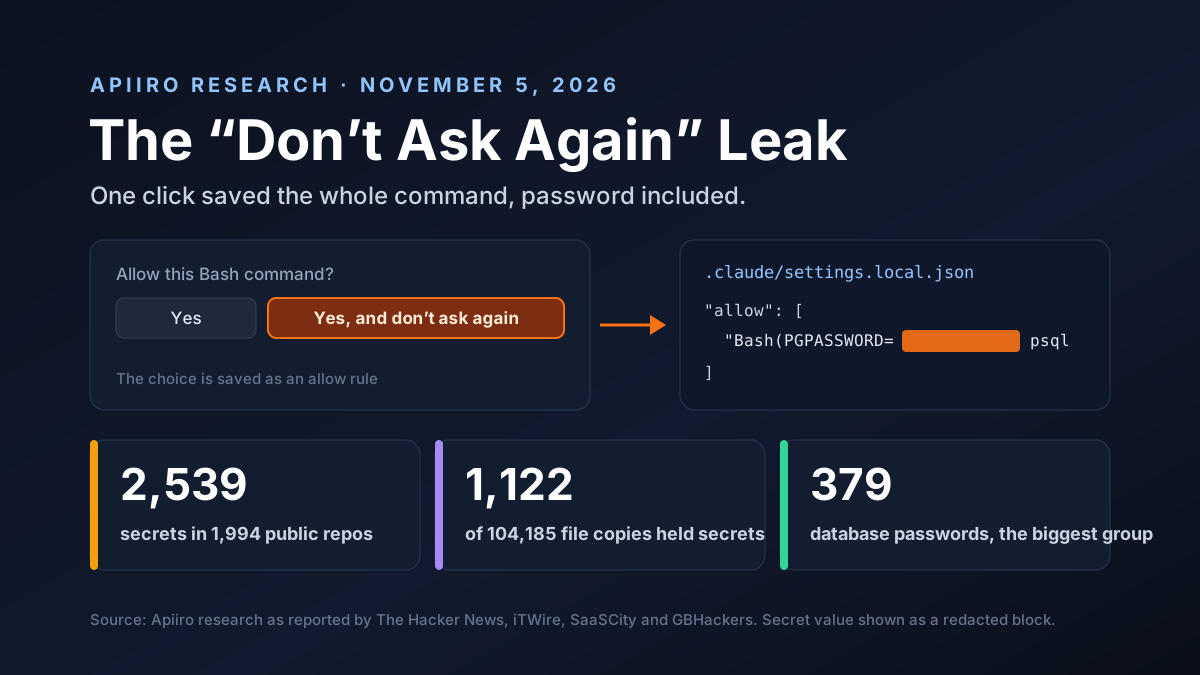
A handy button in Claude Code has been leaking passwords to GitHub. When you approve a command and choose "Yes, and don't ask again," Claude Code saves that exact command in a small settings file. If the command had a password in it, the password is saved too.
Then some of those files got committed. Security firm Apiiro found 2,539 secrets from them in public repos, and the biggest group by far was database access. This guide explains how the leak happens, who's right in the argument about it, and what to do today if your team uses Claude Code.
Disclosure and scope: Van Data Team uses Claude Code every day and builds data and AI systems for clients. We drafted this article with help from Claude, made by Anthropic, the company whose tool is discussed here. We have no business ties to Apiiro. Apiiro's own post blocked our reader, so the figures come from news coverage of it, and we link each source.
Key Takeaways
- The leak: "Yes, and don't ask again" saves the exact command, secrets included, to .claude/settings.local.json
- The scale: 1,122 public copies held secrets, and with git history, shared settings and agent transcripts added, Apiiro counted 2,539 secrets in 1,994 repos
- The damage: 379 database passwords, and at least one live key
- The gitignore: Claude Code adds a rule to your global git excludes, not to the repo, and no ignore rule can protect a file that's already tracked
- The fix: rotate first, then untrack the file, add a repo ignore rule and scan your history
Claude Code Secrets Leak at a Glance
| Item | What was reported |
|---|---|
| Research | Apiiro, published November 5, 2026, by Shmulik Cohen and Matan Giladi |
| File | .claude/settings.local.json, written when you pick "Yes, and don't ask again" |
| Public copies checked | 104,185 copies in 103,617 GitHub repos |
| Copies holding secrets | 1,122, about 1.1%, with 1,379 distinct values |
| Full count | 2,539 secrets in 1,994 repos, adding git history, shared settings and agent transcripts |
| Biggest group | 379 database passwords |
| Claude co-authored edits | 539 of 1,105 traced repos had a Claude co-authored commit that changed the file |
| Live keys | At least one company confirmed its exposed key was live |
How "Don't Ask Again" Saves Your Password
Claude Code asks before it runs a shell command. You can say yes once, or say yes and don't ask again. The second choice is handy. It's also where the trouble starts.
Pick it, and Claude Code writes an allow rule to .claude/settings.local.json in your project, as its settings docs explain. A rule with no wildcard matches one exact command, so the whole command is stored as text. Here's the shape of a risky one, with the secret replaced:
"permissions": {
  "allow": [
    "Bash(PGPASSWORD=REDACTED psql -h db.internal -U app -c 'select 1')"
  ]
}
Nothing here is a bug in the usual sense. The tool saved what you approved. The problem is that what you approved had a password inside it.
This isn't new, either. A bug report filed in August 2025, issue #5544, flagged approved commands with credentials being stored word for word, iTWire reported. It was closed for inactivity in January 2026.
What Apiiro Found in Public Repos
Apiiro's Shmulik Cohen and Matan Giladi pulled public GitHub data from November 1 to 3, 2026, and published on November 5. They found 104,185 public copies of the file across 103,617 repos. Most were harmless. But 1,122 copies, about 1.1%, held secrets, with 1,379 distinct values among them.
Then they looked wider. Counting old versions in git history, shared settings files and agent chat logs, the total rose to 2,539 distinct secrets in 1,994 repos, The Hacker News reported. Apiiro told affected groups on November 2 and 3.
Two caveats matter:
- Untested keys: Apiiro didn't check whether the keys still worked
- Co-authored isn't proof: 539 of 1,105 traced repos had a commit co-authored by Claude that changed the file, but that alone doesn't prove Claude pushed the secret
Which Claude Code Secrets Leaked Most
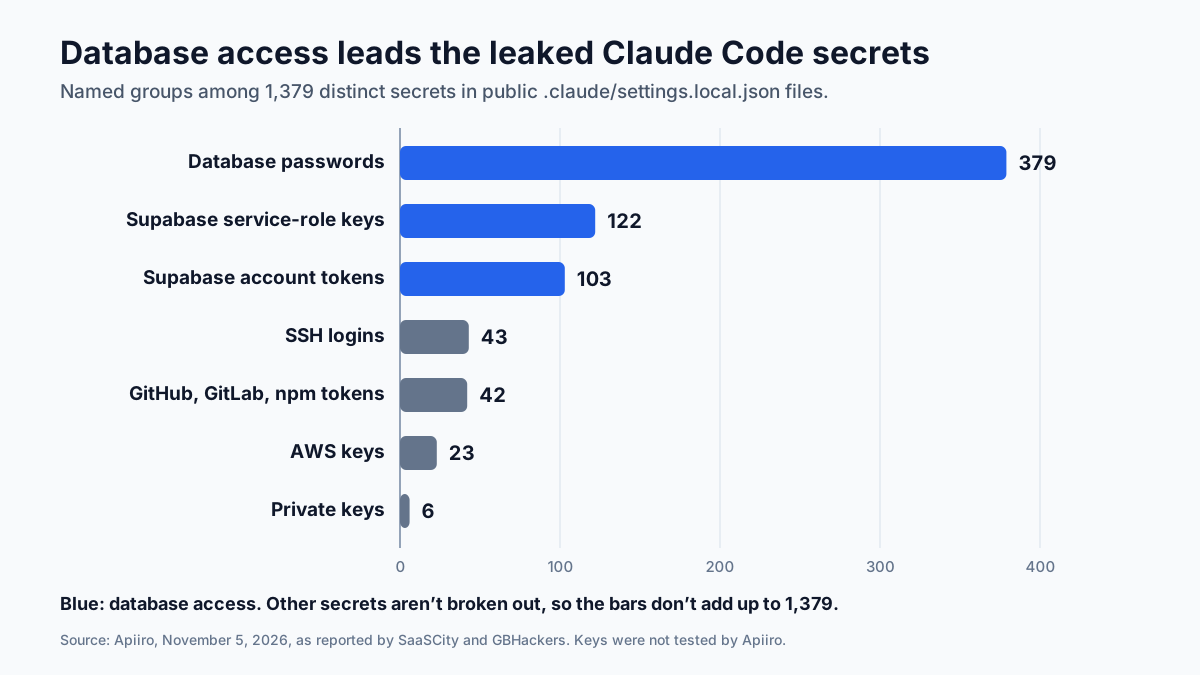
Database access tops the list. In the file scan, Apiiro found 379 database passwords, plus 122 Supabase service-role keys and 103 Supabase account tokens, according to SaaSCity's summary. Coverage puts database access at more than a third of the total.
The rest is a mix:
- 43 SSH logins, some of them root logins passed through sshpass.
- 42 tokens for GitHub, GitLab and npm.
- 23 AWS keys.
- 6 private keys.
The Supabase number deserves a second look. A service-role key skips row-level security, so one leaked key can read or change every table in a project.
GBHackers noted that 734 secrets turned up in older versions of the file, still sitting in git history. Deleting the file today wouldn't remove those.
Why the Gitignore Didn't Stop It
This is the heart of the debate. Anthropic's docs say that when Claude Code creates the settings file, it configures git to ignore it. Coverage quoting the docs says it adds the rule **/.claude/settings.local.json to your global git excludes file.
That's a real guard, and it has gaps:
- It lives on one machine, so a teammate's laptop, a CI runner or a fresh dev box won't have your global rule
- It skips hand-made files, like a .claude folder copied over from another project
- It can't untrack a file, because git ignore rules don't apply to files that are already committed
- It's not in the repo: the project's own .gitignore is untouched, so the rule doesn't travel when someone forks or clones it
So a file can be ignored on your laptop and still end up in a public repo. Any one of those paths is enough.
Who Is Right About Claude Code Secrets?
Both sides have a point:
| Claim | Who says it | Our read |
|---|---|---|
| The file is meant to stay on your machine | Boris Cherny, Claude Code team, on Hacker News | True, and the docs say so |
| Claude Code gitignores the file when it creates it | Cherny and Anthropic's docs | True, but only in your global excludes |
| Leaked copies were made by hand and committed | Cherny | Likely for many, not proven for all |
| The project's own .gitignore isn't changed | The Hacker News | True, so the guard doesn't travel with the repo |
| Claude co-authored many of the commits | Apiiro | True for 539 of 1,105 traced repos, which doesn't prove who pushed the secret |
On Hacker News, in a thread that drew hundreds of comments, Boris Cherny of the Claude Code team made four points:
- The file is meant to stay local
- Claude Code gitignores it when it creates it
- The leaked copies were made by hand and checked in
- Claude Code hasn't done secret scrubbing so far, and the team is looking at ways to prevent this
Our view is simple. The tool did what its docs say. But a feature that writes passwords to a file in your project folder needs a stronger guard than a rule on one machine.
Why Data Teams Are Most Exposed
Look at the top of that list again. Database passwords. That's no accident.
Data work means talking to databases all day. A data engineer asks the agent to check a row count in production, and the quickest command puts the password right in it. Approve it with "don't ask again," and it's saved. Do that across staging, the warehouse and a partner's replica, and the file becomes a neat list of every database you can reach.
Add to that the habits of data teams:
- Notebooks and scripts get copied between repos, and .claude folders come along.
- Quick prototypes get pushed to public repos to share with a client.
- Service accounts often have wide rights, so one password opens a lot.
Check Your Repos for Claude Code Secrets
You can check a repo in about ten minutes. The five commands below answer five questions, in order:
| Step | Question | A bad sign |
|---|---|---|
| 1 | Is the file tracked right now? | The path is printed |
| 2 | Was it ever committed, on any branch? | Any commit is listed |
| 3 | Which ignore rule applies to it? | No rule is named |
| 4 | What commands did people approve? | A password, token or URL with a password in it, which you'll spot by eye even when a scanner doesn't |
| 5 | Does the full history hold other secrets? | Gitleaks reports findings |
Run them from the repo root:
git ls-files | grep "claude/settings.local.json"
git log --all --oneline -- "*.claude/settings.local.json"
git check-ignore -v .claude/settings.local.json
jq -r ".permissions.allow[]" .claude/settings.local.json
gitleaks detect --source . --log-opts="--all"
If the second command prints nothing and the third names an ignore rule, that repo is likely clean. If the second prints commits, go straight to the cleanup steps below.
For a GitHub org, search for the file name across every repo you own, including forks. Then check other agent folders too. Coverage of the research suggested scanning .cursor, .gemini and .specstory folders, since agent tools keep their own config and chat history.
Clean Up Leaked Claude Code Secrets: Rotate First
Order matters here. If you only delete the file, the secret still works. So:
- Rotate every secret that ever appeared in the file, in any version: change database passwords, revoke tokens, disable AWS keys and issue new ones with narrower rights
- Check the logs for logins and API calls you can't explain, going back to the first commit that held each secret
- Untrack the file and add a repo ignore rule, so it can't come back
- Decide on history, and rewrite it only after the secrets are dead
Here's step 3:
git rm --cached .claude/settings.local.json
echo ".claude/settings.local.json" >> .gitignore
git add .gitignore
git commit -m "Stop tracking Claude Code local settings"
Two services need extra care:
- Supabase: replace the service-role key and revoke the old JWT secret
- AWS: disable the key first, then review CloudTrail before you delete it
Should You Rewrite Git History?
Sometimes. Rewriting history with git-filter-repo, as GitHub's guide describes, removes the file from old commits. It's good hygiene for a repo you'll keep public.
But it's not a fix on its own:
- Forks keep their copy: Apiiro found secrets in 211 forks across 74 repos
- Clones keep their copy, for anyone who pulled before you rewrote
- Scanners may already have it, since bots watch public pushes in near real time
Treat rotation as the fix and history rewriting as the cleanup that follows it, never the other way round.
Safer Ways to Run Database Commands With Agents
The lasting fix is to keep secrets out of command text. Then "don't ask again" can only save something harmless.
| Instead of this in the command | Use this | Why it's safer |
|---|---|---|
| PGPASSWORD=... psql | A .pgpass file or a pg_service.conf entry | The command holds a host name, not a password |
| A full URL with user:password@host | A variable such as $DATABASE_URL set outside the session | The rule saves the variable name, not its value |
| A long-lived database password | An IAM auth token from your cloud | Tokens expire in minutes |
| sshpass -p ... | SSH keys with an agent | No password ever sits in a command |
| An admin or owner role | A read-only role for agent work | A leak exposes less |
| Pasting an API key into a curl command | A secret manager call or a token file | The secret is read at run time |
For Postgres, a .pgpass file is the easy win:
- Put the host, port, database, user and password in it, one line per database
- Set it to mode 600, or psql will ignore it
- Let psql read it on its own, so the command your agent runs holds no secret at all
Watch out for one trap. Writing PGPASSWORD=value before a command still puts the value in the text, and only a variable set earlier, outside the agent, keeps it out.
Set Permission Rules That Hold No Secrets
You don't have to give up on "don't ask again." Just shape what gets saved. Set rules on purpose in a shared settings file instead of approving one command at a time:
"permissions": {
  "allow": ["Bash(npm run test *)", "Bash(dbt run *)"],
  "ask": ["Bash(git push *)"],
  "deny": ["Read(./.env)", "Read(./.env.local)", "Read(./secrets/**)"]
}
Wildcard rules like these are safer than exact commands. They save the pattern, not the password. Deny rules keep the agent from reading your env files in the first place.
Cherny pointed users toward Claude Code's auto mode as the better path, with permission rules called "old hat." Whatever mode you use, the rule stands. If a secret never enters a command, no setting can leak it.
Team Guardrails Against Claude Code Secrets Leaks
One careful engineer isn't enough. Build the habit into the repo:
- Ship a .gitignore in every repo template with .claude/settings.local.json in it
- Run gitleaks or TruffleHog in a pre-commit hook and in CI, and include agent folders
- Turn on GitHub push protection and secret scanning for your org
- Give agents their own roles, read-only where you can
- Review allow rules in code review like any other config
Apiiro found that 564 secrets were caught by gitleaks, 643 by TruffleHog, and 215 by neither. Scanners help. They don't replace keeping secrets out of the file.
Is This Only a Claude Code Problem?
No. Claude Code is the tool in this study, but the pattern is wider. Any agent that remembers approvals or keeps chat logs in your project folder can hold a secret you typed once.
Agent config is code, and it needs the same care as a .env file. Check where each tool writes its memory, and ignore that place in the repo itself.
For the bigger picture on agent risk, see our guide to agentic AI security. Last week's Claude Code extension backdoor showed a different side of the same lesson: AI coding tools sit close to your keys.
What to Watch Next
| When | What to watch |
|---|---|
| Coming weeks | Whether Claude Code adds secret scanning before saving an allow rule |
| Coming weeks | Whether Claude Code writes the ignore rule into the project's .gitignore |
| Coming weeks | GitHub push protection catching more of these files |
| Ongoing | Similar files from other coding agents showing up in public repos |
| Ongoing | Reports of breaches traced back to these leaked keys |
The fix we'd most like to see is simple. Check for secrets before saving an allow rule, and warn the user. Cherny said the team is looking at options like that.
Claude Code Secrets: Our Take
This leak is small in percent and large in impact. About 1.1% of public copies held secrets, roughly 1 in 93 by our math, yet many of those secrets were the keys to production databases, the kind of access an attacker would pay real money for.
Nobody hacked Claude Code. People approved commands with passwords inside, and a file did its job. That's exactly why it's worth fixing in your own process instead of waiting for a patch.
So rotate anything that leaked, untrack the file, and change the habit. Keep secrets out of commands, and the "don't ask again" button goes back to being a time saver.
How Van Data Team Helps
We help data teams use AI coding agents without handing them the keys:
- Secret and credential audits across repos, CI and agent folders, through our system operations and maintenance service.
- Pipelines with scanning built in, such as pre-commit and CI checks for leaked keys, via data pipeline development.
- Safe agent setups, with read-only roles and permission rules, through AI agent development.
- Dashboards that track open findings and rotation dates by owner, through agentic BI reporting.
Not sure what your agents have saved? Get in touch and we'll help you find it, rotate it and set up guardrails so it doesn't happen again.
AI Model Brief
The AI models worth knowing, once a week
What shipped, how it scores on independent benchmarks, what it costs per million tokens and what was deprecated, from the data behind our AI model benchmarks.
We use your address only to send the brief. See our privacy policy.
See this week’s brief
Founder of Van Data Team. Builds Vanaxity, the AI agent system for SEO, GEO, and AEO, and leads data engineering delivery for B2B teams.
About the authorArticle FAQ
Questions readers usually ask next.
These short answers clarify the practical follow-up questions that often come after the main article.
Need a similar system?
If this article maps to a workflow your team already operates, the next step is usually a scoped review of the system, constraints, and rollout path.
Consultation
Scope your next AI workflow.
Share the system and blockers. We will map fit, gaps, and the next step.