Claude Code Extension Backdoor: What Cursor Users Should Do
A tampered Claude Code extension sat on Cursor's marketplace for 11 hours and tried to plant SSH backdoors. What happened, who's affected and what to do now.
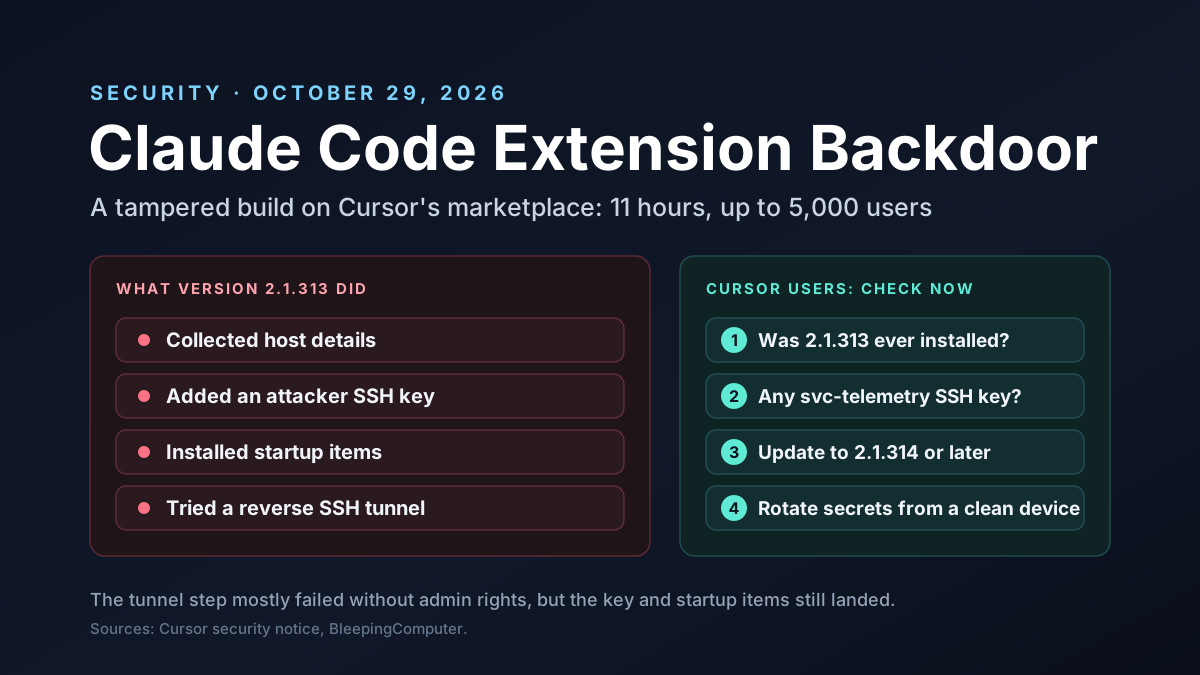
A tampered copy of the Claude Code extension sat on Cursor's marketplace for about 11 hours on October 29, 2026. It wasn't a fake with a lookalike name. It was published under the real extension ID, so Cursor users who had auto-updates on could get it without doing a thing.
Cursor says up to 5,000 users received it. The build tried to plant a lasting SSH backdoor on their machines. Here's what's confirmed, what's still disputed and what any team that uses AI coding tools should do now.
Disclosure and scope: Van Data Team uses AI coding tools, including Anthropic's Claude Code, and we drafted this article with help from Claude. We have no business ties to Anthropic, Cursor or Binance.
This is a developing story, so we quote each company's claims as claims. We cover defense only, at a high level. We don't explain how to attack anything.
Key Takeaways
- What: a tampered build, version 2.1.313 of the
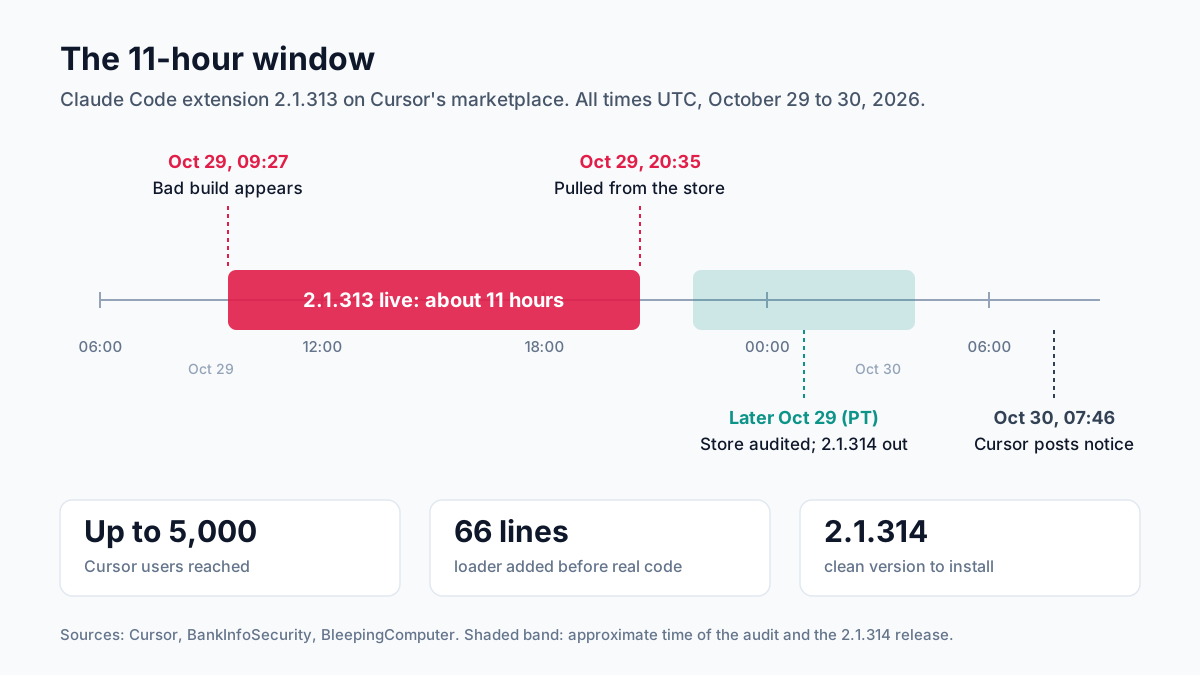
anthropic.claude-codeextension, was on Cursor's marketplace from about 09:27 to 20:35 UTC on October 29. - Reach: at most 5,000 Cursor users, according to Cursor. Anthropic says other stores were safe.
- Payload: it collected host details, added an attacker's SSH key, set up startup items and tried to open a reverse SSH tunnel.
- Partial failure: the tunnel step mostly failed without admin rights, but the key, startup items and data collection still happened.
- Blame is disputed: Anthropic says someone used access to Cursor's marketplace. Cursor hasn't said how the attacker got in.
- Binance link: unconfirmed. One researcher says Binance uses this extension, but no company connects the two attacks.
- Action: if you use Cursor, check for the
svc-telemetrySSH key now. Uninstalling alone doesn't clean up.
Claude Code Extension Backdoor at a Glance
| Item | What's known so far |
|---|---|
| Extension | Claude Code for VS Code, ID anthropic.claude-code |
| Bad version | 2.1.313 (clean neighbors: 2.1.312 and 2.1.314) |
| Where | Cursor's extension marketplace only |
| When | October 29, 2026, about 2:27 a.m. to 1:35 p.m. Pacific Time (09:27 to 20:35 UTC) |
| Users reached | At most 5,000, per Cursor |
| Payload | A 66-line loader added before the real extension code, per researcher Paul McCarty |
| Main sign to check | An SSH key labeled svc-telemetry in authorized_keys |
| Fix | Update to 2.1.314, then remove the key and startup items and rotate secrets |
What Happened on October 29
Cursor is an AI code editor built on VS Code. It runs its own store for add-ons, including Anthropic's Claude Code extension.
Early that day, Pacific Time, a new version showed up there. It looked normal. It carried the right name, the right ID and a version number that looked like the next normal release.
It wasn't normal. Researchers found a small block of bad code at the very start of the add-on's main file, ahead of the real code. Everything else matched the genuine release, so the add-on still worked as expected.
About 11 hours later, Cursor pulled it. Cursor then took its whole store offline, checked each other add-on, rotated its own keys and brought the store back. It also worked with the attacker's hosting provider to take their server offline.
How the Tampered Claude Code Extension Worked
The bad code ran as soon as the add-on loaded. No click was needed. You didn't even have to talk to Claude.
At a high level, it did four things, according to Cursor and the researchers who analyzed it:
- Collected host details: username, hostname, operating system, public IP address, Git email and the names of environment variables that looked like credentials. It sent these to the attacker's server.
- Added a key: it put the attacker's SSH public key, labeled
svc-telemetry, into the user'sauthorized_keysfile. - Set up startup items: a LaunchAgent on macOS, a scheduled task or Startup script on Windows, and
@rebootcron entries, which retried about every 60 seconds. - Tried to open a tunnel: it tried to switch on the machine's SSH service and open a reverse tunnel, so the attacker could log in from outside.
Notice what's missing. The code collected the names of secret-looking environment variables, not their values. BleepingComputer read that as a sign the attacker planned to come back by hand, through the tunnel, to take what they wanted.
Why the Claude Code Extension Backdoor Usually Failed
Here's the lucky part. Turning on a computer's SSH service needs admin rights, and on most Mac and Windows machines, Cursor doesn't run as an admin.
Cursor says the tunnel step would fail "outside of highly unusual circumstances" where Cursor ran as an admin. The bad code also had bugs. BleepingComputer found that on macOS, a status check returned an error instead of "Off", so the code skipped turning SSH on. On Windows, it called a shell that standard Windows installs don't have.
But failure isn't the same as safety. On affected machines, the key was still added, startup items were still installed and host details were still sent. If SSH was already on, or Cursor ran as admin, the tunnel may have worked.
Who Is Affected by the Claude Code Extension Attack?
You're only in scope if all three of these are true:
- You use Cursor, not VS Code, the terminal version of Claude Code or another editor.
- You had the Claude Code extension installed through Cursor's marketplace.
- You installed or auto-updated to 2.1.313 during the window on October 29, which for most people means Cursor updated it for you in the background without asking.
Anthropic says 2.1.313 was never published to the Visual Studio Marketplace, Open VSX or its other official hosts. Early reports that npm and Open VSX were hit were later corrected. If you use Claude Code in the terminal or in VS Code, there's no sign you're affected.
Cursor is reaching out to users who got the bad version. Don't wait for that email, though. Checking takes a couple of minutes.
Is It Anthropic's Fault or Cursor's?
This is the most disputed part of the story, and the answer may change.
Anthropic says its own systems and staff laptops weren't compromised. Anthropic's Felix Rieseberg told The Register: "A malicious actor used access to Cursor's marketplace to publish a tampered copy of the Claude Code extension, which we didn't build or publish." Cursor's notice agrees that the bad version was "not developed by Anthropic."
Neither company has said how the attacker got the access needed to publish under Anthropic's verified listing. Security researcher Kevin Beaumont disagrees. He argues the build went up under Anthropic's verified account, and that Cursor's auto-updates pushed it to users.
For users, the question of blame matters less than this: a trusted name on a trusted marketplace shipped malware.
Was the Binance Hack Linked?
Maybe. Nobody official has said so.
On the same day, Binance lost about $6.3 billion, by its own estimate, in what is now the largest crypto theft on record. Binance's early findings say the attack started on a DevOps engineer's laptop and moved to a service container.
Kevin Beaumont posted that he had confirmed Binance uses Claude Code on Cursor with this extension. That's a notable claim from a respected researcher. But it rests on his posts alone. Binance hasn't named how the laptop was breached, and neither Cursor, Anthropic nor Binance has linked the two attacks.
Be careful here. The tunnel step failed on most machines without admin rights. So even if a Binance laptop received the bad build, that alone wouldn't prove it was the way in. We'll update this section if any company confirms or rules out a link.
How to Check if Your Machine Was Hit
If you use Cursor, do these checks now. Two minutes. They're safe and read-only, and Cursor's notice gives the exact commands for each system.
- Check your extension history. See whether version 2.1.313 of the Claude Code extension was ever installed in Cursor.
- Look for the key. Open your SSH
authorized_keysfile and look for a key labeledsvc-telemetry. - Look for startup items. Check for the LaunchAgent, scheduled task, Startup script and cron entries listed in Cursor's notice and in StepSecurity's write-up.
- Check for the tunnel. Look in your SSH and network logs for links to the attacker's server, listed as 134.209.82[.]225 in the reports.
If you find nothing, update the add-on to 2.1.314 or later and move on. If you find any of these, treat the machine as compromised.
Cleaning Up After the Claude Code Extension Attack
If a machine shows signs of the tampered build, follow this order. It matters.
- Isolate first. Cut the machine off from your network before you change a thing.
- Save evidence. Copy the signs and logs for your security team.
- Remove the key and startup items, by hand or with Cursor's cleanup scripts, and keep a copy of everything you remove so your security team can study it later.
- Update the add-on to 2.1.314 or later.
- Rotate every secret the machine could reach. Do it from a different, trusted device: Git and CI tokens, cloud keys, SSH keys, package registry tokens and browser sessions.
- Rebuild the machine if logs show the tunnel ever connected.
Rotating secrets is the step people skip. The attacker took the names of secret-looking settings on that machine. Assume exposure.
Why Uninstalling Isn't Enough
It's tempting to remove the add-on and call it done. Don't.
The startup items run on their own, outside the add-on. The SSH key stays in authorized_keys until someone deletes it, and it will quietly let the attacker back in if the SSH service is ever turned on later. And the host details have already left the building.
Kevin Beaumont warned that the clean versions, which auto-update, "do not remove the prior backdoors and recon activity." Updating fixes the add-on. It doesn't fix the machine.
What Security Teams Should Do This Week
If you run security for a team, treat this as a fleet-wide check, not a personal one:
- List editors and extensions. Find every machine running Cursor, and every extension version on it.
- Sweep for signs. Search laptops for the
svc-telemetrykey, the startup item names and the attacker's IP address, and check extension folders on every machine, not just the ones you know use Claude Code. - Review SSH exposure. On laptops, the SSH server should almost always be off. Find out where it's on, and why, because a laptop with SSH running and an unknown key in
authorized_keysis exactly what this attack tried to create. - Check who runs editors as admin. Those are the machines where the tunnel could have worked.
- Rotate shared secrets that any affected developer could reach, even if their machine looks clean.
Then write down what you learned. It'll happen again, with a different tool.
Why AI Coding Tools Are a Juicy Target
AI coding tools sit in a very powerful spot. They run on developer laptops. Those laptops hold source code, cloud credentials, SSH keys and access to production pipelines.
Extensions add another layer. An editor extension often runs with the same rights as the editor, which means the same rights as the developer. It can read files, run commands and reach the network. Most teams never review that.
We wrote about this pattern earlier, in our piece on new attacks on AI coding assistants. The Claude Code extension attack is the clearest example so far. Attackers don't need to break the AI model.
Simple, really. They just need to ride along with the tool everyone trusts.
Verified Publisher Doesn't Mean Safe
Many teams treat a verified badge as a safety check. This attack shows its limits.
The badge tells you who the listing belongs to. It doesn't tell you that each build under that listing came from that company's real release process. If someone gains access to the publishing path, at the marketplace or at the vendor, the badge stays on.
That's why a good extension policy checks more than the publisher name:
- Does the version match the vendor's real releases on other channels?
- Is the release recent, and has anyone else reviewed it?
- Does the file size or content differ from the last clean release? StepSecurity found the bad build was about 7KB larger.
Claude Code Extension Auto-Updates: Convenience vs Control
Auto-updates are often good security. They patch bugs fast. Here, they did the opposite, pushing a bad build to thousands of machines in hours.
The answer isn't to turn updates off everywhere. It's to add a short delay, so a bad release gets caught before it reaches you:
- Individuals: leave auto-updates on for the editor itself, but consider manual updates for powerful extensions.
- Teams: use managed settings to pin extension versions and roll out new ones after a short wait, such as 24 to 72 hours.
- High-risk teams: keep an allowlist of approved extensions and versions, and block everything else.
A delay of a day or two would likely have kept most teams safe here. The bad build was live for about 11 hours.
Lessons from the Claude Code Extension Incident
Step back, and the lessons apply to any tool on a developer's machine:
| Lesson | What to do |
|---|---|
| Extensions are software you didn't review | Keep an approved list, and review new or powerful extensions |
| Fast updates cut both ways | Delay extension updates by a day or two on work machines |
| Admin rights turn a failed attack into a working one | Never run editors or AI tools as admin |
| Laptops hold long-lived secrets | Use short-lived tokens and a secrets manager, not plain environment variables |
| SSH servers on laptops are rarely needed | Keep them off by default and alert when one turns on |
| Cleanup is more than uninstalling | Have a written playbook for removing startup items and rotating secrets |
Don't Run Your Editor as Admin
This deserves its own section, because it's the control that saved most people.
The tunnel step needed admin rights. On most machines, Cursor didn't have them. Lucky break. So the attack stopped short of its goal.
Running your editor, terminal or AI agent as an admin, just to save time, removes that safety net.
If a task really needs admin rights, grant them for that one task and then drop them. Teams can enforce this with device management tools, which can block standing admin rights, log each time someone raises them and alert security when an editor starts as admin.
Keep Secrets Out of Easy Reach
The malware looked for the names of secret settings, such as tokens and keys. Many developers keep long-lived secrets in shell profiles or .env files. Convenient, yes. It's also exactly what this attacker hoped to find.
Better habits help a lot:
- Use a secrets manager and fetch secrets only when needed.
- Prefer short-lived tokens. They expire in hours, not months.
- Scope tokens tightly, so one stolen token can't reach everything.
- Keep production access off laptops where you can, and use approval steps for AI agents that touch real systems.
What to Watch Next
- How the attacker got publishing access, and whether Cursor or Anthropic publish a full post-attack report.
- Changes to how stores take uploads, such as signed builds that must match the maker's real release.
- Any official word on Binance, confirming or ruling out a link to this extension.
- Copycat attacks. Other popular AI coding extensions may be next.
Claude Code Extension Attack: Our Take
The Claude Code extension attack is a supply-chain attack aimed at the tools developers trust most. It worked for 11 hours under a real name. It failed in most places only because of missing admin rights and buggy code. Pure luck.
The fix isn't to stop using AI coding tools. It's to treat them like any other powerful software. Approve extensions, delay updates, keep admin rights and long-lived secrets off laptops, and have a cleanup plan ready before you need it.
How Van Data Team Helps Teams Use AI Tools Safely
We help engineering and data teams adopt AI coding tools and AI agents with guardrails built in: approved tool lists, scoped and short-lived access, secrets management, audit logs and attack playbooks.
If your team relies on AI coding tools and you're not sure what they can reach, start with our AI agent attack response playbook, then get in touch for a quick review.
Sources: Cursor's security notice, BleepingComputer, The Register, BankInfoSecurity, StepSecurity.
AI Model Brief
The AI models worth knowing, once a week
What shipped, how it scores on independent benchmarks, what it costs per million tokens and what was deprecated, from the data behind our AI model benchmarks.
We use your address only to send the brief. See our privacy policy.
See this week’s brief
Founder of Van Data Team. Builds Vanaxity, the AI agent system for SEO, GEO, and AEO, and leads data engineering delivery for B2B teams.
About the authorArticle FAQ
Questions readers usually ask next.
These short answers clarify the practical follow-up questions that often come after the main article.
Need a similar system?
If this article maps to a workflow your team already operates, the next step is usually a scoped review of the system, constraints, and rollout path.
Consultation
Scope your next AI workflow.
Share the system and blockers. We will map fit, gaps, and the next step.