What Happened to OpenAI Operator?
OpenAI Operator launched in 2025 and was gone by 2026. Here is the full timeline, why it was folded, what replaced it, and the platform lesson for teams.
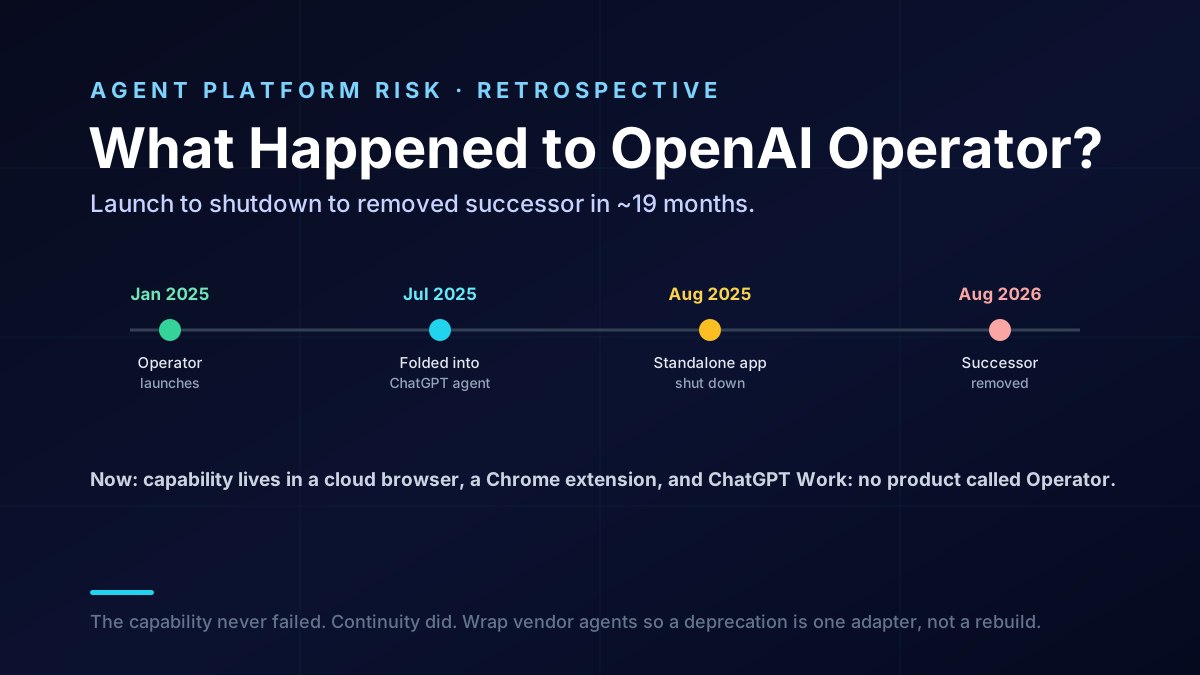
OpenAI Operator was one of the most talked-about agent launches of 2025, and by late 2026 you can't use it. That isn't a scandal, it's a pattern, and it's a useful one to understand if your team builds on vendor agents. This piece lays out the full, sourced timeline of Operator's rise and fall and draws the platform lesson for anyone who wired a workflow to it.
Key Takeaways
- OpenAI Operator was a browser-automation agent, launched January 23, 2025, and released as a research preview to ChatGPT Pro users on February 1, 2025.
- It was folded into the new ChatGPT agent on July 17, 2025, and the standalone Operator app shut down on August 31, 2025.
- ChatGPT agent, Operator's successor, was itself removed from ChatGPT in early August 2026, and the ChatGPT Atlas browser was sunset on August 9, 2026.
- As of September 2026, the capability lives on through a cloud browser on OpenAI's servers, a ChatGPT Chrome extension, and the ChatGPT Work desktop app, not a product called Operator.
- The lesson is platform risk: a vendor agent can launch, merge, and vanish in under two years, so keep an abstraction layer and an exit path for any workflow you build on one.
What Was OpenAI Operator?
OpenAI Operator was a browser-automation agent, not a product you can still use today. OpenAI launched it as a research preview in January 2025, folded it into ChatGPT agent in July 2025, and shut the standalone app down that August. Its successor was then removed in 2026. So the honest answer to "what is Operator" is that it was an early consumer agent that no longer exists under that name.
At launch, Operator could drive a web browser on your behalf, all from a natural-language instruction. It ran on OpenAI's Computer-Using Agent model, which combined vision to read the screen with the ability to issue clicks and keystrokes. The pitch was simple and genuinely new for a mass-market product: describe a web task, and the agent does it in a real browser. In practice, that covered work like:
- Form filling and submissions across sites that never exposed an API.
- Placing online orders and moving through multi-step checkout flows.
- Scheduling and booking appointments through web interfaces.
- Repetitive web navigation that would otherwise need a brittle script.
What made it notable wasn't only the capability, but who it was for. Browser automation had existed for years in developer tools, but Operator put it behind a chat box for non-engineers. That's why it drew so much attention, and it's also why the churn that followed matters: a lot of people, not just scripting teams, started to depend on it.
That capability is exactly what the topic prompts of 2026 still describe, which is why the name keeps resurfacing. The confusion is understandable, because Operator's ideas didn't disappear, only the product did. Understanding the difference between the idea and the product is the whole point of this retrospective.
Why Did OpenAI Shut Down Operator?
Not because it failed, but because OpenAI kept consolidating it. Each shutdown in this story is a merge into something broader, not a retreat from agents.
The first merge came fast. On July 17, 2025, OpenAI launched ChatGPT agent, which combined Operator's browser control with the deep-research capability into a single agentic mode inside ChatGPT. Once that existed, a separate Operator product was redundant, so the standalone app was deprecated and shut down on August 31, 2025, about seven months after launch. Users were told to select agent mode inside ChatGPT instead.
The pattern then repeated at the next level up. According to Wikipedia's Operator timeline, ChatGPT agent itself was removed from ChatGPT in early August 2026, reportedly without an advance deprecation notice. Around the same time, OpenAI sunset its ChatGPT Atlas browser on August 9, 2026, roughly nine months after that browser's October 2025 launch. Two agent-adjacent products, gone within days of each other.
The honest read: this is consolidation, not collapse. OpenAI clearly still believes in browser and desktop automation; it just keeps rehousing the capability as its product strategy shifts. For a user that's fine, but for a team that wired a pipeline to a specific product, each "consolidation" is a migration you didn't schedule.
The OpenAI Operator Timeline at a Glance
Here is the full sequence in one view, with each date as reported. It is the clearest way to see how quickly an agent product can move from launch to removal.
| Date | Event |
|---|---|
| January 23, 2025 | OpenAI launches Operator, a browser-automation agent |
| February 1, 2025 | Released as a research preview to ChatGPT Pro users in the US |
| July 17, 2025 | Folded into the new ChatGPT agent (Operator + deep research) |
| August 31, 2025 | Standalone Operator app shut down |
| October 2025 | ChatGPT Atlas browser launches |
| Early August 2026 | ChatGPT agent removed from ChatGPT |
| August 9, 2026 | ChatGPT Atlas browser sunset |
Read top to bottom, the lifespan is striking. The standalone product lasted about seven months, and the whole Operator-to-agent lineage ran roughly nineteen months before its successor was pulled. That's fast even by 2026 standards, where model and product cycles already turn over in months rather than years. The takeaway isn't that OpenAI moved carelessly; it's that this cadence is now normal, and your architecture has to assume it.
What Replaced OpenAI Operator?
No single successor, which is part of the lesson. Instead of one clean replacement, OpenAI spread the capability across several surfaces, so the thing Operator did still works, but there is no longer one place it lives.
| Operator capability | Where it lives now (Sept 2026) |
|---|---|
| Agent that completes tasks in a browser for you | A cloud browser running on OpenAI's servers |
| Page question-answering and summarization | A ChatGPT Chrome extension |
| Website logins and file downloads | The updated ChatGPT desktop app |
| Multi-step work and coding tasks | A unified desktop app bundling ChatGPT Work and Codex |
The honest read: for an individual user, this redistribution is mostly invisible; you pick a menu and get on with it. For a team, it's the opposite of invisible. A capability that once had a stable name and endpoint now spans a cloud service, a browser extension, and two desktop apps, and each of those can move again. If your automation depended on one of them, you inherited the churn, and you didn't get a vote.
What Does the Operator Story Teach Engineering Teams?
That building directly on a vendor's agent product is a bet on that product's roadmap, not just its capability. The capability was real the whole time; the product surface is what kept moving.
The concrete risk is integration lock-in to a moving target. If in early 2025 you replaced a fragile Playwright or Selenium suite with direct calls to Operator, you had three integration rewrites forced on you within about nineteen months: Operator to agent mode, agent mode to whatever came next, and Atlas features scattering across a cloud browser and extensions. None of those were your choice, and none came with much notice. That's the cost that never shows up in a launch-day benchmark.
It's worth being precise about what did and didn't fail here. The capability never regressed; if anything, browser agents got better across 2025 and 2026. What broke was continuity, the quiet promise that the thing you integrated last quarter will still be there next quarter. For a demo, continuity doesn't matter. For a pipeline that finance or operations runs every morning, continuity is the whole product, and it's exactly what a fast-moving vendor surface can't guarantee.
A few warning signs tell you a vendor agent is quietly becoming load-bearing, and each is a cue to add insulation before you're forced to:
- A scheduled job depends on it. Anything that runs on a cron or a morning routine now has a single point of failure you don't control.
- A human stopped checking the output. Once people trust it enough to skip review, a silent behavior change ships straight to production.
- It touches real credentials. The moment the agent logs into real accounts, a deprecation is also a security event, not just an outage.
- There's no non-vendor path. If you deleted the old Playwright suite, you have no floor to fall back to when the surface moves.
Vanaxity-style takeaway, applied to engineering: the answer is not to avoid vendor agents, which are often excellent, but to insulate yourself from their churn. Keep a thin abstraction layer between your workflow and whatever agent executes it, so a provider change is a configuration edit rather than a rebuild. We design agent systems this way by default, with a stable internal contract and swappable execution backends, the same discipline we bring to AI agent runtime design and to taking agents from prototype to production.
Should You Use a Vendor Agent or Your Own Automation?
It depends on how critical and how stable the workflow is, and the Operator story sharpens the question rather than answering it for you. Use the vendor agent where speed and capability matter more than control; keep your own automation where a broken workflow is a real cost.
Think of it as a spectrum, not a yes or no. On one end sits a throwaway task you run once. On the other sits a job the business depends on daily.
The vendor agent is the right call near the first end. Your own owned path earns its keep near the second. Most workflows sit somewhere between. So the real skill is knowing which end a task is drifting toward, and adding insulation before it arrives, not after a deprecation forces your hand.
A few guidelines keep the decision honest:
- Prototype on the vendor agent. For exploration and low-stakes tasks, a promptable browser agent beats maintaining scripts, and you should use it.
- Abstract before you depend. Before a workflow becomes load-bearing, put an interface between it and the agent, so you can swap providers or fall back to your own Playwright or Selenium suite without a rewrite.
- Keep a fallback that you own. For business-critical automation, maintain a self-owned path, even a minimal one, so a sudden deprecation degrades you instead of stopping you.
- Sandbox and scope every session. An autonomous agent with a real browser and real logins is a security surface, so isolate it, scope its credentials narrowly, and log what it does, as we detail in agentic AI security.
- Re-check quarterly. Agent products move fast, so revisit which surface you depend on and whether it still exists on the cadence this field actually changes.
The honest read: the mistake is treating a vendor agent as permanent infrastructure. Treat it as a fast-moving dependency, useful and worth adopting, but wrapped so that when it moves, and it will move, your workflow doesn't break with it. The teams that came through the Operator churn cleanly weren't the ones who avoided it; they were the ones who never let it become load-bearing without a wrapper and a fallback.
How Van Data Team Approaches Agent Platform Risk
We build agent systems assuming the underlying models and products will change, because they always do. That means a stable internal contract for each workflow, swappable execution backends behind it, and tight scoping and logging around anything that touches real credentials or a real browser. When a provider deprecates a surface, we want the blast radius to be one adapter, not the whole pipeline.
If your team built on Operator, agent mode, or Atlas and is now facing a forced migration, that's exactly the situation we help with. Our AI agent development services can re-platform a brittle, vendor-locked workflow onto a portable design, and our work on building agents with the Model Context Protocol shows how a standard interface keeps you from being trapped by any one vendor's roadmap. The goal is simple: keep the capability, lose the lock-in.

Founder of Van Data Team. Builds Vanaxity, the AI agent system for SEO, GEO, and AEO, and leads data engineering delivery for B2B teams.
About the authorArticle FAQ
Questions readers usually ask next.
These short answers clarify the practical follow-up questions that often come after the main article.
Need a similar system?
If this article maps to a workflow your team already operates, the next step is usually a scoped review of the system, constraints, and rollout path.
Consultation
Scope your next AI workflow.
Share the system and blockers. We will map fit, gaps, and the next step.