MacBook Pro OLED: Is the Touch Screen Worth $400 More?
MacBook Pro OLED review roundup: 2,000 nits, touch, 3 pounds and a $2,899 start, $400 over mini-LED. Who should pay it, and which Mac fits data and AI work.
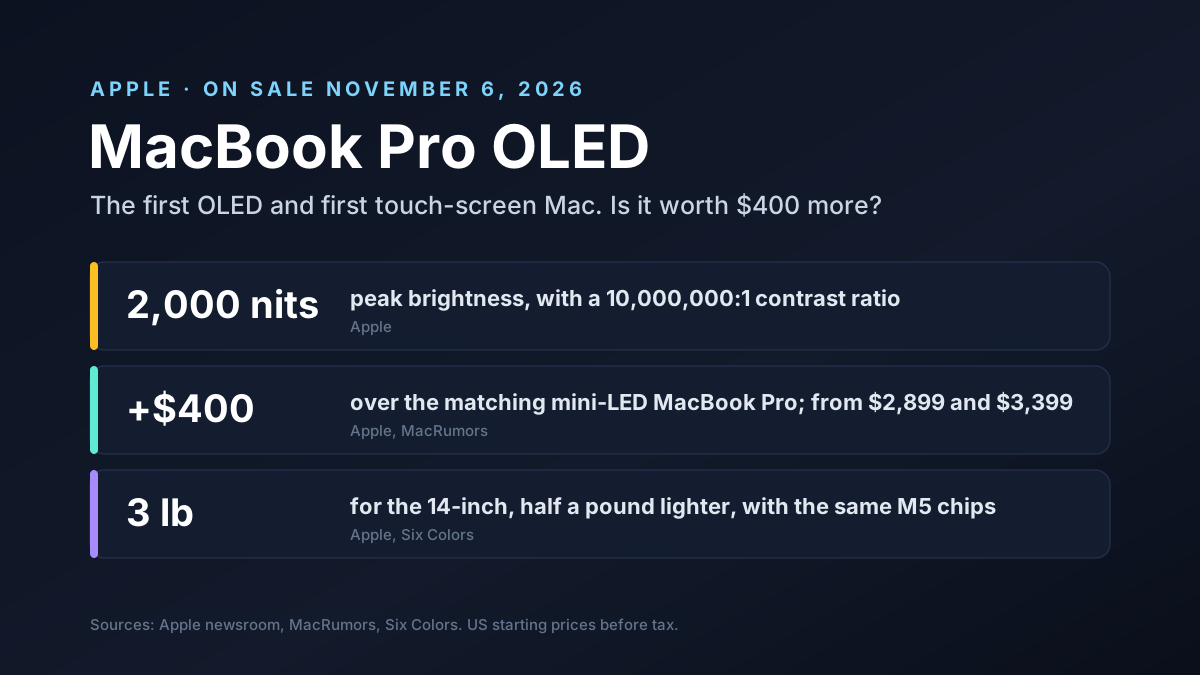
Apple's first OLED Mac is also its first touch-screen Mac. The MacBook Pro with PROLED XDR Display went on sale on November 6, 2026, starting at $2,899. Reviewers love the screen. Most of them shrug at the touch.
This guide covers what the new display does, what reviewers found, how the price compares with the rest of Apple's lineup and which Mac makes sense for data and AI work. We'll keep it practical: what to buy, and what to skip.
Disclosure and scope: Van Data Team builds data and AI systems for clients, and our team works on Macs. We have no business ties to Apple, and we drafted this article with help from Anthropic's Claude before checking every figure against the sources below.
Specs and prices come from Apple and MacRumors. Review quotes come from the outlets named, and we label our own math. Prices are US starting prices before tax.
Key Takeaways
- Two firsts: the MacBook Pro OLED is Apple's first Mac with an OLED screen and its first with touch. It went on sale on November 6.
- The screen is the star: up to 2,000 nits, a 10,000,000:1 contrast ratio and refresh rates from 10Hz to 120Hz.
- Touch is a bonus: reviewers call it handy at times but not a reason to buy. It doesn't work with Apple Pencil.
- Same chips, lighter body: it uses the M5 Pro and M5 Max from March, but the 14-inch weighs 3 pounds, about half a pound less.
- The price: from $2,899 and $3,399, which is $400 over the matching mini-LED model. A maxed-out 16-inch costs $14,549.
- For data and AI teams: buy memory first. The OLED screen is worth it for HDR work, bright rooms and heavy travel, not for SQL.
MacBook Pro OLED at a Glance
| Item | MacBook Pro with PROLED XDR Display | Source |
|---|---|---|
| On sale | November 6, 2026 (announced October 28) | Apple |
| Sizes | 14.2-inch and 16.3-inch | Apple |
| Screen | Tandem OLED, up to 2,000 nits, 10,000,000:1 contrast, 10Hz to 120Hz | Apple |
| Touch | Yes, fingers only; no Apple Pencil | Apple, The Verge |
| Chips | M5 Pro or M5 Max, the same as the March models | Apple |
| Weight | 3 pounds (14-inch), 4 pounds (16-inch) | Apple |
| Price | From $2,899 (14-inch) and $3,399 (16-inch) | Apple |
| Top build | $14,549 (16-inch, 128GB memory, 16TB storage) | MacRumors |
What Is the MacBook Pro OLED?
The MacBook Pro OLED is Apple's official MacBook Pro with PROLED XDR Display. Apple announced it on October 28, 2026, and it reached stores and buyers on November 6. It comes in 14-inch and 16-inch sizes, runs the M5 Pro or M5 Max chip, adds a touch screen and starts at $2,899.
It's the first big redesign of the MacBook Pro since 2021. Apple didn't replace the mini-LED models, though. It sells the OLED version next to them and next to a new, cheaper 14-inch MacBook Pro with the M6 chip.
That makes the choice harder than usual. You're not picking old or new. You're picking between three MacBook Pros that share a name but not a screen.
The PROLED XDR Display in Numbers
The screen is a tandem OLED, which stacks two light-emitting layers so each pixel can get brighter and last longer. Each pixel makes its own light, so black is truly black, and that's where the 10,000,000:1 contrast ratio comes from.
Apple rates it at up to 2,000 nits for both HDR and everyday SDR content. Engadget also reports about 1,000 nits of sustained full-screen brightness. The older mini-LED panel peaks at 1,600 nits for HDR.
| Spec | OLED (PROLED XDR) | Mini-LED (Liquid Retina XDR) |
|---|---|---|
| Panel | Tandem OLED, self-lit pixels | LCD with mini-LED backlight |
| Peak brightness | 2,000 nits, HDR and SDR | 1,600 nits HDR |
| Contrast | 10,000,000:1 | 1,000,000:1 |
| Refresh rate | 10Hz to 120Hz | Up to 120Hz |
| Touch | Yes | No |
| Camera area | Small round cut-out with the Dynamic Island | Notch |
There's a nano-texture glass option to cut glare, now etched into the cover glass. The notch is gone as well. A small round cut-out holds the camera, and the Dynamic Island from the iPhone now shows Spotlight, Siri and live updates around it.
How Touch Works on the MacBook Pro OLED
This is the first touch screen MacBook Apple has sold, yet Apple didn't redesign macOS for fingers. Instead, macOS 27 turns taps into clicks and adds a few small helpers, as Six Colors describes in its review.
- Tap the menu bar and its items spread out.
- Tap a window's close, minimise and zoom buttons and they grow to a size a fingertip can hit without missing, much like on an iPad.
- Double-tap to select text, and tap and hold in Finder to open the menu.
- Double-tap a window and it fills the screen.
You can turn touch off in the settings. Some apps go further: Six Colors saw a music plug-in where several fingers moved different controls at once.
There's one big gap. The Verge found that the Apple Pencil doesn't work at all. This is a touch laptop, not a drawing tablet.
What Reviewers Say About the MacBook Pro OLED
The reviews agree on the screen and split on the touch. MacRumors gathered the main verdicts in its review roundup.
- Bloomberg called the OLED "genuinely striking."
- Engadget headlined its review "Lighter, brighter, but the touchscreen doesn't add much."
- TechRadar said its week of testing confirmed that Apple put the touch screen on the wrong Mac.
- Gizmodo found touch "occasionally useful," while WIRED said it had "no place" in its work.
- Six Colors called the display "spectacular" and touch a nice extra, "and that's all."
The pattern is clear. Nobody says touch is bad. Almost nobody says it's a reason to buy. The screen and the lighter body carry the product.
Lighter and Thinner, Same Chips
OLED panels are thinner than LCDs with a backlight, and Apple spent the savings on weight. The 14-inch model weighs 3 pounds, about half a pound or 15% less than before. The 16-inch weighs 4 pounds, 0.7 pounds less.
Both are a little thinner too: about half a millimetre for the 14-inch and nearly a millimetre for the 16-inch. Six Colors says the weight loss didn't cost battery life.
The chips didn't change. These models use the same M5 Pro and M5 Max chips Apple launched in March, because newer chips weren't ready in time, per MacRumors. So speed is the same as a mini-LED MacBook Pro with the same chip.
What stays the same:
- three Thunderbolt 5 ports, HDMI, an SD card slot, MagSafe and a headphone jack;
- up to 128GB of memory and up to 16TB of storage;
- battery life rated by Apple at up to 24 hours.
MacBook Pro OLED Price and the Full Lineup
The 14-inch MacBook Pro OLED starts at $2,899 with the M5 Pro chip. The 16-inch starts at $3,399. M5 Max models start at $4,499 and $4,799.
The matching mini-LED models start at $2,499 and $2,999. So the OLED screen, touch and lighter body cost $400 extra at the same size and chip, as MacRumors' buyer's guide lays out.
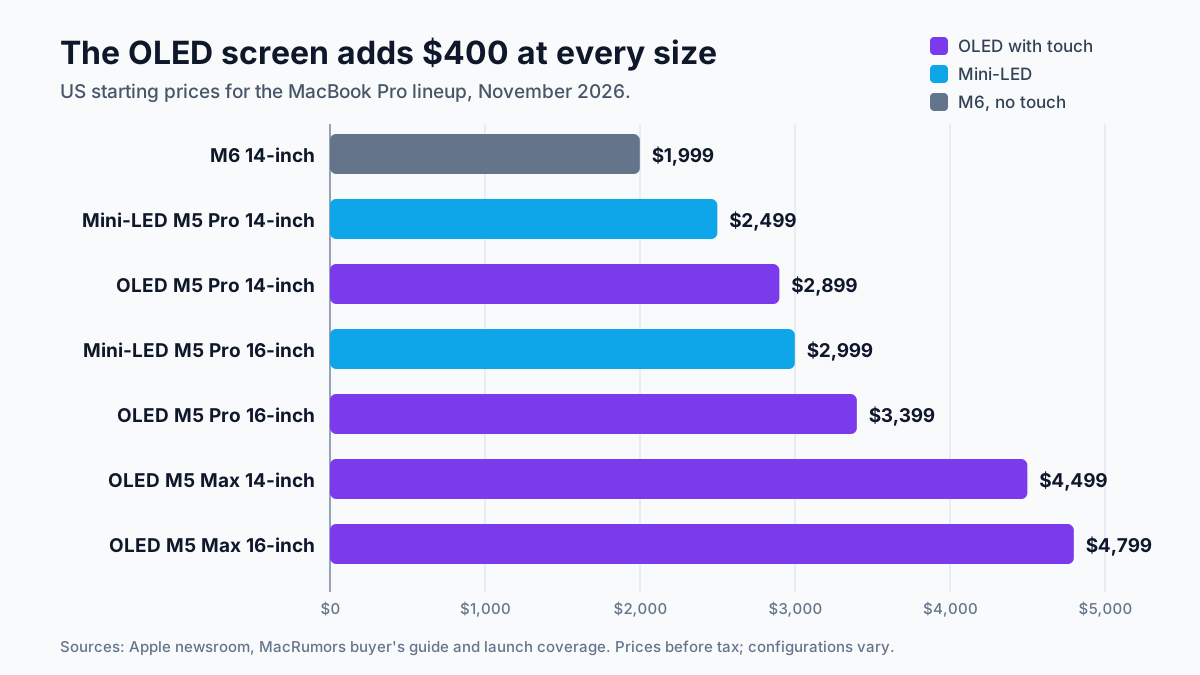
Below them sits a new 14-inch MacBook Pro with the M6 chip at $1,999. It has no OLED and no touch, but it's $900 cheaper than the OLED 14-inch, by our math.
The $14,549 Configuration
The top price got as much attention as the screen. A 16-inch model with the M5 Max, 128GB of memory, 16TB of storage and nano-texture glass costs $14,549, according to MacRumors. The 14-inch tops out at $14,249.
Most of that is storage and memory. BGR counts about $7,000 for the 16TB drive and $2,000 for the jump to 128GB of memory.
That's the lesson. Apple prices its memory and storage upgrades far above what the same capacity costs from other makers, and the gap grows with every step up the list. A fast external drive or network storage often does the job for a fraction of the price.
Everything Apple Put on Sale on November 6
The OLED MacBook Pro wasn't alone. Apple also started selling three other products the same day.
| Product | Starting price | What's new |
|---|---|---|
| MacBook Pro with PROLED XDR Display | $2,899 | First OLED and first touch-screen Mac |
| 14-inch MacBook Pro with M6 | $1,999 | New M6 chip, 12-core CPU and GPU, no touch |
| iMac with M6 | $1,499 | M6 chip; $1,699 for 12-core CPU and GPU |
| iPad mini with OLED | $699 | 8.5-inch OLED, A20 Pro chip, Apple Pencil Pro support |
The iPad mini is the one to note if you want a pen, because its 8.5-inch OLED screen supports Apple Pencil Pro, which the touch-screen MacBook Pro doesn't, though it runs at 60Hz without ProMotion.
Is the MacBook Pro OLED Worth $400 More?
For some people, clearly yes. For most office work, no. Here's how to tell which group you're in.
Pay the extra $400 if you:
- edit HDR photo or video, where true blacks and 2,000-nit highlights are a real tool, not a luxury;
- work outdoors, in bright offices or on trains most days;
- carry the laptop to client sites all week, where half a pound adds up;
- want the best screen Apple has put in a laptop and plan to keep it for five years.
Skip it if you:
- mostly write code, SQL, spreadsheets or dashboards, which look fine on the mini-LED screen;
- need more memory or storage, which the same $400 helps buy on the mini-LED model;
- wanted a pen, since the Apple Pencil doesn't work.
The mini-LED screen is already one of the best laptop screens around. Touch won't change how you write a query.
Which Mac Fits Data and AI Work
Here's how we'd match the November 2026 lineup to common roles. Treat it as a starting point, not a rule.
| Role | Good fit | Why |
|---|---|---|
| Data analyst | M6 14-inch, $1,999 | SQL, notebooks and dashboards run well; the screen is fine indoors |
| Data engineer | Mini-LED M5 Pro | Docker, local databases and builds like cores and memory, not OLED |
| ML engineer running local models | M5 Max with 64GB or 128GB | Memory decides which models fit |
| Designer or video editor | OLED M5 Pro or M5 Max | HDR, true blacks and 2,000 nits change daily work |
| Consultant on the road | OLED 14-inch | 3 pounds, bright enough for trains, cafes and client sites |
| Manager who mostly reads and writes | M6 14-inch or a MacBook Air | The OLED premium buys little for email and docs |
The pattern: spend on the part that limits your work. For most data jobs that's memory, then cores, then the screen.
Running AI Models Locally: Memory Matters More Than the Screen
More teams now run local AI models, open-weight models on their own laptops, for privacy, cost or offline work. On a Mac, the model has to fit in unified memory, which the chip shares between its CPU and graphics.
A rough rule: a model compressed to 4-bit needs about half a gigabyte of memory per billion parameters, plus room for the conversation and your other apps. By that rule, a 70-billion-parameter model needs around 40GB to 48GB, which rules out small builds and fits comfortably in 64GB or more.
So for local AI, the order of spending is simple. Memory first. Pick the M5 Max, pick 64GB or 128GB, and only then decide whether the OLED screen is worth $400 on top.
The M5 Max is sold with both screens. You don't have to trade one for the other.
If a model is too large even for 128GB, a cloud GPU is usually cheaper than a maxed-out laptop. Our guide to cloud cost guardrails shows how to keep that spending in check.
Burn-In, Pencil and Other Limits
OLED screens can suffer burn-in, where a static image such as a menu bar leaves a faint ghost. Apple says it monitors each pixel continuously to prevent it, and the tandem design helps. Time will tell. Long-term results will only show after a year or two of real use across thousands of machines, in offices, labs and homes.
Other limits are worth knowing before you buy:
- No Apple Pencil support, and no fold-back tablet mode.
- No speed gain over the mini-LED models with the same chip.
- Many configurations showed shipping times of two to three weeks at launch.
- The glowing Apple logo on the lid can be turned off, if you'd rather it didn't.
A Worked Example: Buying for a Five-Person Data Team
Say you're buying laptops for three analysts, one data engineer and one ML engineer. Here are three plans at starting prices, using our own math.
- All OLED: five 14-inch OLED M5 Pro models at $2,899 come to $14,495. That's about one maxed-out 16-inch.
- All mini-LED: five 14-inch mini-LED M5 Pro models at $2,499 come to $12,495, saving $2,000.
- Matched to the job: three M6 models for the analysts ($5,997), one mini-LED M5 Pro for the engineer ($2,499) and one 16-inch OLED M5 Max for the ML engineer ($4,799) come to $13,295.
The third plan costs $1,200 less than the all-OLED plan. It also puts the most memory and the best screen where they matter. Add memory upgrades to the ML engineer's machine before anyone else's.
What to Watch Next
| When | What to watch |
|---|---|
| Next few weeks | Shipping times and whether Apple discounts the mini-LED models |
| Next macOS updates | More touch features, and whether apps add real touch controls |
| 2027 | Newer chips for the OLED models, and whether OLED reaches the MacBook Air |
| Over time | Real-world burn-in reports after a year of daily use |
The biggest signal will be what Apple does with the mini-LED models. If they stay on sale at $400 less, the choice stays easy. If they fade out, the OLED screen becomes the default whether you need it or not.
MacBook Pro OLED: Our Take
The MacBook Pro OLED is a great screen in a lighter laptop, with touch added as a bonus. That's a fine product. It just isn't the reinvention the words "first touch-screen Mac" suggest.
For data and AI teams, the decision is mostly about money in the right place. Buy memory for the people who run models, cores for the people who build pipelines and the OLED screen for the people who work with images, light or travel.
And if someone on your team wants it simply because it's new, the mini-LED model at $400 less is still an excellent Mac.
How Van Data Team Helps
We help teams spend on the right tools and run AI where it makes sense:
- AI agents and local models sized to the hardware you already have, from a single laptop to a shared server, through our AI agent development service.
- Data pipelines that run the same on a laptop, a server or the cloud. See our data pipeline development service.
- Cost reviews that compare buying hardware with renting cloud GPUs, through cloud cost optimization.
- Reports for any screen, via agentic BI reporting.
Planning a hardware refresh or a local AI setup for your team? Get in touch and we'll help you size the memory, storage and cloud budget before anyone places an order.
AI Model Brief
The AI models worth knowing, once a week
What shipped, how it scores on independent benchmarks, what it costs per million tokens and what was deprecated, from the data behind our AI model benchmarks.
We use your address only to send the brief. See our privacy policy.
See this week’s brief
Founder of Van Data Team. Builds Vanaxity, the AI agent system for SEO, GEO, and AEO, and leads data engineering delivery for B2B teams.
About the authorArticle FAQ
Questions readers usually ask next.
These short answers clarify the practical follow-up questions that often come after the main article.
Need a similar system?
If this article maps to a workflow your team already operates, the next step is usually a scoped review of the system, constraints, and rollout path.
Consultation
Scope your next AI workflow.
Share the system and blockers. We will map fit, gaps, and the next step.