1Password Breach: What Leaked, What Didn't and What to Do
The 1Password breach explained: how an employee's GitHub account let an attacker in, what customer data leaked, why vaults are safe and what to do now.
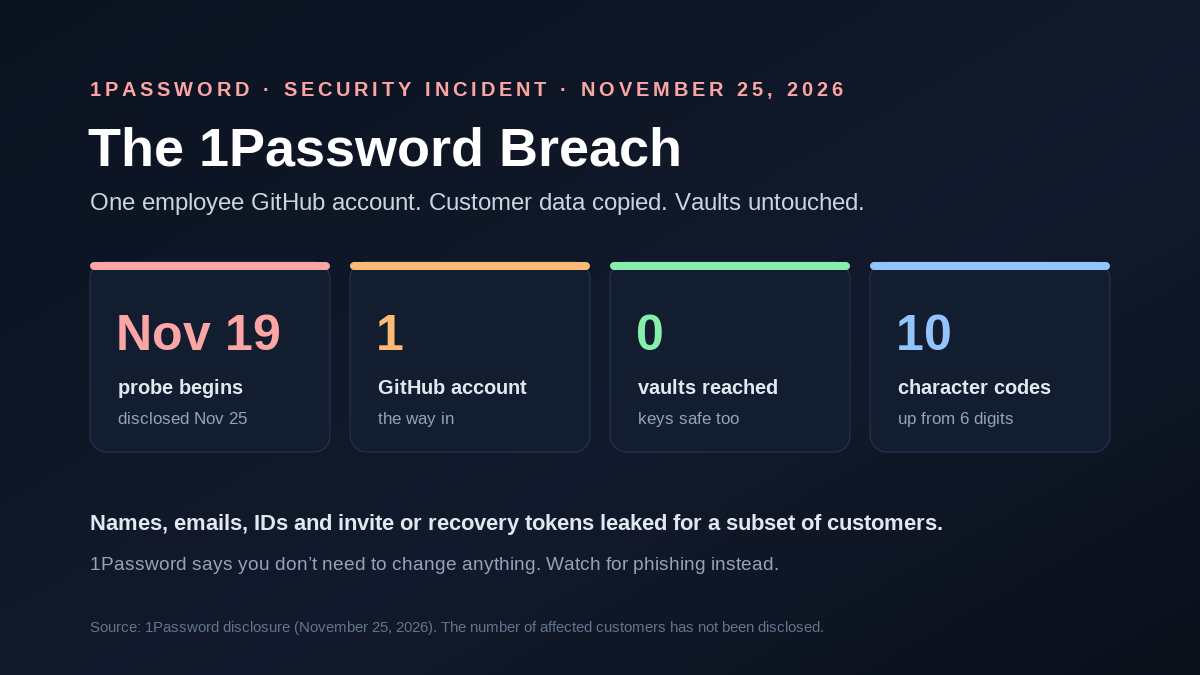
1Password guards passwords for more than 200,000 businesses, according to SiliconANGLE. On November 25, 2026, it said an attacker had broken into part of its backend.
The good news comes first. Vaults, passwords and Secret Keys were not touched. The bad news is how the attacker got in: through one employee's GitHub account.
This guide covers what leaked in the 1Password breach, what didn't, why your vault is still safe, how to spot the phishing that may follow, and what engineering teams should learn from it.
Key Takeaways
- The way in: an attacker took over an employee's corporate GitHub account, then reached source code, the CI/CD system and backend services.
- What leaked: account data for a subset of customers, including names, emails, IDs, sign-in times and tokens from invite and recovery emails.
- What didn't: vaults, vault keys, recovery keys and the apps were not affected.
- What 1Password says to do: nothing in your account. Just watch for phishing.
- What's missing: how many customers were hit, and how the GitHub account was compromised.
- The lesson for teams: one developer account can reach production. Guard it like a root password.
The 1Password Breach at a Glance
Here's the short version, as of November 26, 2026:
| Item | Details |
|---|---|
| Disclosed | November 25, 2026 |
| Investigation began | November 19, 2026 |
| Way in | An employee's corporate GitHub account |
| What leaked | Account data for a subset of customers |
| Vaults and passwords | Not affected |
| Number affected | Not disclosed |
| Action needed | None required, but watch for phishing |
The main source is 1Password's own disclosure. Where details come only from news coverage, we say so.
How the 1Password Breach Started on GitHub
On November 19, 1Password began looking into signs that someone had gained access to an employee's corporate GitHub account. From there, the attacker moved in stages:
- Source code: they copied code from private repos, though 1Password says that code holds no user secrets.
- CI/CD: they reached the system that builds and ships 1Password's software, and that system does hold infrastructure secrets, the kind of keys that let code talk to cloud servers and databases with no person signing in.
- Backend: they pushed bad code to backend services, and that code downloaded customer account data.
Here's that path in one picture:
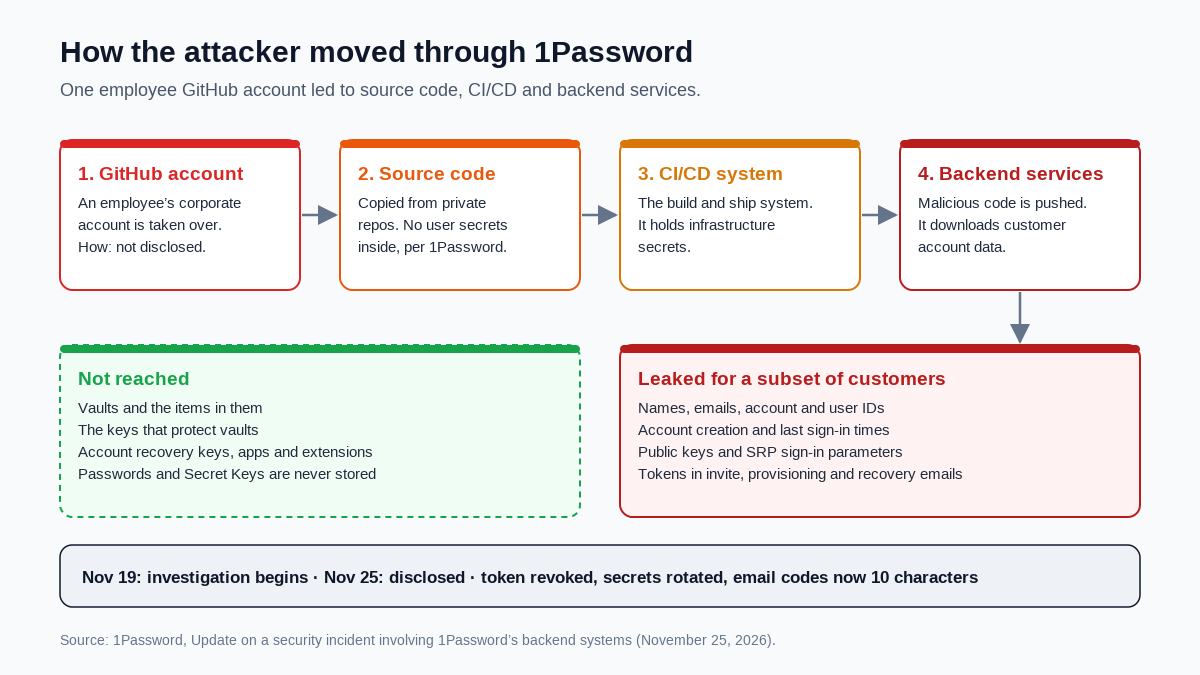
The first step is still a mystery. 1Password hasn't said how the GitHub account was taken over. It did say it revoked "the stolen token," which suggests a GitHub access token was involved, but it hasn't named the type.
What Data Was Exposed in the 1Password Breach
1Password listed the data that was downloaded for affected customers. Here it is, with our read of the risk:
| Data | Risk |
|---|---|
| Names and email addresses | Makes targeted phishing easier |
| Account and user IDs | Low on its own |
| Account creation and last sign-in times | Can make a fake email look more real |
| Public keys | Low: they're public by design |
| SRP sign-in parameters | Low: 1Password says they can't open an account |
| Tokens in invite, provisioning and recovery links | The main concern, though each one also needs SSO or an emailed code |
| Other non-secret metadata | Low |
Some reports describe this as "customer data stolen," which is true. But the list matters. None of it unlocks a vault. Most of it is the data a service needs to run an account, not the secrets inside it.
The tokens are the one item that needs a closer look. We cover them below.
What Was Not Exposed
1Password was clear about what stayed out of reach:
| Not affected | Why it matters |
|---|---|
| Vaults and the items in them | Your saved passwords stayed private |
| Keys that protect vaults | Nobody can decrypt your data |
| Account recovery keys | Recovery can't be hijacked with them |
| Account password and Secret Key | 1Password never stores them |
| Apps and browser extensions | No tampered update reached your devices |
The point about passwords and Secret Keys is key. 1Password says it "does not store your account password or secret key." The attacker couldn't steal them because they were never on 1Password's servers.
Why Your Vault Is Still Safe
1Password is built so the firm can't read your data. Your vault is encrypted on your device with keys made from two things:
- Your account password, which only you know.
- Your Secret Key, a long random code stored on your devices.
Neither one leaves your device in a form anyone can use. When you sign in, 1Password uses a protocol called SRP, which proves you know the password without ever sending it. That's why the leaked SRP parameters don't help an attacker.
So even with full access to 1Password's servers, an attacker would only find encrypted data they can't open. In this case they didn't even reach that.
The Real Risk: Recovery and Invite Tokens
Some affected users had pending emails, such as a team invite, a new account setup or an account recovery request. The links in those emails carry tokens, and those tokens were in the leaked data.
How worried should you be? Less than it sounds:
- Not enough alone: 1Password says a token can't open an account by itself, since it also needs an SSO sign-in or a code sent to your email.
- Longer codes: to be safe, those codes went from six numbers to ten letters and numbers.
- No takeovers: none found so far.
- Few people: 1Password says only a small number of users had a pending invite or recovery request.
A recovery request you didn't make is still worth reporting. If one shows up, tell your admin or contact 1Password support.
Is the 1Password Breach a Phishing Risk?
Yes, and this is the part most people should care about. Attackers now hold the names and emails of real 1Password users, plus when those accounts were made and last used.
That's the raw stuff of good phishing. A fake email that knows your name and says "we noticed a sign-in on November 18" looks far more real than spam.
There's history here. In October 2025, scammers sent 1Password users a fake breach alert that looked official, according to Malwarebytes. A real breach makes that trick easier.
How to Spot a Fake 1Password Email
1Password warns of "unexpected emails, texts or calls that mention 1Password, invitations, or account recovery attempts." Here's what to watch for:
| Red flag | What to do |
|---|---|
| An invite to a team you don't know | Ignore it, and don't click |
| A recovery email you didn't ask for | Don't use the link. Tell your admin or 1Password support |
| Any request for your password or Secret Key | Stop. 1Password says it will never ask |
| A text or call about your 1Password account | Hang up and open the app yourself |
| A "breach alert" with an urgent link | Read the news on 1Password's own site |
The safest habit is simple. Never act on a link in a message about your account. Open the 1Password app or type the address yourself.
How 1Password Responded
1Password says it moved on several fronts:
- Cut off the attacker: it disabled the GitHub account, revoked the stolen token and removed the access the attacker had set up.
- Rotated secrets: it rotated or revoked every internal credential that might have been exposed.
- Restored services: clean versions are back.
- Hardened systems: it tightened controls on GitHub, its CI/CD system and employee devices, and it added new detections meant to flag this kind of attack, though it hasn't said what those detections look for.
- Brought in help: it's working with outside security experts, though it hasn't named a firm.
BleepingComputer reports that affected users were notified one by one. We found no mention of police in the notice.
What Is Known and What Isn't
It's easy to read more into the headlines than the facts support. Here's a cleaner split:
| Known | Not known |
|---|---|
| The way in was an employee's GitHub account | How that account was taken over |
| Investigation began on November 19 | When the attacker first got in |
| A subset of customers had data copied | How many customers, or which ones |
| Source code was copied and CI/CD was reached | Which repos, or which secrets |
| No account takeovers found so far | Whether the data will show up for sale |
The two big gaps are the number of customers and the first step of the attack. As SiliconANGLE notes, how the GitHub account was compromised "was also left unexplained." Until 1Password says more, it's hard to judge how preventable this was.
How the 1Password Breach Compares
Password manager breaches aren't new, and the details matter:
- 1Password, 2023: attackers got into its Okta tenant through Okta's support system breach. 1Password said no user data was affected.
- LastPass, 2022: attackers stole encrypted vault backups, after first going through an engineer's home computer. That's the case people fear most, because stolen vaults can be attacked offline for years.
- 1Password, 2026: account data leaked, but no vaults, and this time the attacker got much deeper inside the company than in 2023, reaching source code, CI/CD and production services along the way.
It's in between. It's worse than 2023, because real customer data left the building. It's far better than LastPass, because no vault data was taken.
Should You Leave 1Password?
For most people, no. Here's how we'd weigh it:
- The core promise held: the company couldn't hand over your passwords, because it never had them.
- Its own security slipped: an attacker reached CI/CD and pushed code to production, which is serious for any firm and more so for one whose whole business is selling security to other companies.
- What to watch: how fast 1Password explains the root cause, and what it changes.
- If you switch: don't go back to reused passwords or a spreadsheet. Any good password manager with end-to-end encryption beats none.
What the 1Password Breach Means for Engineering Teams
This is the bigger lesson, and it applies to almost every software company. One developer's GitHub account was enough to reach:
- Private source code.
- The CI/CD system, with its infrastructure secrets.
- Production backend services, where new code could be pushed.
Many teams have the same setup:
- Wide access: developers can read and push to most repos.
- Stored keys: CI holds long-lived cloud keys.
- Fast deploys: a merge to main ships straight to production.
If one account falls, the attacker gets all of it.
We've seen the same pattern with AI coding tools that leak secrets, which we covered in our post on the Claude Code secrets leak. For a recent AI platform case, see our breakdown of the Fireworks AI breach.
A GitHub and CI/CD Hardening Checklist
Here's a short plan to close the path this attacker used:
| Step | What to do | Why |
|---|---|---|
| Lock down sign-in | Require passkeys or hardware security keys for every GitHub account in your org, including contractors and admins who rarely sign in, and turn off SMS codes as a fallback everywhere. | Stops most takeovers |
| Shorten token life | Swap long-lived personal tokens for fine-grained, short-lived ones. | A stolen token should expire before it can be used. |
| Protect deploy branches | Require review before anything merges to a branch that deploys. | No solo deploys |
| Move secrets out of CI. | Use short-lived cloud credentials through OIDC instead of stored keys. | There's less to steal. |
| Watch for odd pushes. | Alert on pushes at strange hours, new deploy keys and changes to workflow files. | 1Password caught this through signs of unusual access, so detection is what limits the damage. |
None of this is new advice. The 1Password breach is a reminder that even security companies skip some of it, or that one gap is enough.
For teams running AI agents with repo access, the same rules apply to the agent's tokens. Our guide to agentic AI security covers how to scope them.
What to Watch Next
A few signals will tell us how this story ends:
- Root cause: how the GitHub account was compromised.
- Scale: how many customers.
- Phishing waves: fake 1Password emails that use the leaked details.
- Data for sale: whether the stolen records show up on criminal forums.
- Regulators: any filings or notices in the EU, UK or US states with breach laws.
1Password Breach: Our Take
The 1Password breach is two stories. For users, it's mostly reassuring. The design that keeps passwords and Secret Keys off the company's servers did exactly what it was built to do.
For engineering teams, it's a warning. A single developer account led to source code, CI/CD secrets and a malicious push to production at one of the most careful security firms in software. If it can happen there, it can happen at yours.
Our advice: users should stay calm and watch for phishing. Teams should treat developer accounts and CI secrets as the crown jewels they are.
How Van Data Team Helps
We help teams lock down the systems around their code and data:
- Ops and security upkeep for CI/CD, cloud access and secrets rotation, through system operations and maintenance.
- Data pipelines with least-privilege access and audit logs, via data pipeline development.
- AI agents with scoped tokens and review gates, through AI agent development.
This article is based on 1Password's November 25, 2026 disclosure and on coverage by BleepingComputer, SiliconANGLE, Macworld and Malwarebytes, as of November 26, 2026.
Van Data Team has no business relationship with 1Password, LastPass or Okta beyond using common security tools. Worried about your own GitHub and CI/CD exposure? Get in touch and we'll help you review it.
AI Model Brief
The AI models worth knowing, once a week
What shipped, how it scores on independent benchmarks, what it costs per million tokens and what was deprecated, from the data behind our AI model benchmarks.
We use your address only to send the brief. See our privacy policy.
See this week’s brief
Founder of Van Data Team. Builds Vanaxity, the AI agent system for SEO, GEO, and AEO, and leads data engineering delivery for B2B teams.
About the authorArticle FAQ
Questions readers usually ask next.
These short answers clarify the practical follow-up questions that often come after the main article.
Need a similar system?
If this article maps to a workflow your team already operates, the next step is usually a scoped review of the system, constraints, and rollout path.
Consultation
Scope your next AI workflow.
Share the system and blockers. We will map fit, gaps, and the next step.