Gemini Privacy Change: Chats Now Kept for Two Months
A Gemini privacy change keeps temporary chats for about two months, up from 72 hours. What changed, how it compares and what teams and schools should do next.
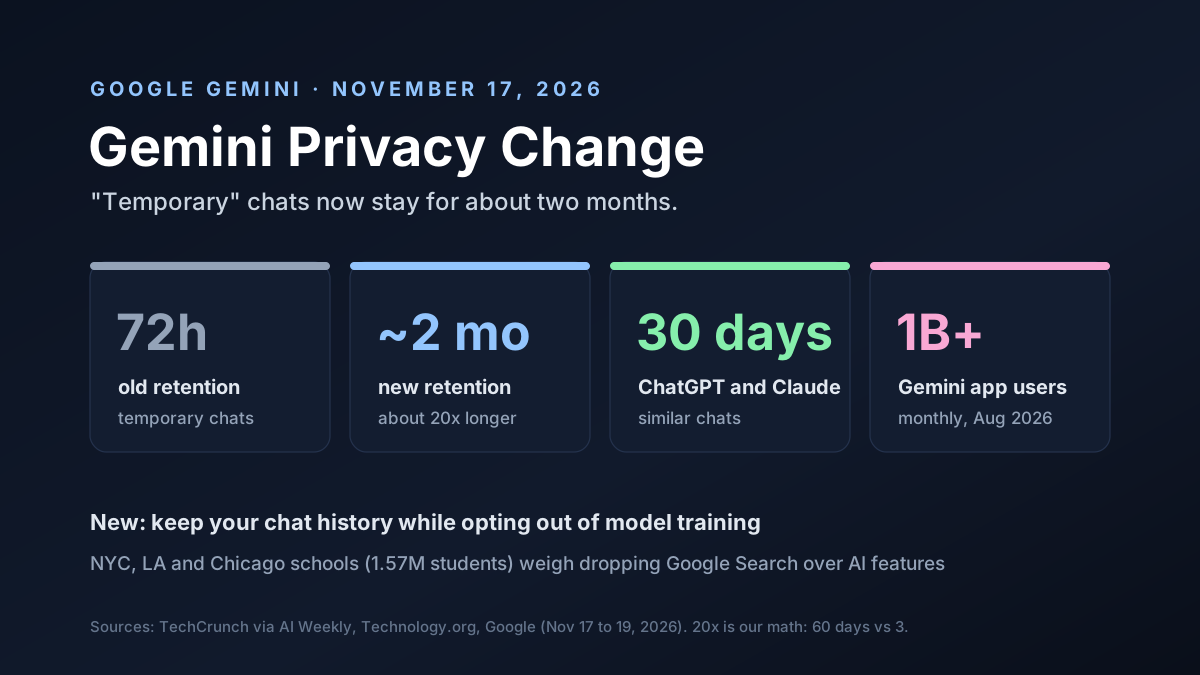
A Gemini privacy change is getting a lot of attention this week. Google now keeps "temporary" Gemini chats, and chats made with history turned off, for about two months. Until now, it kept them for just 72 hours.
That's roughly 20 times longer. It touches a lot of people: the Gemini app passed 1 billion monthly users in August.
The same week, the three largest school districts in the US said they may drop Google Search, because Google won't give them a version without AI. Together, the two stories raise one question for every team that uses AI at work: how much control do you really have over your data?
This guide covers what changed, how it compares, the new settings and what teams and schools should do next.
Key Takeaways
- Longer memory. Temporary chats and chats with history off are now kept for about two months, up from 72 hours.
- No training, Google says. Temporary chats still aren't used to train Google's models, though they now sit on its servers far longer than most people would expect from the word temporary.
- A new opt-out. Keep history, skip training.
- Longer than rivals. ChatGPT and Claude keep similar chats for about 30 days, which makes Gemini's new window roughly twice as long as either of its two biggest rivals.
- Schools push back. NYC, LA and Chicago are weighing other search engines over AI features.
The Gemini Privacy Change at a Glance
Here's what changed, as reported by TechCrunch on November 17, 2026:
| Item | What changed |
|---|---|
| Chats affected | Temporary chats and chats with history off |
| Old retention | 72 hours |
| New retention | Around two months |
| Used for training? | No, per Google |
| New setting | Keep history but opt out of training |
| Rollout | Global, in the Gemini app, over the coming weeks |
| Reported | November 17, 2026, by TechCrunch |
Google quietly updated its Gemini Apps Privacy Hub around November 16. An archived copy from November 12 still said 72 hours. The new page says "around two months."
What "Temporary" Means Now
Many people used temporary chat as a private mode. You'd ask a sensitive question, close the chat and assume it was gone within days.
That assumption no longer holds. Under the new policy, Google keeps those chats with your account for about two months. Google says it uses them to respond to you, handle feedback and protect Google, its users and the public.
It's worth reading that last part closely. "Protect the public" is broad. Google didn't say what prompted the change, or who inside the company can see the chats during that window, according to Technology.org.
Some limits still apply. Google says these chats don't train its models, and they won't show up in your visible history.
Why Google Says It Made the Gemini Privacy Change
Google framed the change as safety work. It said it is "continuing to invest in safety and security measures" to protect users and Gemini.
There are plausible reasons for that. Longer logs help a company spot abuse that unfolds over weeks, like scams, attacks on the model or harmful requests split across many chats. Three days of data can't show a pattern that takes weeks to form.
But Google didn't name a specific reason, and it didn't say whether the longer window changes how chats are reviewed. Until it does, users have to take the safety rationale on trust. That trust matters more each year. People now ask chatbots about health, money and work problems they would never type into a search box.
Gemini Privacy vs ChatGPT and Claude
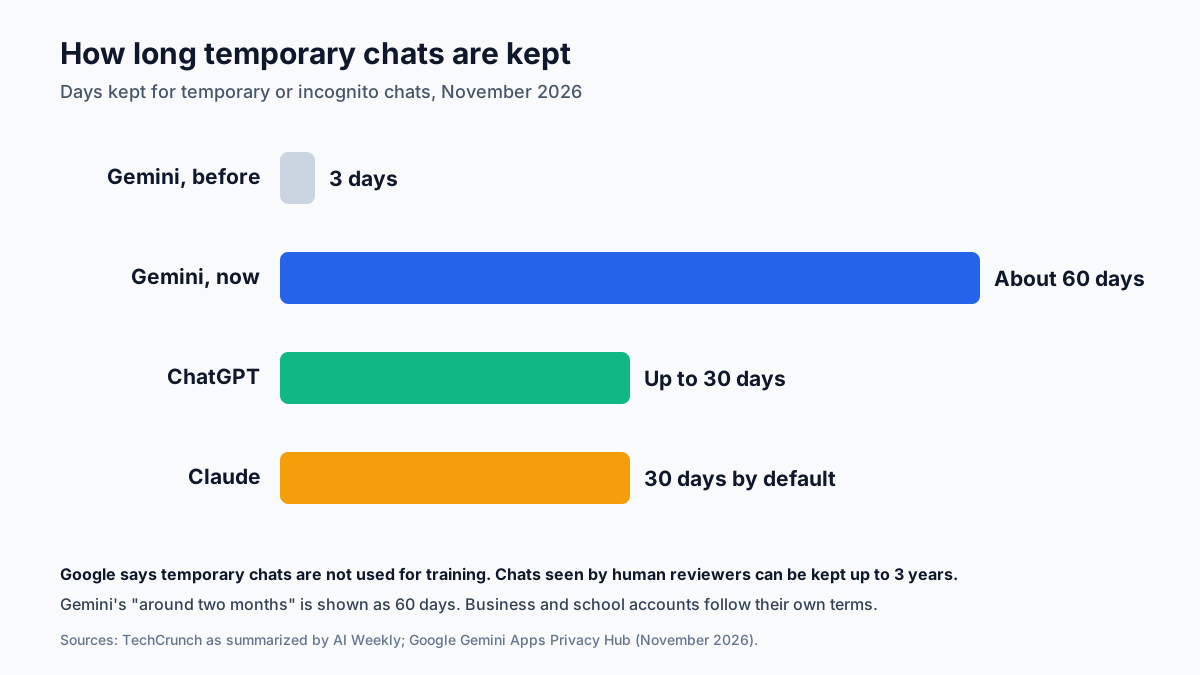
Google's new window is longer than its main rivals:
| Assistant | Temporary or incognito chats kept for |
|---|---|
| Google Gemini | About two months, up from 72 hours |
| OpenAI ChatGPT | Up to 30 days |
| Anthropic Claude | 30 days by default |
So Gemini went from the shortest window of the three to the longest. If short retention mattered to you, that's a real change.
One more detail matters. Google has long kept chats that a human reviewer looked at for up to three years, separated from your account. That rule isn't new, but it's easy to forget. It's one reason to keep truly sensitive details out of any consumer chatbot.
The New Gemini Training Setting
There is good news in the update. Google is splitting its single Keep Activity switch into two:
| Setting | Before | After the update |
|---|---|---|
| Keep chat history | One combined Keep Activity switch | Its own switch |
| Allow model training | Tied to Keep Activity | Its own switch |
| If Keep Activity was off | No history, no training | Both new switches start off |
Until now, keeping your chat history and letting Google train on it came as a pair. After the update, you can keep your history for your own use and still say no to training.
That's a real improvement for people who want their old chats but not their data in the next model. Check your settings once the update reaches your account. If you already had Keep Activity off, both new switches start off, so you won't need to do anything to keep training turned off on your chats.
How to Check Your Gemini Privacy Settings
It takes about two minutes. Here's what to look at:
- Open your activity settings: in Gemini, go to Settings and help, then Activity.
- Check the auto-delete period: choose how long your saved history is kept, such as 3, 18 or 36 months.
- Look for the new training switch: once the update reaches you, decide whether Google may train on your chats.
- Delete what you don't need.
- Use temporary chat with care: it still hides chats from your history, but they now stay on Google's side for about two months.
If you manage family devices, check the settings on each account. The defaults may differ from what you expect.
Who the Gemini Privacy Change Affects
The change covers the consumer Gemini app, rolling out globally over the coming weeks. With more than a billion monthly users, that's one of the largest groups of AI users anywhere.
Business and school accounts are a different case. Google Workspace customers usually work under separate terms, set by their admins, that limit how chat data is used. Don't assume the consumer rule applies to your work account, or that it doesn't. Ask your admin.
The real risk sits in between. It's staff who use a personal Gemini account for work. Their chats follow the consumer rules, including the new two-month window, no matter what the company's contract says.
Schools and the AI-Free Search Fight
The same week brought a second Google privacy and control story, this time about schools.
Public schools in New York City, Los Angeles and Chicago, with 1.57 million students combined, are weighing alternatives to Google Search. Their complaint: Google won't offer a version of Search without its AI features, such as AI Overviews.
| District | Position, as reported |
|---|---|
| New York City | Will explore other search options if Google doesn't reconsider |
| Los Angeles | Turned off AI Overviews for students, still evaluating Search |
| Chicago | Will look to other search tools if AI-free Search isn't possible |
Google clarified on November 3 that schools can turn on Search without turning on its separate Gemini apps. But schools still don't have an admin switch to remove AI Overviews while keeping classic search results. DuckDuckGo and Microsoft Bing are the alternatives being discussed.
Not everyone agrees there's a problem. A Reason column argued that schools that object can simply point students to search engines that let AI be turned off. As of November 19, no district had actually switched.
What Parents and Students Should Know
The school fight and the retention change land on the same people: students using Google tools every day. A few plain tips help:
- Use school accounts for schoolwork: their rules are set by the district, not by consumer terms.
- Keep personal details out of chatbots: names, addresses and health questions don't belong in an AI chat.
- Check AI answers against real sources: AI Overviews can be wrong, and teachers will notice.
- Ask what's allowed.
What the Gemini Privacy Change Means for Teams
For companies, the lesson isn't about Google alone. It's that AI vendors can change data rules at any time, often quietly, and staff usually won't notice.
Here's what to do now:
- Find out who uses personal AI accounts for work: a short survey is enough to start.
- Move work use to business accounts: business terms usually give you more control.
- Write down which tools are approved: people follow clear lists better than vague rules.
- Check retention terms for every AI tool: note the number of days for each one.
- Recheck every year.
We covered how short retention works in practice in our guide to zero data retention. It's worth a read if your contracts promise it, because the gap between what a contract says and what a consumer app does is exactly where data leaks happen.
Chat Retention Questions to Ask Any AI Vendor
Chat retention rules vary a lot between tools, and they can change without much notice. Before you approve any AI tool for work, ask the vendor:
- How many days do you keep normal chats, temporary chats and deleted chats?
- Do you train on our chats, and can we turn that off for every user?
- Who on your side can read our chats, and when?
- Do human reviewers ever see our data, and how long is that kept?
- How will you tell us if any of these rules change?
Date your notes. When terms change, as Gemini's just did, you'll know exactly what moved.
A Simple AI Data Policy
If your team doesn't have an AI data policy yet, start with five rules:
| Rule | Why it helps |
|---|---|
| Use business accounts for work | Business terms usually limit training and retention |
| List approved AI tools | People use what's allowed instead of guessing |
| Ban secrets in personal chatbots | Passwords, keys and client data stay out |
| Review vendor retention yearly | Policies change, as this one did |
| Log which tools touch which data | You can answer audits and requests |
None of these need new software. They need someone to own them and a few hours to write them down.
Worked Example: How Much More Data Is Kept
Here's our own math, to show the scale of the change. Two months is about 60 days. 72 hours is 3. So each temporary chat now sits on Google's servers about 20 times longer than before.
Say a team of 50 people each has 5 temporary chats a week. That's 250 a week, or about 36 a day, and a handful of new chats every working hour.
Under the old rule, about 100 of them existed at any one time, since each lasted 3 days. Under the new rule, it's about 2,100, roughly 20 times more, because each chat now lasts two months. That's a big pile for one small team.
That's the hidden cost of longer retention. More stored data means more to protect, more to review in a breach and more exposure if a request ever comes.
Risks and Open Questions
There's still a lot we don't know:
- Access: who at Google can see temporary chats during the two months
- Legal requests: how stored chats are handled when governments ask for data
- Regional rules: whether Europe and other regions get different terms
- Business accounts: whether any Workspace terms change too
- Schools: whether Google adds an AI-free Search option for districts
What to Watch Next
A few signals to track:
- The rollout, as the new settings reach accounts over the coming weeks
- Regulators, especially in Europe, where data rules are stricter
- Rival moves, if OpenAI or Anthropic change their own retention
- School decisions in New York, Los Angeles and Chicago
- Google's answer on whether it will offer AI-free Search to schools
We've tracked Google's other recent Gemini changes in our post on Gemini Spark.
Gemini Privacy Change: Our Take
The Gemini privacy change is a step back on one front and a step forward on another. Keeping temporary chats for two months instead of three days weakens what "temporary" used to mean. Splitting history from training gives users a choice they didn't have before.
For most people, the practical advice is simple. Don't put anything in a consumer chatbot that you wouldn't want stored for months. For companies, the message is bigger: know which AI tools your staff use, and know each one's data rules.
How Van Data Team Helps
We help teams use AI without losing track of their data:
- AI usage audits and policy setup, through AI agent development.
- Data pipelines that keep sensitive data in your own systems, via data pipeline development.
- Dashboards that show which AI tools touch which data, through agentic BI reporting.
- Cost and vendor reviews, through our cloud cost optimization service.
This article is based on reporting by TechCrunch, AI Weekly, Technology.org and Reason, plus Google's own posts, as of November 19, 2026. Need an AI data policy for your team? Get in touch and we'll help you write it.
AI Model Brief
The AI models worth knowing, once a week
What shipped, how it scores on independent benchmarks, what it costs per million tokens and what was deprecated, from the data behind our AI model benchmarks.
We use your address only to send the brief. See our privacy policy.
See this week’s brief
Founder of Van Data Team. Builds Vanaxity, the AI agent system for SEO, GEO, and AEO, and leads data engineering delivery for B2B teams.
About the authorArticle FAQ
Questions readers usually ask next.
These short answers clarify the practical follow-up questions that often come after the main article.
Need a similar system?
If this article maps to a workflow your team already operates, the next step is usually a scoped review of the system, constraints, and rollout path.
Consultation
Scope your next AI workflow.
Share the system and blockers. We will map fit, gaps, and the next step.