OpenAI Models on Google Cloud: What Changes for AI Teams
OpenAI models on Google Cloud: GPT-6 Astra, GPT-6.1 Sol and GPT-6 Luna are in private preview in Model Garden. What's included, what isn't and who benefits.
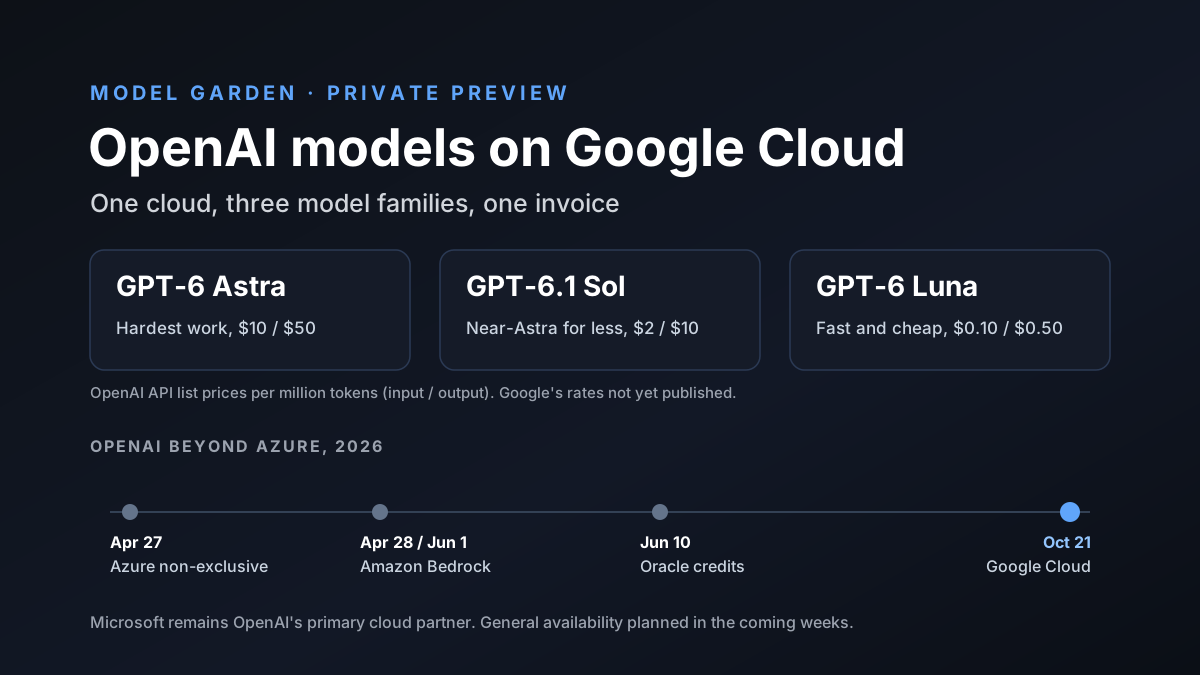
OpenAI models on Google Cloud were hard to imagine a year ago. On October 21, 2026, Google Cloud added OpenAI's GPT-6 Astra, GPT-6.1 Sol and GPT-6 Luna to its Model Garden. They're rolling out in private preview to selected enterprise customers.
Google now says it's the only major cloud with all three leading closed model families: OpenAI's GPT, Anthropic's Claude and its own Gemini. So what's in it? Here's what's included, what's still missing and what it means for teams building with AI.
Disclosure: Van Data Team builds with Claude, GPT, Gemini and other models, and this article was researched with Claude, which Anthropic makes. Anthropic's models are part of this story, so we've stuck to what Google and OpenAI announced.
Key Takeaways
- Google Cloud added GPT-6 Astra, GPT-6.1 Sol and GPT-6 Luna to Model Garden on October 21, 2026, in private preview.
- Usage bills through Google Cloud Marketplace and draws down existing Google Cloud commitments. General availability is planned in the coming weeks.
- Google says prompts and outputs stay in the customer's data perimeter and aren't used for training. Zero Data Retention is still "coming soon."
- This is the last big step in OpenAI's move beyond Azure, after AWS in April and Oracle in June. Microsoft remains OpenAI's primary cloud partner.
- For AI teams, the main gain is simpler buying and easier model switching inside one cloud.
OpenAI Models on Google Cloud at a Glance
| Item | Details |
|---|---|
| Announced | October 21, 2026 |
| Models | GPT-6 Astra, GPT-6.1 Sol and GPT-6 Luna |
| Where | Model Garden on Google Cloud's Gemini Enterprise Agent Platform |
| Status | Private preview for selected enterprise customers |
| Billing | Google Cloud Marketplace, counts toward commitments |
| Coming soon | General availability, Zero Data Retention, Confidential Compute |
| Also coming | OpenAI models in Gemini for business and Google Antigravity |
What Google Cloud Announced
Michael Gerstenhaber, who runs Gemini product work at Google Cloud, wrote the post. His point, per Unite.AI's summary, is simple. Good business AI means matching each task to the right model, not using one model for everything.
Model Garden already lists more than 200 models from Google, partners and open-source projects. Adding OpenAI's newest models fills the biggest gap, since GPT was the one major closed model family that Google Cloud customers couldn't buy there until now.
From October 21, customers in the preview can call the models through Google Cloud's APIs. Google says OpenAI models will also come to Gemini for business and to Google Antigravity, its coding tool, though both are listed as coming soon.
The Three OpenAI Models on Google Cloud
Each model covers a different kind of work. Here's how Google describes them, with OpenAI's own API list prices for comparison:
| Model | Best for | OpenAI API price, per million tokens (input / output) |
|---|---|---|
| GPT-6 Astra | Demanding coding, computer use, professional work and research | $10 / $50 |
| GPT-6.1 Sol | Near-Astra quality at lower cost for agents and coding | $2 / $10 |
| GPT-6 Luna | Fast, cheap everyday work at scale | $0.10 / $0.50 |
Google hasn't shared its own prices for these models yet. Don't assume they match OpenAI's API prices until your account team says so. Our post on GPT-6 Sol and Luna covers how the cheaper models perform in independent tests.
What the Three Models Cost in Practice
Price gaps between the three models are large. Here's a simple example, using OpenAI's list prices and our own math. Say one task uses 10 million input tokens and 2 million output tokens a month:
| Model | Input cost | Output cost | Monthly total |
|---|---|---|---|
| GPT-6 Astra | $100 | $100 | $200 |
| GPT-6.1 Sol | $20 | $20 | $40 |
| GPT-6 Luna | $1 | $1 | $2 |
Astra costs 100 times as much as Luna for the same work. So the choice of model often matters more than the choice of cloud. Use the strong model only where it pays off, and test whether a cheaper one is good enough for the rest.
Real costs will differ. Cached input is much cheaper, Google's rates aren't public yet and many tasks use far fewer tokens. Treat this as a way to compare, not a quote.
How Billing Works: Commitments and One Invoice
For many companies, billing is the most useful part of the news. OpenAI models are sold through Google Cloud Marketplace. Usage appears on your normal Google Cloud invoice.
It also draws down your existing cloud commitments and counts toward Flexible Savings Plans, Google says. If your company has already committed to spend a set amount with Google Cloud, you can use that money on OpenAI models.
That matters more than it sounds. Signing a new AI vendor can take months of legal, security and procurement review. Buying through a cloud you already use often skips most of that.
Data, Security and Governance Terms
Google set out three promises for running OpenAI models on its platform:
- Data perimeter: your prompts and outputs stay inside your chosen data boundary and are never used to train models.
- Isolated access: the models run on dedicated Google Cloud infrastructure. Queries pass through isolated gateways, and OpenAI gets no access to your cloud environment.
- Audit and identity: every model call runs under an authenticated identity, with VPC Service Controls and unified audit logs.
Two important options aren't ready yet. Zero Data Retention, which stops providers keeping your data even briefly, is "coming soon." So is Confidential Compute. If your rules require either one, wait before moving sensitive workloads. Our AI governance guide covers how to set those rules.
Codex on Google Cloud
Developers get something too. Google says users can connect their local Codex CLI and Codex Desktop to Google Cloud for inference, starting October 21. OpenAI says full Codex availability on Google Cloud is planned in the coming weeks.
For teams that like Codex but run their infrastructure on Google Cloud, this removes a common blocker. Coding work can now run through the same cloud account, billing and logs as everything else.
OpenAI's Multi-Cloud Timeline
This launch completes a big shift. For years, OpenAI's models were sold on Azure and nowhere else among the big clouds. That changed in 2026:
| Date | What happened |
|---|---|
| April 27, 2026 | Microsoft and OpenAI amend their deal; Microsoft's license becomes non-exclusive |
| April 28, 2026 | OpenAI models arrive on Amazon Bedrock in limited preview |
| June 1, 2026 | OpenAI models become generally available on Amazon Bedrock |
| June 10, 2026 | OpenAI says Oracle customers can use Oracle credits for OpenAI models and Codex |
| October 21, 2026 | Google Cloud adds OpenAI models to Model Garden in private preview |
Still, OpenAI says Microsoft is its main cloud partner. For the earlier steps, see AWS's launch post and OpenAI's Oracle news. Our post on GPT-5.6 on Amazon Bedrock covers the AWS side.
What It Means for Each Type of Cloud Customer
The news lands differently depending on where you run today:
- Google Cloud shops: the biggest winners. You can now use GPT models without a new vendor, under the controls you already have.
- Azure shops: little changes. You already had OpenAI models, and Microsoft is still OpenAI's main cloud partner.
- AWS shops: you've had OpenAI models on Bedrock since April, so the real difference now is that Gemini, which Google keeps on its own cloud, is the one family you can't get on AWS.
- Multi-cloud companies: you now have more ways to buy the same model. Compare price, limits and data terms on each cloud before you pick one.
For most teams, the right move is to use the cloud you already trust, then make sure your apps can switch models if needed.
What It Means for Microsoft
Microsoft once had OpenAI's models to itself among the big clouds. That edge is now gone. AWS, Oracle and Google can all sell OpenAI models too.
Microsoft still has a lot. OpenAI calls it its primary cloud partner, and Microsoft builds OpenAI models into its own products, such as Microsoft 365 Copilot. But Azure can no longer win customers just because it's the only place to get GPT.
For buyers, more competition is good news. It gives you more room to push for better prices, higher limits and stronger data terms, because each cloud now has to compete for the same OpenAI workloads.
Is Google Really the Only Cloud With All Three?
Google says it's the only big cloud with all three top closed model families. Per Techzine, those are GPT-6 Astra, Claude Fable 5.1 and Gemini 4 Argon.
The claim holds up, with one caveat. AWS and Azure both offer OpenAI and Anthropic models. But Google keeps Gemini on its own cloud, so neither rival can offer all three. Google can, because it's the only one that owns one of the three model families.
In other words, Google's edge here comes from its own model, not from a better deal with OpenAI. For buyers, the result is the same: one platform where you can try all three side by side.
Why OpenAI Models on Google Cloud Matter for AI Teams
For teams that build with AI, this changes a few practical things:
- Simpler buying: teams on Google Cloud no longer need a separate OpenAI contract to use GPT models at work.
- Easier comparison: you can test GPT, Claude and Gemini on the same platform, with the same logs and permissions.
- Easier switching: if one model gets slower, pricier or worse at a task, you can change models without changing cloud.
- Fewer exceptions: security teams can review one platform instead of approving each model vendor separately.
It doesn't make models interchangeable, though. Each family still behaves differently, and prompts tuned for one often need work on another.
When to Use OpenAI Models on Google Cloud
Going through Google Cloud isn't always the best choice. Here's how we'd think about it:
- Use it if your company already runs on Google Cloud, has unused commitments or needs one bill and one set of audit logs.
- Use it if you want to compare GPT, Claude and Gemini under the same security controls.
- Wait if you need Zero Data Retention or Confidential Compute today, since both are still coming.
- Go direct to OpenAI if you need the newest OpenAI features the day they launch. Cloud versions can lag behind.
Many teams will end up with both: OpenAI direct for experiments and new features, and Google Cloud for production work that must meet company rules.
What's Still in Preview for OpenAI Models on Google Cloud
It's easy to read a launch like this as finished. It isn't. Here's what's still missing or unclear:
- General access: the models are in private preview for selected customers. Others must join a waiting list.
- Pricing: Google hasn't published per-token rates for the models on its platform.
- Data options: Zero Data Retention and Confidential Compute are listed as coming soon.
- Wider products: OpenAI models in Gemini for business and Google Antigravity are also coming later.
- Feature parity: it's not yet clear which OpenAI API features, such as specific tools or batch options, will work the same way on Google Cloud.
Plan pilots now, but don't commit production timelines until general availability.
How to Get Access to OpenAI Models on Google Cloud
If you want in, the steps are straightforward:
- Step 1: fill in Google Cloud's interest form for OpenAI models, or ask your Google Cloud account team.
- Step 2: confirm pricing and whether usage will count toward your commitment.
- Step 3: check which data protections are live for your account.
- Step 4: run a small pilot on one real task, comparing GPT with the models you already use.
Keep the pilot narrow. One task with clear measures beats a broad test that's hard to judge.
A Simple Pattern for Using Several Models
Having three model families on one cloud is only useful if your system can actually switch between them. A pattern we use with clients looks like this:
- One gateway: route all model calls through a single internal service, so you can change models without changing app code.
- Task-level choices: pick a model per task, not per company. Cheap for sorting. Strong for hard reasoning.
- Shared tests: keep a set of real test cases and run every candidate model against them before switching.
- A fallback: if one model is slow or down, send the request to a second choice automatically.
This setup works the same whether your models come from Google Cloud, AWS, Azure or the providers directly. It's what turns "model choice" from a marketing line into a real saving.
Questions to Ask Before You Switch
Before moving work onto OpenAI models through Google Cloud, get clear answers to these:
- What will we actually pay per million tokens, and does it all count toward our commitment?
- Which data protections apply today, and when will Zero Data Retention be available for our account?
- Which features are supported, and how quickly do new OpenAI releases reach Google Cloud?
- What are the rate limits in preview and after general availability?
- Who fixes it when something breaks?
If your account team can't answer these yet, that's normal for a preview. Just don't move critical work until they can.
Common Mistakes With OpenAI Models on Google Cloud
New options invite quick decisions. These are the mistakes we expect to see most:
- Moving everything at once. Start with one task, prove it works on real data with real users and only then move the next one across.
- Using the top model everywhere. Astra is great, but most tasks don't need it. Try Sol or Luna first, and step up to Astra only where you can show the extra quality is worth five to 100 times the price.
- Skipping the data check. Preview terms can differ from final ones. Read them before you send real customer data.
- Copying prompts as they are. A prompt tuned for Gemini or Claude may need changes for GPT, because each model family reads instructions a little differently.
- Forgetting the exit. Keep your apps able to switch models. Today's best choice may not be next quarter's.
None of these are hard to avoid. They just need a plan before the excitement of a new launch takes over.
OpenAI Models on Google Cloud: Our Take
This is a good change for buyers. OpenAI models on Google Cloud mean fewer contracts, simpler billing and an easier way to compare the leading model families under one set of controls. It also shows how far the market has moved from the single-cloud deals of a few years ago.
The limits are real for now: a private preview, no published pricing and key data options still coming. Teams on Google Cloud should start a small pilot, measure results on real tasks and keep their systems flexible enough to switch models as prices and quality change.
How Van Data Team Helps Teams Use Several AI Models
We help companies build AI systems that aren't tied to one model or one cloud. That means setting up model gateways, building test sets from real tasks, comparing GPT, Claude and Gemini on cost and quality, and adding the logging and controls your security team needs.
Planning a model test? Start with our GPT-6 Astra vs Fable 5.1 comparison and our Gemini 4 Argon review.

Founder of Van Data Team. Builds Vanaxity, the AI agent system for SEO, GEO, and AEO, and leads data engineering delivery for B2B teams.
About the authorAI model benchmarks
Models in this article
Current pricing, context window and independent scores for each model.
Side by side
Article FAQ
Questions readers usually ask next.
These short answers clarify the practical follow-up questions that often come after the main article.
Need a similar system?
If this article maps to a workflow your team already operates, the next step is usually a scoped review of the system, constraints, and rollout path.
Consultation
Scope your next AI workflow.
Share the system and blockers. We will map fit, gaps, and the next step.