Claude Code 403 Cloudflare Error: Causes, Fixes and Status
Hit the Claude Code 403 Cloudflare error? Check the Anthropic status page first, then use these fixes and backup paths for a login error or mid-session drop.
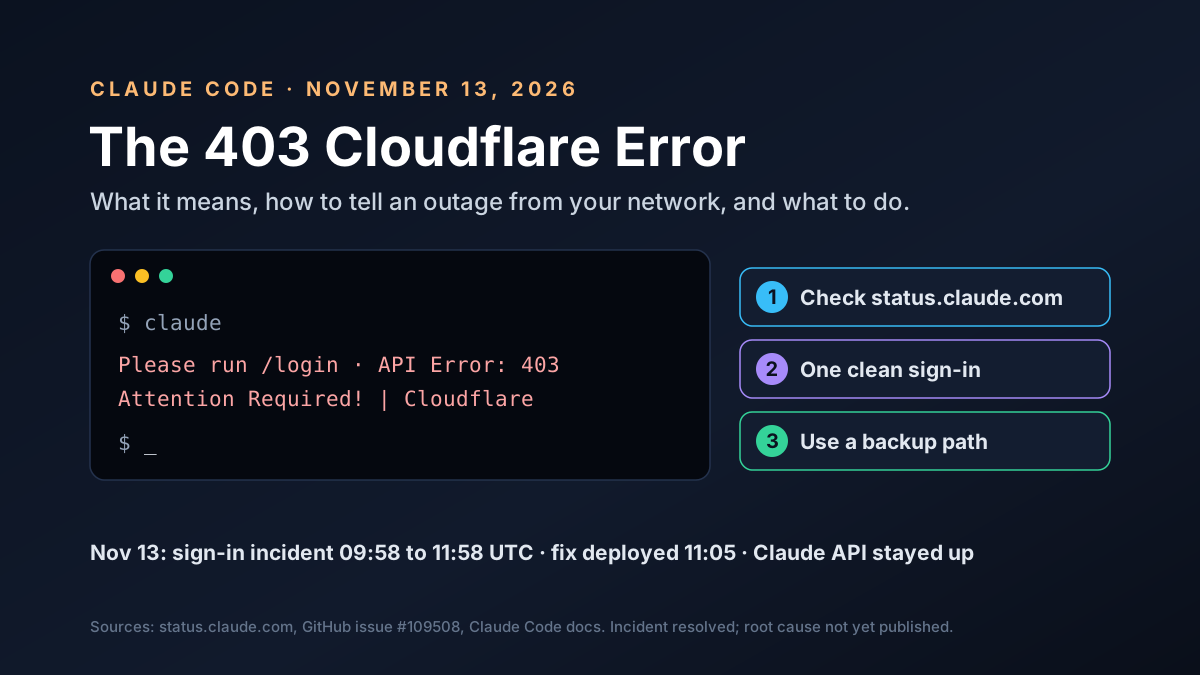
If Claude Code suddenly says "API Error: 403 Attention Required! | Cloudflare" and asks you to run /login again, you're not alone. On November 13, 2026, users around the world hit this error at the same time.
Anthropic confirmed a problem. At 09:58 UTC, its status page posted an incident about users signing in to Claude.ai and Claude Code. A fix went out at 11:05 UTC, and the incident was marked resolved at 11:58 UTC. If the error showed up for you that morning, your machine was probably fine.
This guide explains what the Claude Code 403 Cloudflare error means, how to tell an outage from a local problem, and what you can safely do while you wait.
Key Takeaways
- Check the status page first. On November 13, Anthropic reported a sign-in incident from 09:58 to 11:58 UTC.
- It's often not your fault. A 403 from Cloudflare means a security layer blocked the request before it reached Claude.
- Don't reinstall. One clean sign-in is fine, but repeated logins and reinstalls won't fix a server-side problem.
- Backups exist. An API key or Claude through Bedrock, Google Cloud or Microsoft Foundry kept working.
- If it's only you, check your VPN, proxy and Claude Code version.
Claude Code 403 Cloudflare Error at a Glance
Here's what's known about the November 13 incident:
| Item | What's known |
|---|---|
| Error text | API Error: 403 Attention Required! | Cloudflare |
| Where users saw it | At /login and mid-session in Claude Code |
| Incident start | November 13, 2026, 09:58 UTC |
| Status page title | Elevated errors on claude.ai, Claude Code, and platform.claude.com |
| Fix and resolution | Fix deployed 11:05 UTC; resolved 11:58 UTC |
| Not affected | Claude API, Bedrock, Google Cloud and Microsoft Foundry paths |
The first GitHub report appeared at 09:57 UTC, one minute before the status page update. Other users quickly added that they saw the same message. One, on a Taiwan home connection with no VPN, said it struck mid-session: a request worked, then the next one got the 403.
Timeline of the November 13 Incident
Here's how the morning unfolded, in UTC, from GitHub and the Anthropic status page:
| Time (UTC) | What happened |
|---|---|
| 09:57 | First GitHub report: 403 Attention Required at /login |
| 09:58 | Status page opens an incident about sign-in to Claude.ai and Claude Code |
| 10:10 | A user reports the 403 striking mid-session, after a tool ran |
| 10:21 | A user says a VPN got them through |
| 11:05 | Anthropic deploys a fix and starts monitoring |
| 11:58 | Incident marked resolved |
A separate incident followed from 13:09 to 15:38 UTC, and this one degraded the Claude API and agents as well. We cover both, plus the Microsoft 365 outage the same week, in our post on the Claude and Microsoft outages.
What Anthropic Has Said
Anthropic's updates were short. First it said it was investigating an issue with users authenticating to Claude.ai and Claude Code. At 11:05 UTC it said a fix had been deployed, and at 11:58 UTC it marked the issue resolved.
It hasn't named a cause. Not yet. It also hasn't said whether Cloudflare rules, a sign-in service or something else was at fault. Treat any confident explanation you see on social media with care until Anthropic posts one.
What the Error Actually Means
Anthropic, like many large services, puts Cloudflare in front of its servers. Cloudflare checks each request and blocks traffic that looks like an attack or a bot.
When it blocks a request, it returns a page titled "Attention Required!" with a 403 code. A browser can show that page and sometimes a challenge to solve. Claude Code can't. It just reports the 403 and asks you to log in again.
So it tells you where. Not why. The cause can be on Anthropic's side. Or it can be on yours, such as a VPN exit point that Cloudflare distrusts.
Cloudflare's block page usually includes a Ray ID, a code that identifies the request. It's useful if you report the problem, per Cloudflare's docs.
Claude Code 403 Cloudflare Error vs Other 403 Errors
Not every 403 in Claude Code means the same thing. The words after the number matter:
| Error text | What it usually means | Where to look |
|---|---|---|
| 403 Attention Required, Cloudflare | A security layer blocked the request | Status page, then your network |
| 403 Request not allowed | Your account or role lacks access | Subscription and Console role |
| Plain 403 on the install script | A proxy or network filter blocked the download | Proxy and firewall |
The "Request not allowed" version is the one Anthropic documents. Its troubleshooting guide says to check your subscription, your Console role and any proxy. The "Attention Required" version doesn't appear in the docs at all. It's Cloudflare's own block page, which is why the fix often sits outside your account settings.
Claude Code 403 Cloudflare Error: Outage or Just You?
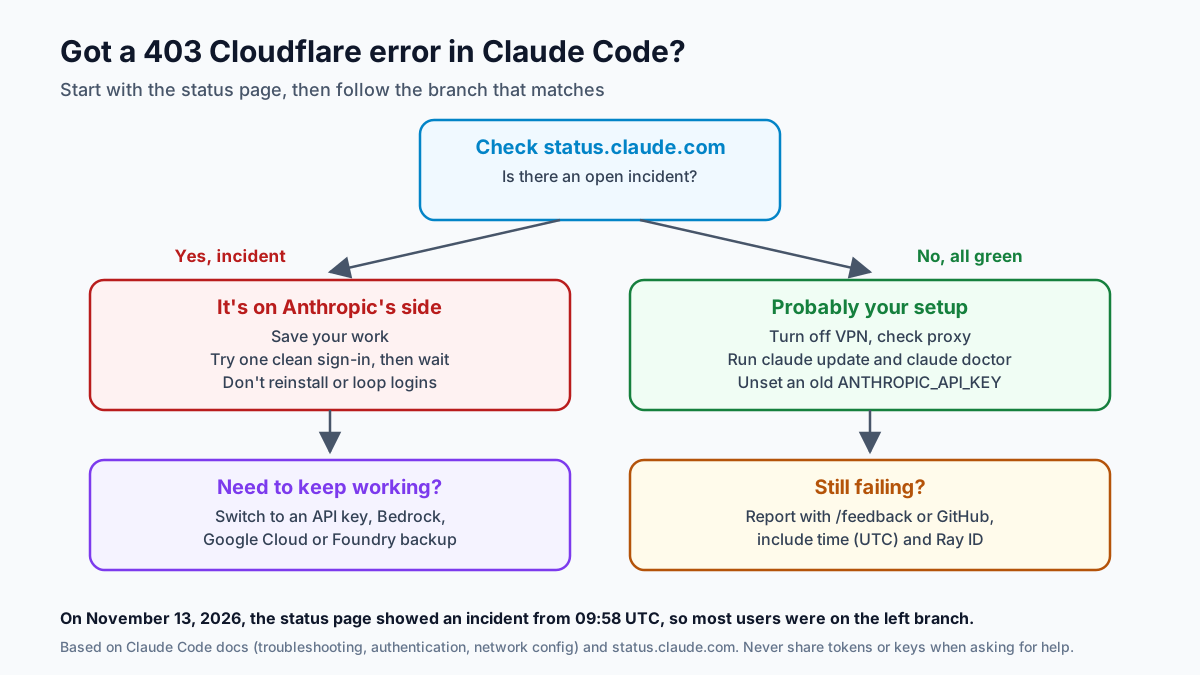
Start here. It takes 30 seconds and saves a lot of guesswork.
Open status.claude.com. Here's what it showed at 10:50 UTC on November 13, mid-incident:
| Component | Status at 10:50 UTC, Nov 13 |
|---|---|
| claude.ai | Major outage |
| Claude Code | Partial outage |
| Claude Console (platform.claude.com) | Partial outage |
| Claude Cowork | Degraded performance |
| Claude API (api.anthropic.com) | Operational |
| Claude on cloud platforms | Operational |
Notice the split. The login-based products were hit, while the Claude API and the cloud provider paths stayed up. So the trouble was in sign-in, not in the models themselves, which is why API keys and cloud accounts kept working all morning.
Other quick signs of an outage:
- Teammates on different networks see the same error.
- The GitHub issues for Claude Code fill with similar reports.
- The claude.ai website also fails to load your account.
If all three are true, stop debugging your machine and wait.
What to Do During a Claude Code Outage
When the status page shows an incident, the best fix is patience. But there are a few things that help, and a few that hurt.
Do these:
- Save your work by committing or stashing changes
- Try one clean sign-in: run /logout, close Claude Code and start it again
- Subscribe to updates on the status page
Anthropic's troubleshooting guide lists that clean sign-in as the first step for login loops.
Avoid these:
- Reinstalling Claude Code or deleting its config folders
- Logging in again and again in a loop, which can look even more like bot traffic
- Setting
NODE_TLS_REJECT_UNAUTHORIZED=0, which Anthropic's docs warn against - Pasting tokens or keys into chats or forums while asking for help
One user on GitHub said a VPN got them through. That may work for some people, but changing networks can also trigger more security checks. Only do it if your company allows it.
How to Fix the Claude Code 403 Cloudflare Error When It's Only You
If the status page is green and your teammates are fine, the problem is likely local. Here are the common causes:
| Likely cause | Signs | What to try |
|---|---|---|
| Anthropic incident | Status page shows an incident; many users hit it at once | Wait, or use a backup path |
| VPN or shared IP | Works on another network | Turn the VPN off, or ask IT |
| Corporate proxy | Other web tools also get blocked | Check proxy settings with IT |
| Stale login | Only you are affected | One clean sign-in |
| Old version | You haven't updated in a while | Run claude update |
Work through them in order:
- Turn off your VPN and try again, since shared exit points often trip security checks
- Check your proxy settings with IT
- Update Claude Code with
claude updatefrom your shell
Then two quick checks:
- Run
claude doctorto print installation and settings diagnostics - Look for stray keys: an old
ANTHROPIC_API_KEYcan override your subscription login
Claude Code reads HTTPS_PROXY and NO_PROXY at startup, and /status shows a Proxy row, per the network guide. The authentication docs explain the key order; unset an old key if you don't mean to use it.
If you're on a company network, ask IT to allow the hosts Claude Code needs, such as api.anthropic.com, claude.ai, claude.com and platform.claude.com. The full list, including hosts for downloads, MCP servers and the browser bridge, is in the network guide.
Is Your Account or Data at Risk?
A login error during an outage isn't a sign that your account was hacked. Nothing on the status page points to a data problem. It describes trouble signing in.
But outages do bring one real risk: scams. When many people can't log in, fake support messages and lookalike login pages tend to appear. Only sign in through Claude Code itself or claude.ai, and never paste a token or key into a page someone sends you.
If you're worried, change your password after the incident ends and review active sessions in your account settings. That's good hygiene, not an emergency step.
Claude Code 403 Cloudflare Error: Backup Paths That Kept Working
Here's the useful part for teams, and the one most worth acting on once things calm down. On November 13, the problem hit subscription sign-in. Other ways of reaching Claude stayed up.
Claude Code can use several sign-in methods, and the docs list a clear order. Cloud provider settings come first, then API keys, then your claude.ai subscription. So a team with a backup set up can switch in minutes:
| Backup path | What you need | Setting |
|---|---|---|
| Anthropic API key | A Console account with billing | ANTHROPIC_API_KEY |
| Amazon Bedrock | AWS account with Claude access | CLAUDE_CODE_USE_BEDROCK=1 |
| Google Cloud | Project with Claude enabled | CLAUDE_CODE_USE_VERTEX=1 |
| Microsoft Foundry | Foundry resource with Claude | CLAUDE_CODE_USE_FOUNDRY=1 |
For Amazon Bedrock, you set CLAUDE_CODE_USE_BEDROCK=1 and your AWS region and profile. For Google Cloud, you set CLAUDE_CODE_USE_VERTEX=1, your region and your project ID. Each has a setup wizard too.
There's a catch. These paths bill differently from a Claude subscription, and they need setup before an outage, not during one. Also note that the second incident that day did degrade the Claude API, so a backup through a cloud provider covers more failure types than an API key alone. If your team hasn't done it, today is a good reminder to plan it.
The Claude Code 403 Cloudflare Error in CI and Scripts
Outages hit automation differently. A developer can wait. A nightly job just fails.
If your scripts sign in with a token from claude setup-token, they use the same account sign-in system that had trouble on November 13. They may fail in the same way. API keys and cloud credentials take a separate path. Those stayed up.
Three habits make scripts sturdier:
- Retry with a delay instead of failing the whole run on the first 403.
- Log the full error, including any Ray ID, so you can match it to the incident later.
- Keep a switch that moves the job to a backup path without a code change.
Why This Matters for Teams That Rely on Claude Code
For many developers, Claude Code is now part of the daily workflow. When sign-in fails, work slows down for everyone at once.
That's a dependency like any other. You wouldn't run production on one server with no failover, no alerts and nobody watching, so don't run your coding workflow that way either. Coding agents deserve some of the same thinking:
- Know who owns the fix. Pick one person to watch the status page and post updates.
- Keep a backup ready: an API key or cloud path, tested once a quarter, with written steps that anyone on the team can follow under pressure.
- Don't block CI on it. Pipelines that call Claude Code should fail softly and retry later.
- Track the cost. Note how many hours an outage costs, so you can judge what a backup is worth.
We covered another side of this in our post on Claude Code secrets leaks. Both point to the same lesson: treat your AI coding tool as real infrastructure.
Worked Example: What a Two-Hour Outage Costs
Here's our own math with made-up numbers, to show why a backup can be worth it.
Say a team of 20 developers uses Claude Code most of the day. An outage blocks half their work for two hours. That's 20 hours of reduced output.
At a loaded cost of $100 an hour, that's about $1,000 of slowed work, or more if a release is waiting. Setting up an API key backup once might take an hour of an engineer's time, plus some usage charges when you need it.
One outage won't break a team. If it happens a few times a year? A tested backup pays for itself.
How to Report the Error Usefully
If the problem continues after the status page goes green, report it. A good report gets fixed faster:
- Use /feedback in Claude Code if you can start a session; it attaches session context.
- Check GitHub issues for the Claude Code repo and add to an existing report.
- Contact support through claude.ai's Get help menu for account issues, per Anthropic's support page.
Include the time in UTC, your operating system, your network type, whether you use a VPN or proxy, and the Ray ID if you saw one. Don't include passwords, tokens or keys.
A Quick Checklist You Can Pin
Save this for the next time Claude Code throws a 403:
- Check status.claude.com before anything else.
- Ask one teammate, ideally on a different network, if they see the same error.
- Save your work.
- Try one clean sign-in, not ten, because repeated logins can look like bot traffic to the same security layer that blocked you.
- Turn off your VPN if you use one.
- Run
claude updateandclaude doctor. - Switch to your backup path if the outage drags on.
- Report it with the time and Ray ID if it lasts after a fix.
That's it. Most of the time, the first three steps tell you all you need to know.
What to Watch Next
A few things will show how this plays out:
- A root cause for the sign-in incident, if Anthropic shares one
- A post-incident report, if Anthropic publishes one
- Whether errors return in the hours after a fix
- Any guidance from Anthropic on what users should do after sign-in recovers
We'll update this guide if Anthropic shares more.
Claude Code 403 Cloudflare Error: Our Take
Most people who saw this error on November 13 did nothing wrong. The fastest fix was to check the status page, try one clean sign-in and then wait.
The bigger lesson is for teams. A coding agent that the whole team relies on needs a plan B, just like any other critical tool. Set up an API key or cloud path now, test it and write down who switches when. The next outage will be a short pause instead of a lost afternoon.
How Van Data Team Helps
We help teams run AI tools reliably:
- Backup access setups for Claude through API keys or your cloud provider, via AI agent development.
- Monitoring and alerts for the AI services your team depends on, through our system operations and maintenance service.
- CI pipelines that degrade gracefully when an AI tool is down, via data pipeline development.
- Cost tracking for AI tools and outages, through agentic BI reporting.
This article reflects Anthropic's status page and public reports as of November 14, 2026. Need a backup plan for your team's AI tools? Get in touch and we'll help you set one up.
AI Model Brief
The AI models worth knowing, once a week
What shipped, how it scores on independent benchmarks, what it costs per million tokens and what was deprecated, from the data behind our AI model benchmarks.
We use your address only to send the brief. See our privacy policy.
See this week’s brief
Founder of Van Data Team. Builds Vanaxity, the AI agent system for SEO, GEO, and AEO, and leads data engineering delivery for B2B teams.
About the authorArticle FAQ
Questions readers usually ask next.
These short answers clarify the practical follow-up questions that often come after the main article.
Need a similar system?
If this article maps to a workflow your team already operates, the next step is usually a scoped review of the system, constraints, and rollout path.
Consultation
Scope your next AI workflow.
Share the system and blockers. We will map fit, gaps, and the next step.