Claude and Microsoft Outages: What AI Teams Should Learn
The Claude and Microsoft outages hit the same week: Microsoft 365 broke Claude's Outlook tools, then a Claude outage followed. What failed and what to fix now.
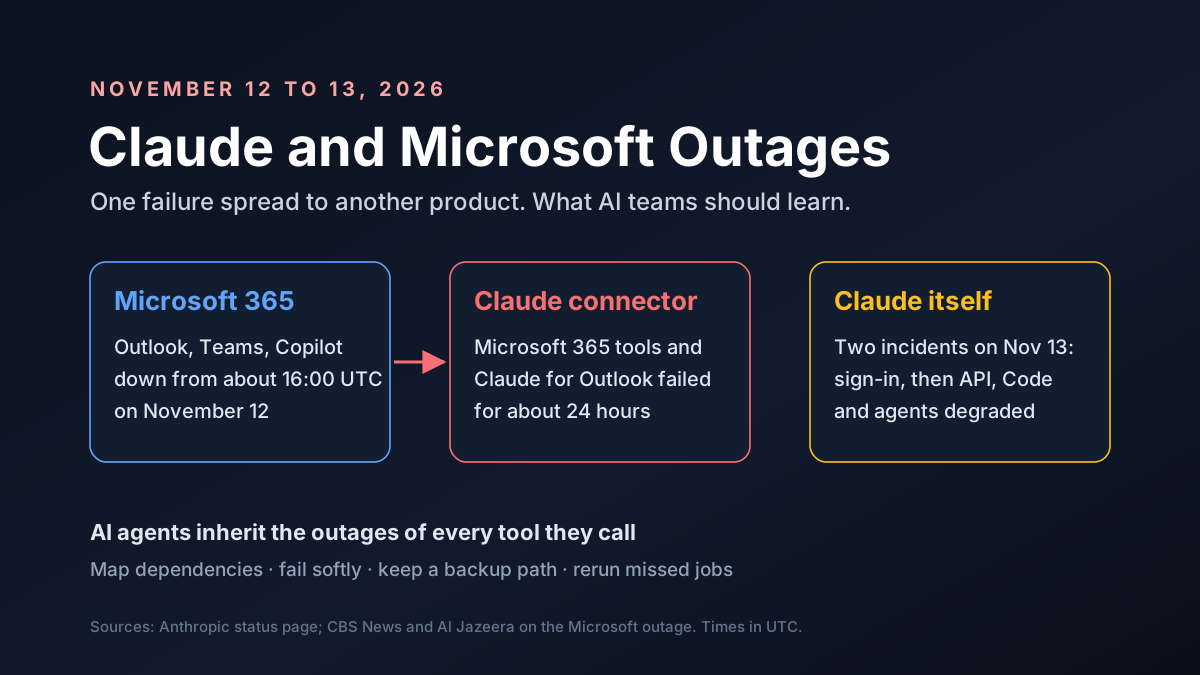
It was a bad week to depend on the cloud. On November 12, 2026, a global Microsoft 365 outage knocked out Outlook, Teams and Copilot for users in more than 70 countries. The next day, Claude had two incidents of its own.
The two stories met in the middle. When Microsoft 365 failed, Claude's Microsoft 365 connector and Claude for Outlook failed with it, Anthropic said, for about 24 hours.
This guide lays out what happened in the Claude and Microsoft outages, how one failure spread to another product, and what AI teams should change before the next one.
Key Takeaways
- Microsoft 365 went down globally from about 16:00 UTC on November 12, and recovery dragged into November 13.
- Claude's Microsoft tools broke with it. The Microsoft 365 connector and Claude for Outlook returned errors from 16:03 UTC on November 12 to 16:40 UTC on November 13.
- Claude had two separate incidents on November 13: a sign-in problem, then a wider one that hit the Claude API and agents.
- Agents inherit outages. An AI agent is only as available as every tool it calls.
- The fix is planning, not panic: map dependencies, fail softly and keep a backup path.
Claude and Microsoft Outages at a Glance
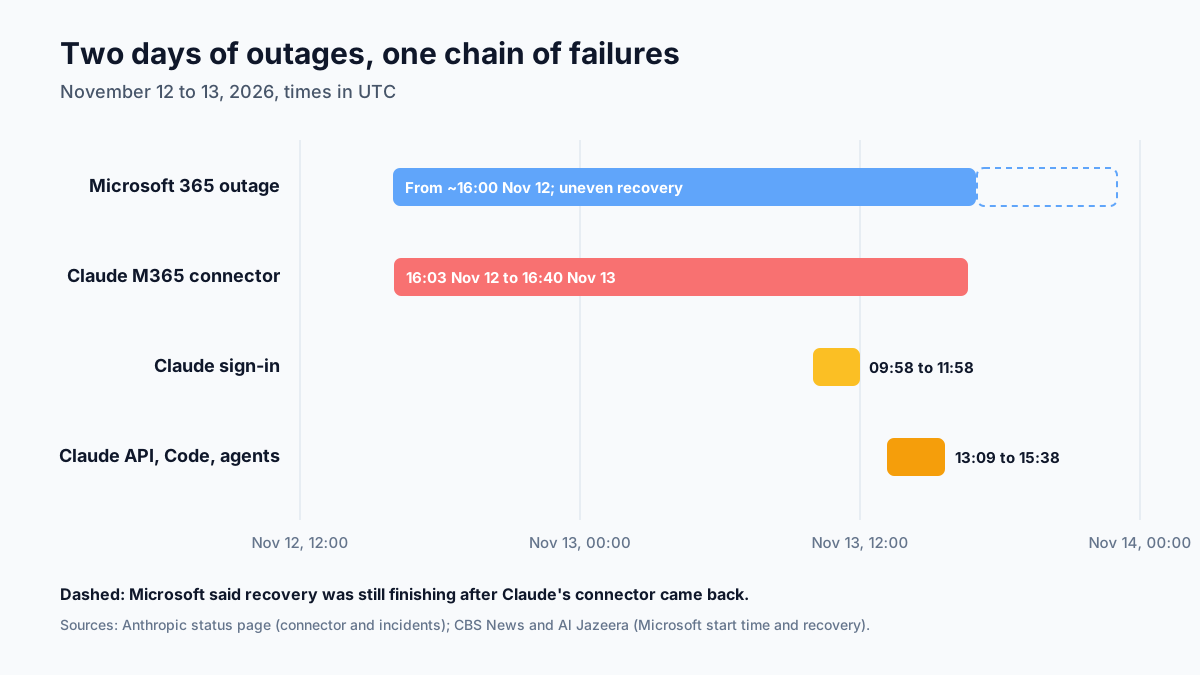
Here's the sequence, as of November 14, 2026:
| Event | When (UTC) | What failed |
|---|---|---|
| Microsoft 365 outage | From about 16:00, November 12 | Outlook, Teams, Copilot, Exchange Online |
| Claude Microsoft 365 connector | 16:03 Nov 12 to 16:40 Nov 13 | Mail, calendar and search tools; Claude for Outlook |
| Claude sign-in incident | 09:58 to 11:58, November 13 | Logins to claude.ai and Claude Code |
| Claude multi-surface incident | 13:09 to 15:38, November 13 | claude.ai, Claude API, Claude Code, connectors, agents |
| Claude purchases | From 02:54, November 14 | Plan purchases and upgrades on claude.ai |
Anthropic has marked its November 13 incidents resolved. Microsoft said it fixed the underlying issue but gave no time for full recovery as of Friday afternoon, CBS News reported.
What Happened at Microsoft
The trouble started around 16:00 GMT on Thursday, November 12, when users couldn't open Outlook, Al Jazeera reported. It spread to Teams, Copilot and Exchange Online, and to consumer accounts too.
| Item | What's reported |
|---|---|
| Services hit | Outlook, Teams, Copilot, Exchange Online and consumer apps |
| Reports | More than 130,000 on Downdetector on November 12 |
| Reach | Users in more than 70 countries and territories |
| Cause, per Microsoft | Servers became unexpectedly unavailable; not a cyberattack |
| Recovery | Slow and uneven; some restored servers failed again in Europe |
| Root cause report | Promised, not yet published |
Microsoft said a number of servers had become unexpectedly unavailable, and that the load wasn't caused by higher traffic. Executive vice president Charles Lamanna said there was no sign of malicious or cyber activity.
Recovery was hard. Microsoft spoke of "marginal success" more than 12 hours in, and some servers it had restored failed again in Europe on Friday morning. Lamanna said a post-mortem with the timeline and repair items would follow.
The impact reached well beyond office email. Government systems in Singapore, Japan and the Philippines were disrupted, and Air India rerouted its email, per CBS and Al Jazeera.
Claude and Microsoft Outages: How the Outlook Tools Broke
Here's the part most AI teams should study. Claude can connect to Microsoft 365, so it can read mail, check calendars and search SharePoint for you. That connection depends on Microsoft's servers.
At 17:52 UTC on November 12, Anthropic posted that its Microsoft 365 connector was failing. By 18:34, it had traced the cause to an upstream provider. By 22:23, it named the problem directly: a Microsoft 365 service incident.
Claude itself was fine. But for anyone who used Claude to triage email or plan meetings, it didn't matter. The tool they relied on had stopped working, and the cause sat two companies away.
Anthropic's final note says recovery came at 16:40 UTC on November 13. It also warned that Microsoft was still recovering, so occasional errors might continue.
The Claude Outage on November 13: Two Incidents
Separately, Claude had two incidents on November 13, per its status page:
| Incident | Surfaces affected | Notes |
|---|---|---|
| Sign-in, 09:58 to 11:58 | claude.ai, Claude Code, Console | Fix deployed at 11:05 |
| Multi-surface, 13:09 to 15:38 | claude.ai, API, Claude Code, connectors, Managed Agents | Routines ran up to two hours late |
| Microsoft 365 connector | Connector tools, Claude for Outlook | Caused by Microsoft's incident |
The first was a sign-in problem. Many Claude Code users saw a "403 Attention Required" error from Cloudflare and got stuck at /login. We covered that one in our Claude Code 403 Cloudflare guide.
The second was wider. It degraded claude.ai, the Claude API, Claude Code, connectors such as Claude Docs and Sheets, Claude Security and Claude Managed Agents. Scheduled tasks and routines could run more than two hours late, and some runs were skipped, Anthropic said.
That last detail matters for automation. If a nightly report or a scheduled agent run is skipped, someone needs to notice and rerun it.
Were the Claude and Microsoft Outages Connected?
Partly. The Microsoft outage clearly caused the Claude connector failures. Anthropic said so.
Claude's two November 13 incidents are a different matter. Anthropic hasn't tied them to Microsoft, and it hasn't published a root cause for either. Microsoft hasn't published its full cause yet either.
So treat claims that one company "took down" the other with care. What we can say for sure is that a failure in one widely used service spread into another product that depends on it. That pattern is the lesson.
Who Was Hit Hardest in the Claude and Microsoft Outages
Not everyone felt these outages the same way. Here's a rough guide to who lost the most:
| Group | What they lost | How long |
|---|---|---|
| Outlook and Teams users | Email, chat and calendars | Most of November 12 to 13 |
| Claude users on the Microsoft 365 connector | Email triage, meeting prep, SharePoint search | About 24 hours |
| Claude Code users | Sign-in, then degraded service | About two hours, then another two |
| Claude API customers | Degraded responses in the second incident | About two and a half hours |
| Scheduled agent runs | Late or skipped jobs | Up to two hours late, some skipped |
The pattern is clear. People who used one tool directly could switch to a phone call or a browser. Automation was different. Jobs that read mail or calendars on a schedule often failed quietly, and nobody knew anything was wrong until a report came out empty or a meeting brief never arrived.
Why AI Agents Inherit Every Outage
A chatbot that only talks needs one thing to work: the model. An agent needs more. One task may touch five services.
Each of those is a link in a chain. If any link breaks, the task fails, even when the model is fine. That's what happened with the Microsoft 365 connector.
The math is simple, and a little scary. If an agent relies on five services that are each up 99.9% of the time, and failures don't overlap, the chance that all five are up is about 99.5%. That's roughly 44 hours of possible trouble a year instead of about 9.
Our math, not a forecast. Real outages cluster and overlap. But the direction is clear: every tool you add to an agent adds a way for it to fail.
Map Your AI Dependencies
Start by writing down what your AI work depends on. Most teams have never done this for their agents. Here's a simple map:
| Layer | Example | What to plan |
|---|---|---|
| Model provider | Claude API | A second model or region |
| App and sign-in | claude.ai, Claude Code login | API key or cloud path |
| Connected tools | Microsoft 365, Google Workspace | Clear errors and a manual path |
| Scheduled jobs | Routines, cron, CI | Retries and catch-up runs |
| People | On-call owner | Who decides and who tells users |
For each layer, ask three questions. What breaks if this goes down? How would we know? What do we do instead?
Don't forget sign-in. On November 13, the model API kept working during the first incident while subscription logins failed. Teams with an API key or a cloud path kept working.
Build Agents That Fail Softly
When a tool fails, a good agent says so clearly instead of guessing. Here's what that looks like in practice:
- Set timeouts on every tool call, so one slow service doesn't hang the whole task.
- Retry with backoff, but cap the retries to avoid piling on a struggling service.
- Tell the user plainly which tool failed and what wasn't done.
- Save partial work, so the task can resume later.
- Never fake a result. An agent that invents an email summary because the mailbox didn't load is worse than one that stops.
That last point is about trust. During an outage, a clear "I couldn't reach Outlook" message keeps people safe. A confident wrong answer doesn't.
Plan for Missed and Late Jobs
Anthropic said some scheduled runs were skipped during its second incident. Microsoft's outage delayed email for hours, which means any agent that waited for a reply, a calendar invite or a file to arrive simply sat idle or timed out. Both can quietly break automated work.
Three habits help:
- Track every scheduled run, and alert a named person when one doesn't finish on time or finishes with errors that nobody looked at.
- Make jobs safe to rerun, so a catch-up run doesn't send duplicate emails.
- Keep a short list of jobs that need a human check after any outage.
These are old ideas from data engineering. They matter even more now that agents run on schedules too.
An Outage Runbook for AI Teams
A runbook is a short list of steps everyone follows when something breaks. Here's a simple one for AI tools. Before an outage:
- List your AI dependencies, from the model and sign-in to every connector and scheduled job, and name an owner for each one
- Set up a backup path, such as an API key or a cloud provider, and test it
- Subscribe to status pages
During and after an outage:
- Confirm the scope on the status page before anyone debugs their own machine
- Switch critical work to the backup path or a manual process
- Rerun missed jobs once service returns, and note what failed for the review
Keep it on one page. A runbook nobody can find in a crisis doesn't help.
Worked Example: What a Day Without the Connector Costs
Here's our own math with made-up numbers, to show the scale.
Say a 50-person sales team uses Claude with the Microsoft 365 connector to triage email and prep meetings. They say it saves each person about 30 minutes a day. That's 25 hours a day for the team.
The connector was down for about 24 hours. At a loaded cost of $80 an hour, the team lost about $2,000 of saved time, plus the cost of any meetings that went in unprepared.
That's not a crisis. But if the same team had no manual fallback, and a big deal was due that day, the real cost could be far higher. A one-page "what we do if the tools are down" plan is cheap insurance.
What This Means for Choosing AI Vendors
It's tempting to react by switching providers. That rarely helps. Every major AI and cloud company has had outages, and the next one will come from somewhere.
A better question is how each vendor behaves when things break. Did it post updates quickly? Did it explain the scope in plain words? Did it publish a root cause later?
On those counts, both companies posted regular updates this week. Microsoft promised a post-mortem. Use that kind of record, along with uptime, when you compare vendors at renewal time.
Lessons From the Claude and Microsoft Outages
Pulling it together, here's what this week teaches:
- Outages are normal. Even the biggest providers fail, sometimes for a day.
- Dependencies are hidden. Few teams knew.
- Status pages help, but only if someone is assigned to watch them and pass updates to the rest of the team in plain words.
- Backups must exist before the outage. Nobody sets up a second model path in the middle of an incident.
- Honest failure beats silent failure. Agents should report what they couldn't do.
None of these is new. What's new is how many workflows now run through AI agents that touch many services at once, which makes resilience a design choice, not an afterthought.
After the Claude and Microsoft Outages: Checks for Microsoft 365 Teams
If your team connects Claude to Microsoft 365, a few checks are worth doing now that service is back:
- Open the Microsoft 365 connector and confirm mail, calendar and search tools respond.
- Reopen Claude for Outlook.
- Check any routines or agents that read mail or calendars, and rerun those that failed.
- Expect occasional errors for a while, since Microsoft said its recovery was still finishing.
Regulated teams should also note the outage in their incident logs. We covered how Claude works inside government Microsoft 365 setups in our post on Claude in Microsoft 365 GCC.
What to Watch Next
A few things will tell us more:
- Microsoft's post-mortem, which Lamanna said would come shortly
- Any root cause from Anthropic for its November 13 incidents
- Whether errors return as Microsoft finishes recovery
- Changes to service commitments from either company after the outages
We'll update this guide as those land. You can follow Microsoft's progress on its service status page, which lists open incidents for Microsoft 365, Azure and other services, with updates every hour or so while an incident is active.
Claude and Microsoft Outages: Our Take
This week wasn't a disaster. Not even close. Both companies restored service within about a day, and neither reported a security breach. But it was a clear warning about how AI work is built.
An AI agent is a chain of services, and it's only as strong as its weakest link. Teams that map those links, fail softly and keep a backup path will barely notice the next outage. Teams that don't will learn the same lesson again, probably at a worse time.
How Van Data Team Helps
We help teams build AI systems that keep working when providers don't:
- Resilient agents with timeouts, retries and honest error messages, via AI agent development.
- Dependency maps and alerts for the AI services and tools your team relies on, through our system operations and maintenance service.
- Scheduled jobs that recover cleanly after an outage, with alerts for late runs and safe catch-up runs that don't send duplicates, via data pipeline development.
- Outage cost tracking and reliability dashboards, through agentic BI reporting.
This article is based on Anthropic's status page and press reports as of November 14, 2026. Want to check how your AI agents would cope with the next outage? Get in touch and we'll help you find the weak links.
AI Model Brief
The AI models worth knowing, once a week
What shipped, how it scores on independent benchmarks, what it costs per million tokens and what was deprecated, from the data behind our AI model benchmarks.
We use your address only to send the brief. See our privacy policy.
See this week’s brief
Founder of Van Data Team. Builds Vanaxity, the AI agent system for SEO, GEO, and AEO, and leads data engineering delivery for B2B teams.
About the authorArticle FAQ
Questions readers usually ask next.
These short answers clarify the practical follow-up questions that often come after the main article.
Need a similar system?
If this article maps to a workflow your team already operates, the next step is usually a scoped review of the system, constraints, and rollout path.
Consultation
Scope your next AI workflow.
Share the system and blockers. We will map fit, gaps, and the next step.