Claude Duet: What Anthropic's Proactive Agent Can Do
Claude Duet is Anthropic's proactive agent that messages you first. How it works, what it connects to, its limits and how it compares with Meta Muse and Dots.
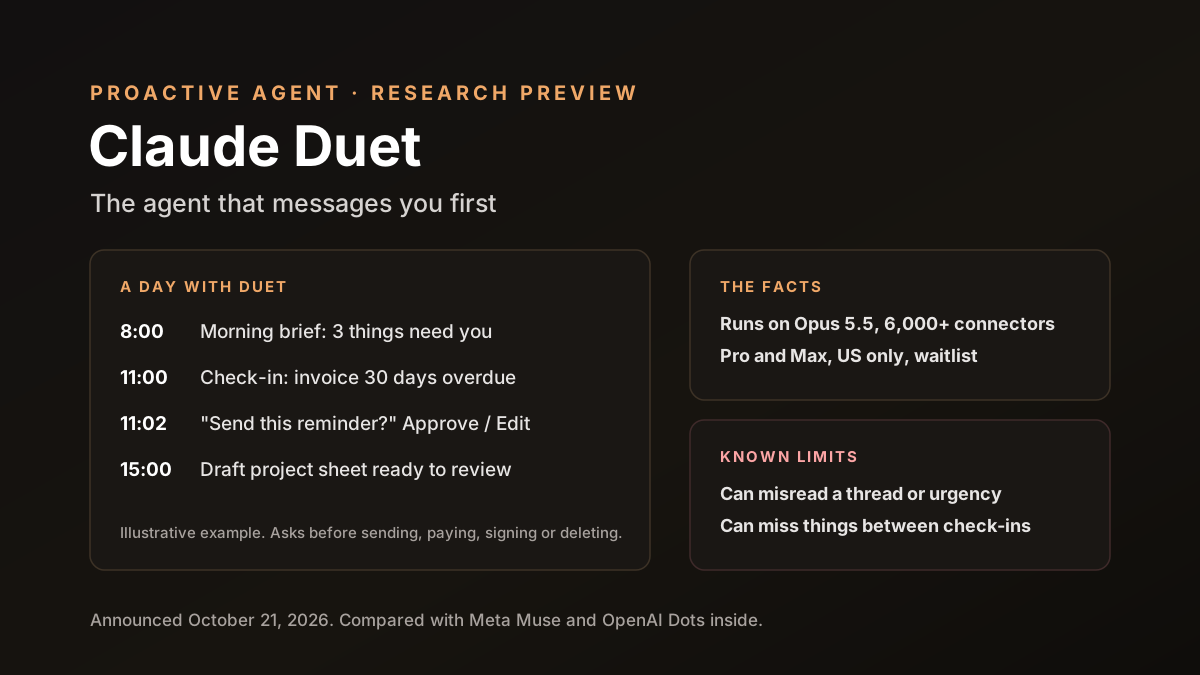
Claude Duet is Anthropic's answer to a new kind of AI product: the agent that messages you first. Announced on October 21, 2026, it sends a morning brief, checks your connected apps every few hours and gets in touch when something needs a decision.
It isn't first. Meta's Muse and OpenAI's Dots arrived a few weeks earlier, so the big AI labs now all have an always-on agent. Here's what Duet does and doesn't do. We also compare it with its rivals and list what to check before you connect your business apps.
Disclosure: Van Data Team builds with Claude and other models, and this article was researched with Claude. Anthropic makes Claude Duet, so we've stuck to what Anthropic and independent outlets have published, and we cover the limits as plainly as the features.
Key Takeaways
- Claude Duet is a proactive agent from Anthropic. It sends a morning brief, checks your apps every few hours and messages you when something needs you.
- It runs on Claude Opus 5.5, works in its own cloud computer and can connect to more than 6,000 apps and plugins, including Gmail, Slack, Stripe and QuickBooks.
- It asks before sensitive actions such as sending messages, paying, signing or deleting.
- It's a research preview for Pro and Max users in the US, by waitlist. Team and Enterprise plans aren't included yet.
- Anthropic says it can misread a thread, misjudge urgency or miss something between check-ins. Start small.
Claude Duet at a Glance
| Item | Details |
|---|---|
| Announced | October 21, 2026 |
| What it is | A proactive agent that works in the background and contacts you when needed |
| Model | Claude Opus 5.5 |
| Where | Web at claude.ai, plus standalone iOS and Android apps |
| Who can use it | Pro and Max subscribers in the US, by waitlist |
| Price | No separate price; uses your plan's usage limits |
| Status | Research preview |
What Is Claude Duet?
Most AI assistants wait for you to type. Claude Duet works the other way round. According to Anthropic's product page, it's "a proactive agent that understands what needs your attention."
You connect the apps you use, such as email, chat, files and payments. Duet then watches them and drafts next steps. When something needs a decision, it comes back to you. You talk to it in one ongoing thread, by text or voice.
Anthropic pitches it at people who juggle a lot: small business owners, freelancers and anyone running several projects at once. Its examples include a café owner keeping track of hiring, leases, fundraising and daily operations.
How Claude Duet Works Day to Day
The rhythm is simple. Here's what a normal day looks like, based on Anthropic's description and MacRumors' coverage:
- Morning brief: a short summary of what matters across your connected apps.
- Check-ins: Duet looks at your apps every few hours and sends an alert when something needs you.
- Bigger tasks: you can hand it work like scheduling meetings, building a dashboard or even a simple web app. It reports back when done.
- Finished work: documents, sheets or decks to review.
- One thread: every request, update and approval lives in a single conversation.
The work happens on Duet's own cloud computer, with its own browser. That means it doesn't need access to your laptop, and it can keep working while your devices are off, which is what lets it check your apps every few hours even when you're asleep or on a plane.
What Claude Duet Connects To
Duet uses the same memory, skills and connected apps as your Claude account. Anthropic says it can reach more than 6,000 connectors and plugins.
The examples Anthropic gives show who it's aimed at:
- Communication: Gmail and Slack.
- Money: Stripe and QuickBooks.
- Files: Google Drive.
That's a lot of access. Connecting email, payments and accounting gives an agent a detailed view of a business. It's useful for exactly that reason, and it's why the safety controls matter so much.
What Claude Duet Is Good At
Based on how Anthropic describes it, Duet fits work that is regular, spread across several apps and easy to check. Good early uses include:
- Inbox triage: spotting the few emails that need a reply today and drafting answers.
- Payment follow-ups: noticing unpaid invoices in Stripe or QuickBooks and preparing polite reminders for you to approve.
- Scheduling: finding times that work and drafting the invites.
- Weekly reports: pulling numbers from several tools into one simple sheet.
- Loose ends: reminding you about a lease renewal, a supplier quote or a job applicant you forgot to answer.
What these have in common is low risk. If Duet gets one wrong, you'll notice before any harm is done, because you approve the final step.
What Claude Duet Isn't Good At Yet
Some jobs are poor fits for any first-generation agent, Duet included:
- Decisions about people, such as hiring, firing or handling a complaint from a key customer.
- Legal or tax judgments, where a small misreading can cost real money.
- Anything that needs real-time watching. Duet checks in every few hours, not every minute.
- Final money decisions. It can prepare a payment, but you should own the choice to send it.
Use Duet to prepare and remind. Keep judgment calls for yourself.
Approvals and Safety Controls
Anthropic has put clear limits on what Duet can do alone. It asks for your approval before it:
- Sends a message on your behalf.
- Makes a payment.
- Signs a document.
- Deletes a file.
According to MacRumors, Duet doesn't see your passwords or logins when you give it access to an account. Anthropic also says a dedicated classifier and safety checks review messages to guard against sensitive information leaking. You can watch what Duet is doing and steer it at any time.
These are sensible defaults. They match the lessons from early agent mistakes, which we covered in our post on AI agent permissions for Muse and Dots. The weak point in most agent incidents is a broad "allow always" approval, so keep approvals specific.
Known Limitations
Anthropic is open about what can go wrong. Its product page says Duet may:
- Misread a thread, taking the wrong meaning from an email or chat.
- Misjudge urgency, flagging something minor or missing something important.
- Miss things between check-ins, since it looks every few hours, not constantly.
There are practical limits too. It's a research preview, so features, limits and even the way it behaves day to day may change, sometimes without much notice, as Anthropic learns from early users. It's US-only for now. And because background checks use your plan's limits, heavy use could leave less room for your normal Claude work.
None of this is unusual for a first version. It does mean Duet is a helper to supervise, not a manager to trust blindly.
An Example Week for a Small Agency
To make this concrete, here's an illustrative example. It's our own scenario, not a customer story. Picture a five-person design agency whose owner connects Gmail, Google Drive, Slack and QuickBooks.
On Monday, the morning brief flags two client emails waiting since Friday and an invoice that's 30 days overdue. Duet drafts both replies and a reminder for the late invoice.
The owner edits one reply. Approves the rest. Done in ten minutes.
By Wednesday, the owner asks Duet to build a simple sheet of all open projects, with deadlines and hours used. It returns a draft spreadsheet that afternoon. Two numbers are wrong, because one project was logged under an old name. The owner fixes them, asks Duet to remember the new project name for next time and moves on, still well ahead of where a manual report would have been.
On Friday, Duet flags that a supplier quote expires on Monday. That's the kind of thing that used to slip. Small wins like this are where proactive agents earn their place.
Privacy: What We Know and What We Don't
Duet sees a lot. It reads email, files and payment records to do its job, which means it can end up seeing salaries, client contracts, bank details and private messages along the way. So it's worth being clear about what's public.
Anthropic says logins, approvals and safety checks happen inside Duet's cloud computer, and MacRumors reports that Duet doesn't see your passwords. Beyond that, the product page links to Anthropic's general privacy policy and terms. We didn't find Duet-specific data terms.
Until there are, read the general terms, check your Claude privacy settings, including whether your chats can be used to improve models, and avoid connecting accounts that hold other people's sensitive data. Business plans with stronger contracts aren't available for Duet yet.
Claude Duet vs Meta Muse vs OpenAI Dots
All three big AI labs now have an always-on agent. Here's how they compare, based on public announcements:
| Claude Duet | OpenAI Dots | Meta Muse | |
|---|---|---|---|
| Launched | October 21, 2026 | September 29, 2026 | September 8, 2026 |
| Model | Claude Opus 5.5 | GPT-6 Astra | Meta's Muse models |
| Where it lives | One thread on web and mobile apps | Inside ChatGPT, Slack and Teams | Across Meta's apps |
| Connections | 6,000+ connectors and plugins | 4,000+ apps through plugins | Meta's apps plus business connectors |
| Who can use it | Pro and Max, US, waitlist | ChatGPT Pro and Business Premium | Consumers and small businesses |
The biggest difference is setting. Muse sits inside apps billions of people already use. Dots sit inside ChatGPT and workplace chat. Duet is a separate app built around one thread with you.
None is clearly "best" yet. They're all early, and real-world reliability over months of daily use will matter far more than any feature list from launch week, for all three.
Who Claude Duet Is For
Duet makes the most sense for one kind of person: someone who runs many things at once and loses time to keeping track. That includes:
- Small business owners juggling suppliers, staff, payments and customers.
- Freelancers and consultants with several clients and inboxes.
- Founders who handle sales, hiring and operations themselves.
If you already pay for Pro or Max and live in the US, trying it costs nothing beyond your plan's usage. It's a weaker fit for teams that need shared controls, audit trails and admin settings. Team and Enterprise plans aren't included yet, so companies should wait for business features before rolling it out.
What Claude Duet Costs
There's no separate price for Duet during the preview. It uses your plan's limits.
Anthropic says background checks and larger tasks use more of those limits. In practice, that means the more apps Duet watches and the bigger the jobs you give it, the faster you'll reach your plan's cap. Start with a few connections and watch how much it uses before adding more.
Max plans come with higher usage limits than Pro, so people who want Duet to watch many apps may find Max a better fit. Either way, check your usage after the first few days.
Before You Connect Your Business Apps
A proactive agent is only as safe as the access you give it. Before connecting real business accounts, work through this list:
- Start with read-only where possible. Let Duet read email and files before you let it draft or act.
- Connect the fewest apps you need. Each new connection adds one more place where something can go wrong, and it also uses more of your plan's limits every time Duet checks it in the background.
- Keep payments behind approval. Never pre-approve payments or deletions, even small ones.
- Separate personal and business accounts. Don't mix them.
- Check what your clients allow. Some contracts limit sharing client data with AI tools.
- Review the activity log weekly. Look at what Duet actually did, not just what it told you it did, and question anything that surprises you, however small it seems at the time.
If you handle sensitive data, such as health or financial records for others, check your legal duties before connecting those systems at all.
A Sensible First Week With a Proactive Agent
Trust should be earned in steps. Here's a simple plan for the first week:
- Days 1 and 2: connect email and calendar only, then read each morning brief side by side with what you would have flagged yourself, and note every miss or false alarm in a simple list.
- Days 3 and 4: ask for drafts, such as replies and schedules, but send them yourself.
- Day 5: give it one bigger task, like a summary spreadsheet, and check every number.
- Days 6 and 7: decide what worked. Then add one app.
Blind spots show up fast. If it keeps misjudging urgency in one inbox, you'll know to watch that area more closely.
Questions to Ask Before Trusting Any Proactive Agent
These questions apply to Duet, Dots, Muse or any agent that acts in the background:
- What can it do without asking me? Get a clear list, not a general promise.
- Can I see a full log of what it read and did?
- How do I revoke access to one app quickly?
- Where is my data processed and stored, and is it used for training?
- What happens if it makes a mistake with a payment or a message?
No clear answers? Then ask before you connect anything important.
How Proactive Agents Change Daily Work
The real change isn't any single task. It's who keeps track. Today, most people hold their to-do list in their head and check apps all day to stay on top of things.
A proactive agent flips that. It watches the apps and tells you what changed, so you check one thread instead of ten tabs. Done well, that frees up attention. Done badly, it adds one more stream of alerts.
The difference comes down to tuning. Tell Duet what matters and what doesn't, and correct it when it flags the wrong things. Like a new assistant, it gets more useful as it learns your priorities.
What Proactive Agents Mean for Teams Building Their Own
Duet, Dots and Muse set a new bar for what users expect from AI products. People will start to expect agents that notice things, not just answer questions.
That raises the stakes. Good proactive agents need clear approval rules, honest status updates, easy ways to stop them and logs people can actually read. Our guide to designing AI agents with human review loops covers how to get those right.
Claude Duet: Our Take
Claude Duet is a careful first step into proactive agents. The approval rules are sensible. Anthropic is upfront about its limits, and the single-thread design keeps things simple. The fair test, though, is reliability over weeks of real use, and that's not known yet.
For small business owners in the US with a Pro or Max plan, it's worth joining the waitlist and trying it on low-risk tasks. For teams and companies, it's better to wait for business controls, and to use this moment to set your own rules for agent access.
How Van Data Team Helps Teams Use Proactive Agents Safely
We help companies adopt AI agents without losing control. That means mapping which apps an agent should reach, setting approval rules, building logs and alerts and testing agents against mistakes and misuse before they touch real work.
If you're weighing agents like Duet, Dots or Muse for your business, our posts on agentic AI security and AI governance are good places to start.

Founder of Van Data Team. Builds Vanaxity, the AI agent system for SEO, GEO, and AEO, and leads data engineering delivery for B2B teams.
About the authorArticle FAQ
Questions readers usually ask next.
These short answers clarify the practical follow-up questions that often come after the main article.
Need a similar system?
If this article maps to a workflow your team already operates, the next step is usually a scoped review of the system, constraints, and rollout path.
Consultation
Scope your next AI workflow.
Share the system and blockers. We will map fit, gaps, and the next step.