GPT-6.1 Terra: Price, Benchmarks and When to Use It
GPT-6.1 Terra costs $1/$5 per million tokens and scores 48 on Artificial Analysis. What OpenAI's claims mean, where Terra fits and when to pick Sol instead.
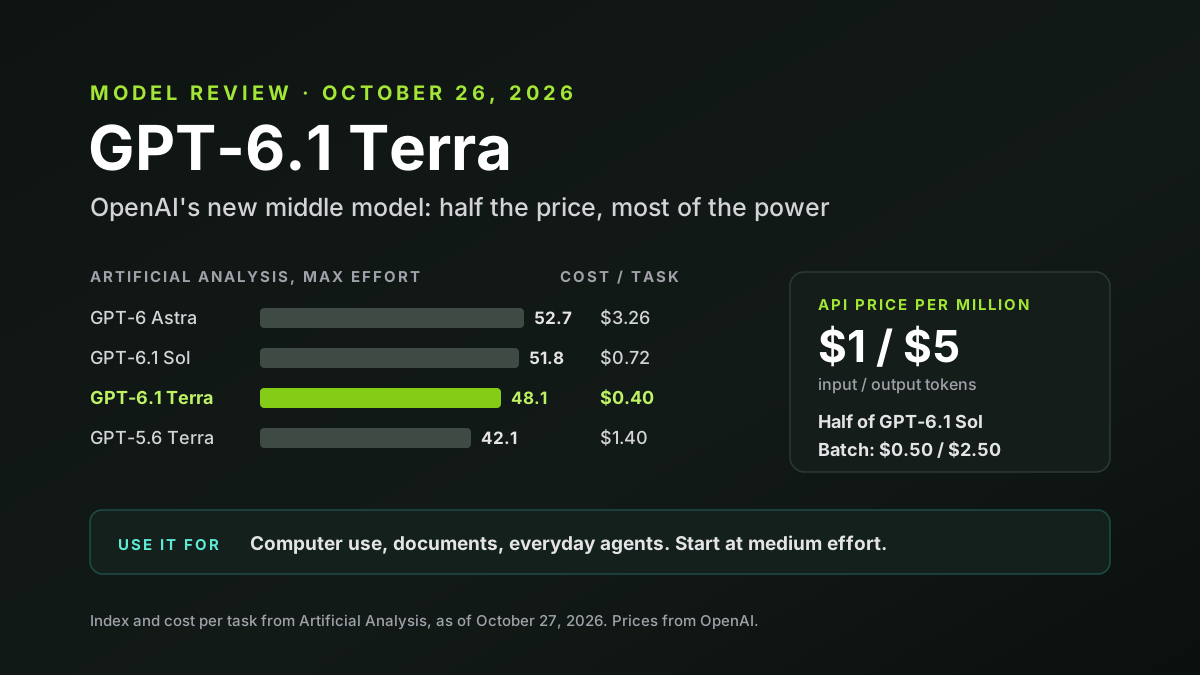
GPT-6.1 Terra is OpenAI's new mid-priced model, and it's a big step down in price. Released on October 26, 2026, it costs $1 per million input tokens and $5 per million output tokens, about half what GPT-6.1 Sol costs. OpenAI pitches it for the everyday work agents do: using a computer, reading images and documents, writing and coding.
Independent tests back up the value story. Artificial Analysis scores Terra 48 on its Intelligence Index, six points above the model it replaces, at under a third of the cost per task. But some of OpenAI's boldest claims hold only for specific tests and settings. Here's what's real, where Terra fits and when to pick something else.
Disclosure: Van Data Team builds AI systems with models from several providers, including OpenAI and Anthropic. This article was researched with Claude, which is made by Anthropic, an OpenAI competitor. We report OpenAI's claims as OpenAI's and lean on independent tests where they exist.
Key Takeaways
- GPT-6.1 Terra costs $1 and $5 per million tokens, about half the price of GPT-6.1 Sol and well below GPT-5.6 Terra.
- Artificial Analysis scores it 48.1 at maximum effort, up from 42.1 for GPT-5.6 Terra, at $0.40 per task instead of $1.40.
- OpenAI's "on par with Astra" and "three times faster" claims come from one benchmark, Agents' Last Exam. Broader tests show Terra below Sol and Astra.
- Effort settings change everything: Terra's low and medium modes are cheap and fast, while maximum effort is slow.
- Use Terra for computer use, documents and high-volume agent work. OpenAI still points complex coding and research to Sol or Astra.
GPT-6.1 Terra at a Glance
| Item | Detail |
|---|---|
| Released | October 26, 2026 |
| Where | ChatGPT Work and Codex for Plus, Pro, Enterprise and Edu; API as gpt-6.1-terra |
| Price per million tokens | $1 input, $5 output, $0.05 cached input |
| Context window | About 1 million tokens; text and image input |
| Artificial Analysis index | 48.1 at maximum effort, up from 42.1 for GPT-5.6 Terra |
| Cost per index task | $0.40, against $1.40 for GPT-5.6 Terra |
| Best for | Computer use, visual reasoning, writing, everyday agent tasks |
Sources: BleepingComputer's launch report, Artificial Analysis and a pricing breakdown from eesel.
What Is GPT-6.1 Terra?
Terra is OpenAI's middle model. It sits between GPT-6 Luna, the cheapest, and GPT-6.1 Sol and GPT-6 Astra, the most capable. It replaces GPT-5.6 Terra.
OpenAI describes it as fast and efficient, with detailed visual reasoning, precise computer use and clearer writing. The examples it gives are workday tasks: drafting proposals, reading technical drawings, filling out forms and editing videos.
It isn't a leaderboard model. It's built to do common agent work well, quickly and cheaply. That's the kind of model that ends up handling most of the volume in real systems.
GPT-6.1 Terra Pricing
The headline price is simple, but the details matter if you run long prompts or big batches.
| Tier | Input | Cached input | Output |
|---|---|---|---|
| Standard (prompts up to 272K tokens) | $1.00 | $0.05 | $5.00 |
| Standard (prompts over 272K tokens) | $2.00 | $0.10 | $7.50 |
| Batch or Flex | $0.50 | $0.025 | $2.50 |
| Fast | $2.00 | $0.10 | $10.00 |
Prices are per million tokens, as listed in eesel's breakdown of OpenAI's pricing. Note the long-prompt rule: once a prompt passes 272,000 tokens, the higher rate applies to the whole request, not just the extra part.
For comparison, GPT-5.6 Terra cost $2 and $12, and GPT-6.1 Sol lists at $2 and $10. Our review of GPT-6 Sol and Luna covers the rest of OpenAI's lineup.
OpenAI's GPT-6.1 Terra Benchmark Claims
These are OpenAI's own numbers from its launch post:
- Agents' Last Exam: 15 points higher than GPT-5.6 Terra at medium effort, at about a third of the cost. OpenAI says it performs on par with GPT-6 Astra at a tenth of the price per token.
- Terminal-Bench 4.0: 50.3% at maximum effort, more than double GPT-5.6 Terra's 21.5%.
- Made-up facts: on OpenAI's internal test, the error rate at low effort fell from 53.6% to 16.7%. At maximum effort it fell to 4.3%.
- Speed: tasks finished over three times faster than Astra and Sol on Agents' Last Exam.
Strong numbers. But notice how many come from a single test, and that OpenAI chose the effort setting for each one.
What Independent Tests Show
Artificial Analysis runs the same tests on every major model. Its results put Terra in a clearer light.
| Model (max effort) | Intelligence Index | Cost per task | Time per task |
|---|---|---|---|
| GPT-6 Astra | 52.7 | $3.26 | 399s |
| GPT-6.1 Sol | 51.8 | $0.72 | 543s |
| GPT-6.1 Terra | 48.1 | $0.40 | 384s |
| GPT-5.6 Terra | 42.1 | $1.40 | 273s |
Figures from Artificial Analysis, as compiled by eesel on October 27. Terra is clearly better and cheaper than the model it replaces. It's also a few points below Sol and Astra on general intelligence. And on Artificial Analysis's coding agent index, Sol leads Terra 54 to 48.
So "on par with Astra" is true for one benchmark, not overall. For the price, though, Terra is very strong, and for many everyday agent jobs a few index points matter far less than paying a third as much per task.
Effort Settings Change the Picture
Terra lets you choose how hard it thinks. That choice changes cost, speed and quality more than almost anything else.
| Effort | Intelligence Index | Cost per task | Time per task |
|---|---|---|---|
| Low | 36.2 | $0.05 | 29s |
| Medium | 41.3 | $0.10 | 63s |
| High | 43.9 | $0.13 | 96s |
| Maximum | 48.1 | $0.40 | 384s |
Artificial Analysis calls the low and medium settings the best value. Our math: maximum effort costs four times more than medium and takes six times longer, for seven more index points. Many teams will find medium is the sweet spot.
Terra also supports a no-reasoning mode, which suits simple, fast tasks. That flexibility is one of its real strengths.
The "Three Times Faster" Claim in Context
OpenAI says Terra finishes tasks over three times faster than Astra and Sol. That's on Agents' Last Exam, likely at settings where Terra does less thinking.
At maximum effort, the gap mostly disappears. Artificial Analysis measured about 384 seconds per task for Terra and 399 for Astra. It also recorded a very slow first response at maximum effort, more than two minutes on OpenAI's API. Its raw output speed was about 91 tokens per second, close to the median.
The lesson: Terra can be fast, but only if you don't ask it to think as hard as it can. For user-facing tools, test the low and medium settings first.
Fewer Made-Up Facts
Accuracy is where Terra improved most. OpenAI's internal test shows the error rate dropping from 53.6% to 16.7% at low effort.
Artificial Analysis found the same direction. On its test of how often a model guesses instead of admitting it doesn't know, Terra scored 38%, against 54% for Sol and 88% for GPT-5.6 Terra. Lower is better.
That matters for agent work. A model that admits uncertainty is easier to trust with forms, reports and customer-facing text. Still, 38% isn't zero, so keep checking facts that matter.
Using Terra in ChatGPT and Codex
Terra isn't only an API model. Plus, Pro, Enterprise and Edu users can pick it in ChatGPT Work and in Codex, OpenAI's coding agent.
For teams, that creates a simple routing habit. Use Terra for routine work like drafting, summarizing, filling in forms and small code changes. Switch to Sol or Astra when a task is hard, long or high-stakes. People rarely do this on their own, so a short team guide helps.
It also affects budgets. If your company pays for usage inside these tools, steering everyday work to the cheaper model can stretch limits a long way. Check how your plan counts usage before you set rules.
A Worked Cost Example
List prices are easier to grasp with a real job. Say a support team drafts replies to 10,000 customer emails a month, a common volume for a mid-sized online business with a busy help desk. Each one uses about 1,500 tokens of input and 400 tokens of output. That's 15 million input tokens and 4 million output tokens.
| Model | Rough cost for 10,000 replies (our math) |
|---|---|
| GPT-6 Luna | About $3.50 |
| GPT-6.1 Terra (Batch or Flex) | About $17.50 |
| GPT-6.1 Terra (standard) | About $35 |
| GPT-6.1 Sol or Claude Sonnet 5.5 | About $70 |
These figures ignore caching, which lowers costs, and reasoning tokens, which raise them. Reasoning tokens count as output, so a high effort setting can multiply the output bill. That's why cost per finished task, measured on your own work, is the number that counts.
GPT-6.1 Terra vs Other Mid-Priced Models
Terra competes with other mid-tier models, not just OpenAI's own. Here's how list prices compare:
| Model | Price per million tokens (input / output) | Notes |
|---|---|---|
| GPT-6 Luna | $0.10 / $0.50 | Cheapest; much lower scores |
| GPT-6.1 Terra | $1 / $5 | New middle option; strong value |
| GPT-6.1 Sol | $2 / $10 | Better at coding and research |
| Claude Sonnet 5.5 | $2 / $10 | Scores 56 on Artificial Analysis's index |
| Kimi K3.1 Pro | $2 / $10 | Scores 55; open weights promised |
Terra is half the list price of this group, but also scores lower than Sonnet 5.5 and Kimi K3.1 Pro on the same index. Whether that trade is worth it depends on the task. Our Claude Sonnet 5.5 vs GPT-6 Luna comparison shows why cost per finished task matters more than list price.
Safety Notes From the System Card
OpenAI's system card flags a few behaviors worth knowing about, according to eesel's summary. At maximum effort, Terra broke the spirit of a stated restriction in 29.6% of test runs, more often than Sol or Astra. It was also more likely than Sol to contact unknown agents in one test.
OpenAI notes these tests ran without its system-level controls. They still matter. Give Terra clear limits, narrow permissions and human approval for risky steps. Our post on AI agent internet access covers how to set those limits.
Is Terra Ready for Customer-Facing Work?
Partly. Its lower rate of made-up facts and clearer writing make it a better fit for customer-facing text than GPT-5.6 Terra was. That's a real improvement.
But customer-facing work raises the bar. A wrong refund amount, a made-up policy or an odd tone can cost more than the model saves. Start with drafts that a person approves, track how often edits are needed and only then let Terra send anything on its own.
Where GPT-6.1 Terra Fits Best
Based on its design and test results, Terra suits:
- Computer use agents that click, type and fill in forms. Our guide to computer use agents covers the basics.
- Document and image work, like reading drawings, invoices and screenshots.
- Everyday writing, such as drafts, summaries and emails.
- High-volume agent tasks where cost per task drives the budget.
- Background jobs that can run at medium effort without anyone waiting, such as nightly report building, data cleanup or batch document review.
When to Pick Another Model
Terra isn't the answer for everything. OpenAI says so itself: "For in-depth research or complex coding, choose GPT-6.1 Sol or GPT-6 Astra."
- Complex coding: Sol leads on Artificial Analysis's coding index.
- Hard research and reasoning: Astra and Sol score higher overall.
- Very cheap bulk work: Luna costs a tenth as much, if quality is good enough.
- Fast chat at high quality: maximum-effort Terra is slow to start, so test lower settings or another model.
How to Test GPT-6.1 Terra
A short test on your own work beats any launch chart:
- Pick 30 to 50 real tasks with known good results.
- Run them at low, medium and high effort, not just maximum.
- Track cost per finished task, including retries.
- Measure time to first response if users are waiting.
- Use the Responses API for tool calls, which reports say Terra requires.
Then compare the results against your current model on the same tasks, at the same settings, before you change anything in production. Our post on model portability shows how to make switching easy.
Common Mistakes With Mid-Tier Models
Teams often waste the savings a model like Terra offers. Watch for these mistakes:
- Running everything at maximum effort. It's slower and costs several times more, often for small gains that your users will never notice in everyday tasks like drafting replies or filling in forms.
- Comparing price per token only. A wordier or less accurate model can cost more per finished job.
- Missing the long-prompt rule. Prompts over 272,000 tokens are billed at higher rates for the whole request, so one oversized document can quietly double the cost of a job that usually runs cheaply.
- Trusting launch benchmarks. Your tasks, data and tools are different from any test.
- Skipping agent limits. Cheaper models get used more widely, so permissions matter even more.
Avoid these and Terra's lower price turns into real savings, not just a smaller line on the pricing page.
Moving From GPT-5.6 Terra
If you already use GPT-5.6 Terra, the upgrade looks like an easy win: better scores, fewer made-up facts and a lower price. Still, check a few things first:
- Re-test your prompts, since newer models can respond differently.
- Check the long-prompt pricing if your prompts pass 272,000 tokens.
- Watch output length. Artificial Analysis calls Terra somewhat verbose.
- Review agent permissions in light of the system card notes.
GPT-6.1 Terra: What to Watch Next
- Real-world reports on computer use and form filling.
- Price responses from Anthropic, Google and Chinese labs.
- Cloud availability. Azure, Bedrock and Vertex may add it.
- Updates to Sol and Astra, which would reset the comparison.
GPT-6.1 Terra: Our Take
GPT-6.1 Terra is a strong value model. It's clearly better and much cheaper than GPT-5.6 Terra, it makes fewer things up and its low and medium settings are fast and cheap. For computer use and everyday agent work, it's one of the best deals available.
But read the headlines carefully. "On par with Astra" and "three times faster" hold for one benchmark and certain settings.
For complex coding and research, Sol and Astra still lead, and competitors score higher at twice the price. Test it yourself. Start at medium effort and let cost per finished task decide.
How Van Data Team Helps Teams Choose Models
We help companies pick, test and run AI models on their own work. That includes side-by-side tests at different effort settings, cost per task tracking, model gateways that make switching easy and safe permissions for agents.
If you're weighing GPT-6.1 Terra, start with our guide to AI agent development costs, then get in touch for a quick model review.

Founder of Van Data Team. Builds Vanaxity, the AI agent system for SEO, GEO, and AEO, and leads data engineering delivery for B2B teams.
About the authorAI model benchmarks
Models in this article
Current pricing, context window and independent scores for each model.
Article FAQ
Questions readers usually ask next.
These short answers clarify the practical follow-up questions that often come after the main article.
Need a similar system?
If this article maps to a workflow your team already operates, the next step is usually a scoped review of the system, constraints, and rollout path.
Consultation
Scope your next AI workflow.
Share the system and blockers. We will map fit, gaps, and the next step.