Microsoft Ignite 2026: What the Copilot Rebuild Means
Microsoft Ignite 2026 rebuilt Copilot around Home, Autopilot and Agent 365, plus seven MAI models and a Salesforce deal. What shipped and what it means for you.
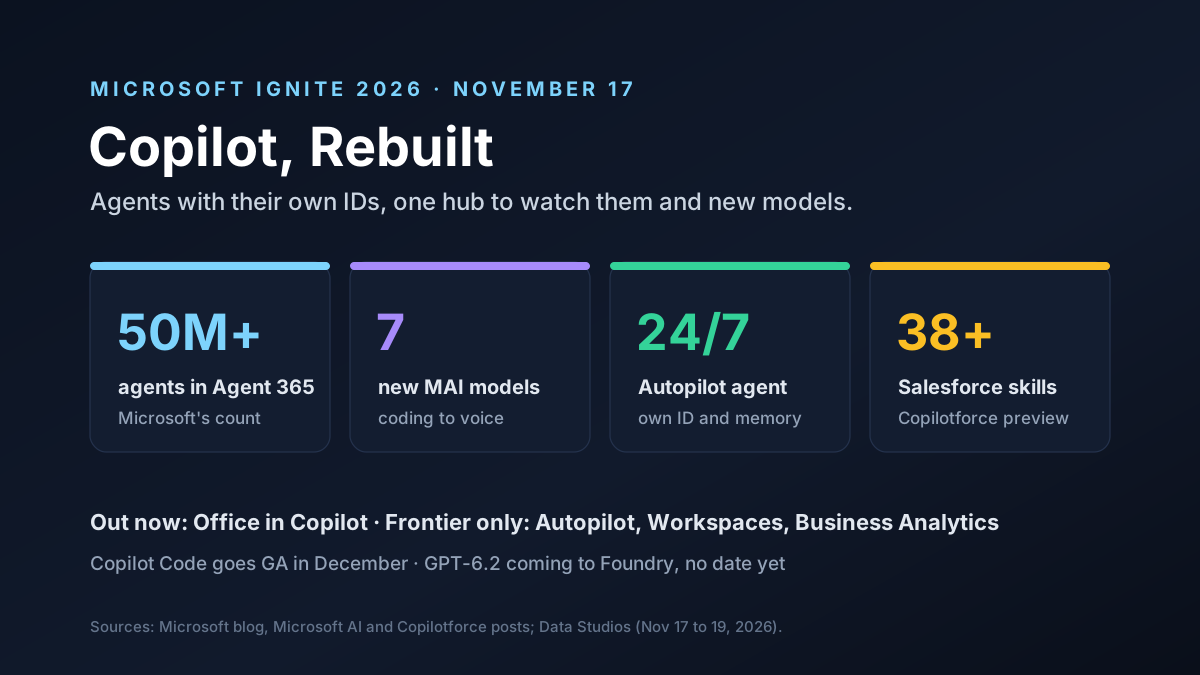
Microsoft Ignite 2026 opened on November 17 in San Francisco, and the big news was a rebuilt Copilot. Microsoft now calls it a "new OS for work," a single place where people and AI agents share the same files, notes and goals.
There was a lot. Copilot got a new Home screen, Office inside the app, shared Workspaces and an agent called Autopilot that works day and night. Microsoft also said Agent 365 now tracks more than 50 million agents, launched seven of its own MAI models, said GPT-6.2 is on the way to Foundry and signed a deal with Salesforce.
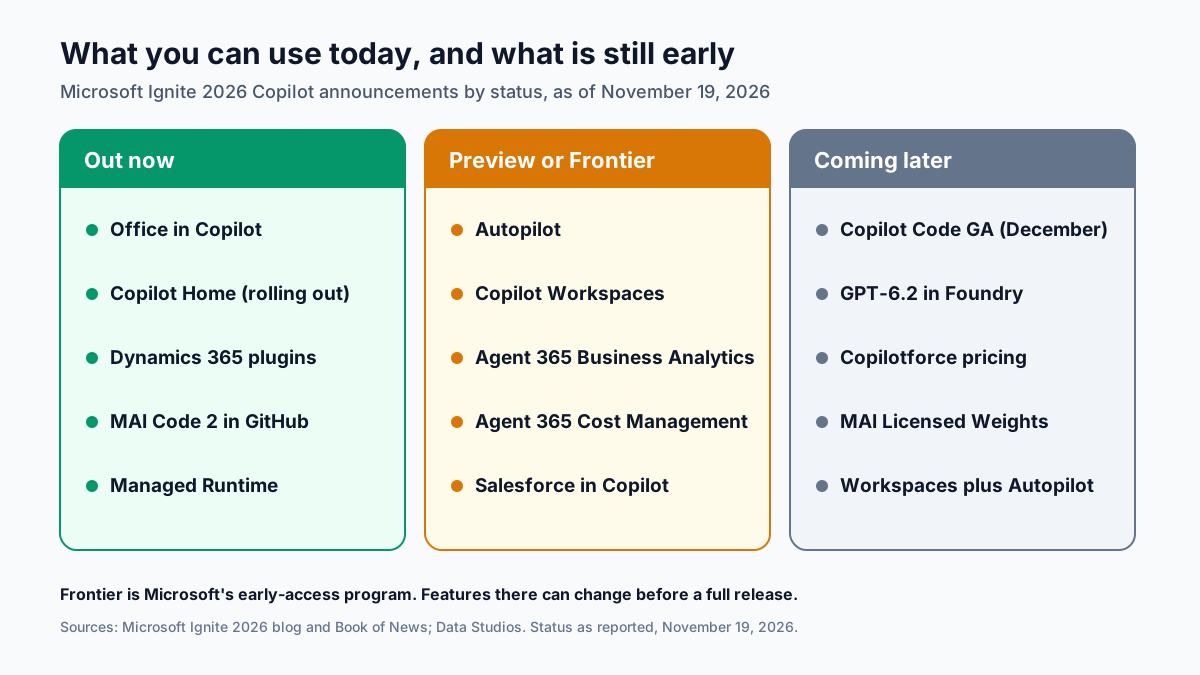
Not all of it ships today. Some parts are out now, many sit in Microsoft's early-access Frontier program, and a few are just plans. This guide sorts out what's real, what's next and what it means for data and IT teams.
Key Takeaways
- Copilot is now a workspace. Chat, files and agents now live in one app, so most daily work can start from a single screen instead of five.
- Autopilot is the big bet. It's a personal agent that runs all day with its own ID and memory.
- Agent tracking grew up. Agent 365 now counts more than 50 million agents and adds cost tools.
- Microsoft wants its own models. Seven MAI models aim for near-top quality at far lower prices.
- Salesforce moves in. A deal called Copilotforce brings sales data and actions into Copilot, Teams and Fabric.
Microsoft Ignite 2026 at a Glance
Here's what was announced and where each piece stands, as of November 19, 2026, based on the Microsoft blog and coverage by Data Studios:
| Announcement | What it is | Status |
|---|---|---|
| Copilot Home | One starting screen for chat and multi-step work | Rolling out worldwide |
| Office in Copilot | Word, Excel and PowerPoint inside the Copilot app | Out now |
| Copilot Workspaces | Shared space for a team, its files and Copilot | Frontier program |
| Autopilot | Always-on personal agent with its own identity and memory | Rolling out in Frontier |
| Copilot Code | Natural-language app and dashboard builder | Frontier now, GA in December |
| Agent 365 | Control plane for governing agents | More than 50 million agents |
| Copilotforce | Salesforce data and actions in Copilot | Public preview |
| MAI models | Seven Microsoft-built models | Mixed, GA to preview |
See the pattern? Microsoft announced a lot, but most of the agent tools are still in Frontier. Plan around what's out now. Test the rest.
The New Copilot at Microsoft Ignite 2026
The rebuilt app has three main parts.
Home is the new start screen. Quick chat and longer jobs now sit behind one text box. A router called Auto picks how to handle each request, and it can suggest moving a big job into Cowork, the mode for longer tasks. Users can still choose OpenAI or Anthropic models if their company allows it.
Office in Copilot lets you keep working in Word, Excel or PowerPoint without leaving the app. Files save to OneDrive and keep their usual access rules and labels. It's out now.
Workspaces turns Copilot Notebooks into a shared space for a team, its files and the AI. It shows what changed and what's still open. For now, only Frontier customers get it.
We covered how teams roll out Cowork in our Copilot Cowork adoption guide. The same lessons apply here. Start small. Set clear rules, then measure who actually uses it and for what, before you buy more seats or turn on more agents.
Autopilot: An Agent With Its Own ID
Autopilot is the boldest idea at Microsoft Ignite 2026. It's an agent that works for one person, around the clock, even while that person is asleep or on leave.
Three things set it apart from a normal assistant:
- Its own ID. It acts under its own Microsoft Entra Agent ID, so admins can check and manage it like a staff account.
- Its own memory. It keeps track of work across days, not just inside one chat.
- A seat in Teams. Colleagues can @mention it to hand it work.
That's useful. It's also risky. An agent that acts on its own needs firm limits on what it can read, send and change, and someone who answers for it when it gets things wrong. We wrote about those limits in our guide to AI agent permissions.
Autopilot began rolling out to Frontier customers at Ignite. Microsoft gave no date for a full release.
Agent 365 at Microsoft Ignite 2026
If agents are going to run everywhere, someone has to keep track of them. That's the job of Agent 365, the hub where companies list, watch and control their agents. Microsoft says it now holds more than 50 million.
Here's what's new:
| Agent 365 feature | What it does | Status |
|---|---|---|
| Registry | Lists agents, including ones from other vendors | More than 50 million agents |
| Dynamic Agent Risk | Scores how risky each agent is | Preview |
| Cost Management | Shows and limits usage-based AI spend | Preview |
| Business Analytics | Links AI cost to completed work | Frontier program |
The cost tools matter most. Copilot now mixes a per-user license with pay-as-you-go Copilot Credits, and some features, like the always-updating Today Feed, burn credits as they run. Business Analytics tries to tie that spend to finished work. That's the first thing a finance team will ask about.
Seven New MAI Models at Microsoft Ignite 2026
Microsoft also launched seven of its own models, under the MAI name. Here they are, with Microsoft's own claims:
| Model | Job | Microsoft's claim |
|---|---|---|
| MAI Code 2 | Everyday agentic coding | 98% of GPT-6.1 Sol at about 40% of the price |
| MAI Code 2 Flash | High-volume coding tasks | Close to GPT-6 Luna at 65% of the price |
| MAI Cyber 2 Flash | Security monitoring and patching | Beats GPT-6 Astra on one test at under 2% of the cost |
| MAI Image 2.7 | Image generation and editing | First on Artificial Analysis image editing |
| MAI Realtime 1 | Live speech-to-speech | From $0.01 per audio minute |
| MAI Transcribe 2 | Medical transcription in Dragon Copilot | Halves multilingual error rates |
| Decision 1.1 | Routes requests to the right model | Used by 4,000 customers |
These are Microsoft's numbers, from its own test averages. Treat them as a starting point. We ran an earlier coding model through its paces in our MAI Code 2 comparison.
Microsoft also unveiled MAI Licensed Weights. Trusted customers can take an MAI model, tune it on their own data and run it in their own Azure setup. No price or date yet.
The plan is plain. Microsoft still sells OpenAI and Anthropic models, and GPT-6.2 is coming to Foundry. But cheap models of its own give it more say over cost, and less need to lean on any one partner.
Copilotforce: The Salesforce Deal
The biggest surprise at Ignite was a deal with Salesforce, a long-time rival in business software. The two firms announced Copilotforce:
| Piece | What it does | Status |
|---|---|---|
| Salesforce in Copilot | 38+ sales skills, read and update CRM records | Public preview |
| Sales Cloud in Teams | Salesforce work inside Teams | Pilot |
| Data 360 and Fabric OneLake | Two-way zero-copy data sharing | Announced |
For data teams, the last row matters most. Zero-copy sharing lets Salesforce Data 360 and Fabric OneLake read each other's data without making copies. That can cut pipeline work and avoid stale duplicates.
Some questions remain:
- Price: none was given for the plugin or the data sharing.
- Credits: it's not clear if the plugin will need Agentforce credits or new fees once it leaves preview.
- What's new: Microsoft already had a Salesforce connector, so part of this builds on what was there.
Microsoft IQ and the Data Layer
Under all of this sits Microsoft IQ. Microsoft says it helps a company build and keep its own know-how, using data from Fabric, Foundry, Microsoft 365 and outside tools.
In practice, that means more connectors (hundreds, Microsoft says) and shared business context that agents can reuse. It's the same path we saw at Microsoft Data Days: Fabric as the data hub, with AI on top.
The catch is data quality. An agent that can reach more data will also reach more messy data. IQ is only as good as the clean, well-labeled sources under it.
What Microsoft Ignite 2026 Means for Data Teams
Most of the work to make this pay off will land on data and IT teams. Here's where to focus:
- Clean the sources first. Agents repeat whatever they read, good or bad.
- Label sensitive data. Copilot follows labels, but only if they exist, so files with no label are open to any agent a user lets in.
- Map agent IDs. Every Autopilot and custom agent needs a named owner.
- Track usage costs. Credits add up quietly.
- Plan the Salesforce link. Pick which system holds the truth before you share data both ways.
Teams that skip this step tend to end up with agents that give sure answers from old data. That's worse than no agent at all.
Who Should Act Now, and Who Can Wait
Not every team needs to move this month. Here's a simple way to sort it:
- Already on Microsoft 365 Copilot: try Home and Office in Copilot now, since there's nothing new to buy.
- Heavy Salesforce users: test the preview with a sandbox org, and keep live data out of it for now.
- Fabric shops: read up on zero-copy sharing with Data 360, and plan a small trial once the docs land.
- Security and IT teams: start an agent list in Agent 365 before Autopilot spreads across the company.
- Teams not on Copilot yet: wait for the Frontier tools to reach a full release, with real prices.
The common thread is simple. Use what's out today. Pilot what's in preview. Don't build plans on features that only exist in a keynote.
Questions to Ask Before You Roll It Out
Before you turn on new Ignite features, get answers to these:
| Question | Why it matters |
|---|---|
| Which features are GA in our tenant? | Frontier features can change before release |
| Who owns each agent's Entra ID? | Someone must answer for what it does |
| What will Copilot Credits cost us? | Usage pricing grows with adoption |
| Which data can Copilot reach? | Connectors widen what an agent can read |
| How do we measure value? | Spend needs a link to finished work |
A short pilot with one team answers most of them, and it costs far less than fixing a rollout to the whole company after the fact.
Microsoft's Cost Study, With a Caveat
Microsoft also shared a cost study, checked by GigaOm, that compares Copilot with ChatGPT Enterprise and Claude Enterprise. It put Copilot at about $30 a month for an everyday user. ChatGPT Enterprise came out at $81, and Claude Enterprise at $205.
Microsoft paid for that study. It uses model users and assumed prices, and Microsoft admits some rival plans list about $10 lower before usage is added. Run your own numbers with your own usage before you trust any vendor's math.
Risks and Open Questions
There's still a lot to watch:
- Timing: when Autopilot, Workspaces and Business Analytics leave Frontier
- Price: what Copilot Credits and the Salesforce plugin will cost at scale
- Agent sprawl: whether 50 million agents turn into a security problem
- Model quality: whether MAI models live up to their claims on real work
- Data reach: how far connectors and zero-copy sharing reach into sensitive systems
What to Watch Next
A few dates and signals to track:
- December: Copilot Code goes live for everyone, and new Agent 365 cost tools arrive
- GPT-6.2 in Foundry, with no date yet
- Copilotforce pricing and its path to a full release
- Outside tests of MAI Code 2 and the other MAI models
- The Ignite Book of News, for the full list of updates and their status
Microsoft Ignite 2026: Our Take
Microsoft Ignite 2026 marks Copilot's turn from a chat helper into a place where agents do ongoing work. Autopilot, Agent 365 and Microsoft IQ fit into one clear plan: agents with their own IDs, watched from one hub and fed by company data.
But much of it is early. Office in Copilot is real today. Autopilot and Workspaces are promises with a pilot program attached, and they may change before most companies can use them.
For data teams, the job is the same as ever, just more urgent. Clean, labeled, well-owned data decides whether these agents help you or embarrass you.
How Van Data Team Helps
We help teams get ready for agents on Microsoft and beyond:
- Data pipelines that feed Fabric with clean, labeled data, via data pipeline development.
- AI agents with clear rights and owners, through AI agent development.
- Dashboards that link AI spend to results, through agentic BI reporting.
- Cost reviews for Copilot Credits and cloud spend, through our cloud cost optimization service.
This article is based on Microsoft's Ignite 2026 announcements, the Microsoft AI and Copilotforce posts, and coverage by Data Studios as of November 19, 2026. Planning a Copilot or Fabric rollout? Get in touch and we'll help you scope it.
AI Model Brief
The AI models worth knowing, once a week
What shipped, how it scores on independent benchmarks, what it costs per million tokens and what was deprecated, from the data behind our AI model benchmarks.
We use your address only to send the brief. See our privacy policy.
See this week’s brief
Founder of Van Data Team. Builds Vanaxity, the AI agent system for SEO, GEO, and AEO, and leads data engineering delivery for B2B teams.
About the authorArticle FAQ
Questions readers usually ask next.
These short answers clarify the practical follow-up questions that often come after the main article.
Need a similar system?
If this article maps to a workflow your team already operates, the next step is usually a scoped review of the system, constraints, and rollout path.
Consultation
Scope your next AI workflow.
Share the system and blockers. We will map fit, gaps, and the next step.